

Skip to content
DataMiner Dojo

More results...

Generic selectors
Exact matches only
Search in title
Search in content
Post Type Selectors
Search in posts
Search in pages
Search in posts
Search in pages
Log in
Menu
  • Updates & Insights
  • Questions
  • Learning
    • E-learning Courses
    • Tutorials
    • Open Classroom Training
    • Certification
      • DataMiner Fundamentals
      • DataMiner Configurator
      • DataMiner Automation
      • Scripts & Connectors Developer: HTTP Basics
      • Scripts & Connectors Developer: SNMP Basics
      • Visual Overview – Level 1
      • Verify a certificate
    • YouTube Videos
    • Solutions & Use Cases
      • Solutions
      • Use Case Library
    • Agility
      • Learn more about Agile
        • Agile Webspace
        • Everything Agile
          • The Agile Manifesto
          • Best Practices
          • Retro Recipes
        • Methodologies
          • The Scrum Framework
          • Kanban
          • Extreme Programming
        • Roles
          • The Product Owner
          • The Agile Coach
          • The Quality & UX Coach (QX)
      • Book your Agile Fundamentals training
      • Book your Kanban workshop
    • >> Go to DataMiner Docs
  • DevOps
    • About the DevOps Program
    • Sign up for the DevOps Program
    • DataMiner DevOps Support
    • Feature Suggestions
  • Downloads
  • Swag Shop
  • PARTNERS
    • Business Partners
    • Technology Partners
  • Contact
    • Sales, Training & Certification
    • DataMiner Support
    • Global Feedback Survey
  • >> Go to dataminer.services

Unable to access DMA06

Solved29 views3 hours agoCube Launcher Cube Login
2
Arunkrishna Shreeder [SLC] [DevOps Enabler]4.34K 6 hours ago 0 Comments

Hi Dojo,

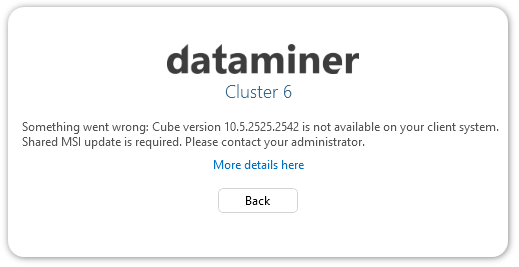
I get this error when trying to access DMA6 in our DMS :
The Cube.zip file on DMA (CHT-006) is the correct file as is the versions txt file. Same as the other DMAs.

We can log onto other DMAs with the 2525.2542 launcher with no issues:
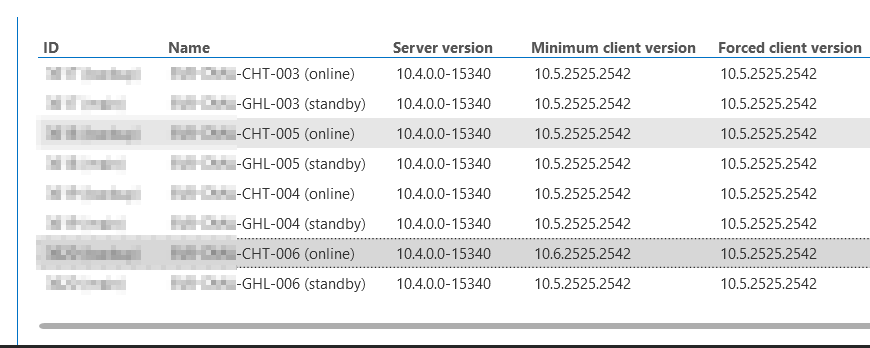
Any ideas as to what could cause this and how to resolve it ?

Arunkrishna Shreeder [SLC] [DevOps Enabler] Selected answer as best 3 hours ago

1 Answer

  • Active
  • Voted
  • Newest
  • Oldest
4
Bert Buysschaert [SLC] [DevOps Advocate]5.20K Posted 4 hours ago 0 Comments

It appears the shared MSI installation was performed on your client machine. As indicated in the docs, this type of installation cannot update automatically. The versions.txt + Cube.zip is only used by the normal (per-user) launcher version.

https://docs.dataminer.services/dataminer/Getting_started/The_DataMiner_User_Interface/DataMiner_Cube/Installing_DataMiner_Cube/DataMiner_Cube_deployment_methods.html

You can either install the missing 10.5.2525.2542 shared MSI version of Cube, or, switch to the normal launcher version by uninstalling all shared MSI versions of Cube.

Arunkrishna Shreeder [SLC] [DevOps Enabler] Selected answer as best 3 hours ago
Please login to be able to comment or post an answer.

My DevOps rank

DevOps Members get more insights on their profile page.

My user earnings

0 Dojo credits

Spend your credits in our swag shop.

0 Reputation points

Boost your reputation, climb the leaderboard.

Promo banner DataMiner DevOps Professiona Program
DataMiner Integration Studio (DIS)
Empower Katas
Privacy Policy • Terms & Conditions • Contact

© 2026 Skyline Communications. All rights reserved.

DOJO Q&A widget

Can't find what you need?

? Explore the Q&A DataMiner Docs