
Skip to content
DataMiner Dojo

More results...

Generic selectors
Exact matches only
Search in title
Search in content
Post Type Selectors
Search in posts
Search in pages
Search in posts
Search in pages
Log in
Menu
  • Updates & Insights
  • Questions
  • Learning
    • E-learning Courses
    • Tutorials
    • Open Classroom Training
    • Certification
      • DataMiner Fundamentals
      • DataMiner Configurator
      • DataMiner Automation
      • Scripts & Connectors Developer: HTTP Basics
      • Scripts & Connectors Developer: SNMP Basics
      • Visual Overview – Level 1
      • Verify a certificate
    • YouTube Videos
    • Solutions & Use Cases
      • Solutions
      • Use Case Library
    • Agility
      • Learn more about Agile
        • Agile Webspace
        • Everything Agile
          • The Agile Manifesto
          • Best Practices
          • Retro Recipes
        • Methodologies
          • The Scrum Framework
          • Kanban
          • Extreme Programming
        • Roles
          • The Product Owner
          • The Agile Coach
          • The Quality & UX Coach (QX)
      • Book your Agile Fundamentals training
      • Book your Kanban workshop
    • >> Go to DataMiner Docs
  • DevOps
    • About the DevOps Program
    • Sign up for the DevOps Program
    • DataMiner DevOps Support
    • Feature Suggestions
  • Downloads
  • Swag Shop
  • PARTNERS
    • Business Partners
    • Technology Partners
  • Contact
    • Sales, Training & Certification
    • DataMiner Support
    • Global Feedback Survey
  • >> Go to dataminer.services

How to find out what element is the Parent DVE?

Solved349 views23rd April 2026Dynamic virtuals elements
4
Caio Moreti Koga [SLC] [DevOps Advocate]235 23rd April 2026 0 Comments

Hi Dojo,

I have a view with many child DVEs. However, I'm not sure which one is the parent DVE. Is there a way to easily find this information through Cube?

Thanks!

Caio Moreti Koga [SLC] [DevOps Advocate] Selected answer as best 23rd April 2026

3 Answers

  • Active
  • Voted
  • Newest
  • Oldest
1
Arunkrishna Shreeder [SLC] [DevOps Enabler]4.31K Posted 23rd April 2026 1 Comment

Hi Caio,

You can find the parent element by simply looking at the name. DVEs are named <parent_element_name>.<identifier> like Parent_element.Slot1.

You can also look at the protocol of the DVE. The DVEs take the protocol of the parent element's protocol - so searching in Protocols & Templates also can help you find the parent element.

Miguel Obregon [SLC] [DevOps Catalyst] Posted new comment 23rd April 2026
Miguel Obregon [SLC] [DevOps Catalyst] commented 23rd April 2026

Hi,
I believe this the default behavior. However, there are some connectors that can implement a different approach. See the option exportProtocol in https://docs.dataminer.services/develop/schemadoc/Protocol/Protocol.Type-options.html
"Add :noElementPrefix to leave out the parent element name in the virtual element name"

3
Miguel Obregon [SLC] [DevOps Catalyst]22.87K Posted 23rd April 2026 0 Comments

Hi Caio,

Another possible way (via Dashboard app) is using a GQI query (see data source 'Get elements'). You could use the column 'DVE Parent ID' to identify the parent element.
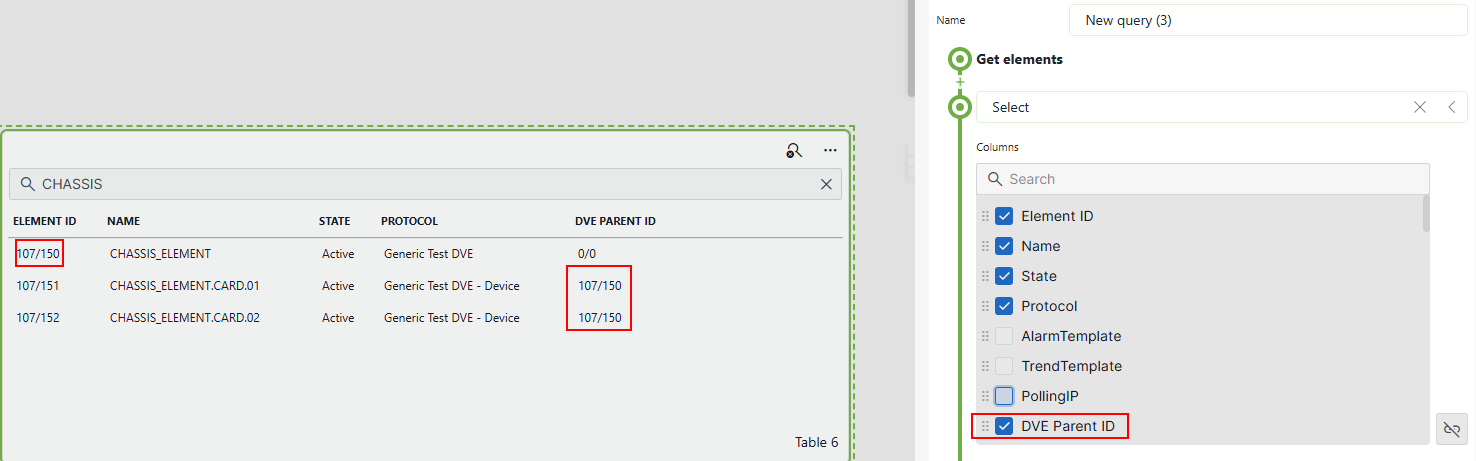
Hope it helps.

Miguel Obregon [SLC] [DevOps Catalyst] Edited answer 23rd April 2026
3
Catarina Grilo [SLC] [DevOps Enabler]3.20K Posted 23rd April 2026 2 Comments

Hi Caio,

You can send the GetElementByID message via the Client Test Tool. The input IDs should be taken from the DVE element. Example:

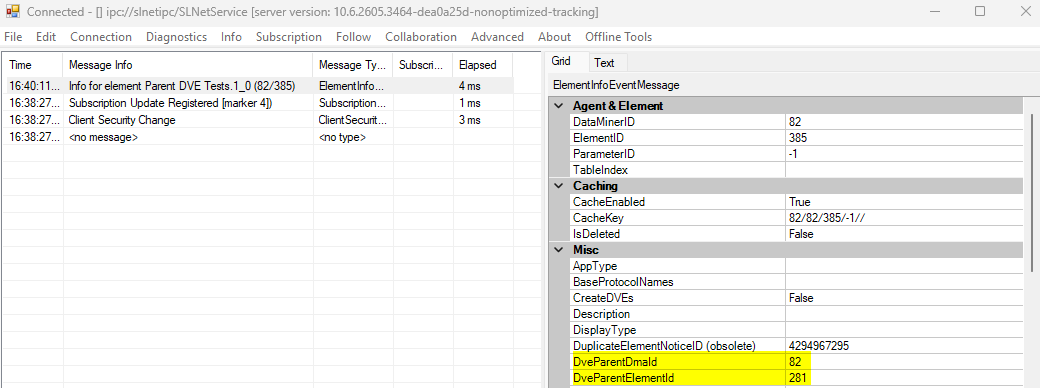
Kind regards,

Pieter Van Compernolle [SLC] [DevOps Enabler] Posted new comment 24th April 2026
Caio Moreti Koga [SLC] [DevOps Advocate] commented 23rd April 2026

Hi Catarina, thank you for your reply. This is definitely useful! But in cases where I don't have access to Client Test tool, is there an easy way to find this info only using Cube?

Pieter Van Compernolle [SLC] [DevOps Enabler] commented 24th April 2026

you can do the same in an automation script:

IConnection conn = engine.GetUserConnection();

int dataminerID = 1; // change to your dve dma id
int elementID = 123; // change to your dve element id
DMSMessage[] resp = conn.HandleMessage(new GetLiteElementInfo() { DataMinerID = dataminerID, ElementID = elementID });
if (resp.Length == 1 && resp[0] is LiteElementInfoEvent element)
{
// now retrieve the main element via element.DveParentDmaId/element.DveParentElementId
resp = conn.HandleMessage(new GetLiteElementInfo() { DataMinerID = element.DveParentDmaId, ElementID = element.DveParentElementId });
if (resp.Length == 1 && resp[0] is LiteElementInfoEvent mainelement)
{
engine.GenerateInformation("Main element is: " + mainelement.Name);
}
}

Please login to be able to comment or post an answer.

My DevOps rank

DevOps Members get more insights on their profile page.

My user earnings

0 Dojo credits

Spend your credits in our swag shop.

0 Reputation points

Boost your reputation, climb the leaderboard.

Promo banner DataMiner DevOps Professiona Program
DataMiner Integration Studio (DIS)
Empower Katas
Privacy Policy • Terms & Conditions • Contact

© 2026 Skyline Communications. All rights reserved.

DOJO Q&A widget

Can't find what you need?

? Explore the Q&A DataMiner Docs

[ Placeholder content for popup link ] WordPress Download Manager - Best Download Management Plugin