
Skip to content
DataMiner Dojo

More results...

Generic selectors
Exact matches only
Search in title
Search in content
Post Type Selectors
Search in posts
Search in pages
Search in posts
Search in pages
Log in
Menu
  • Updates & Insights
  • Questions
  • Learning
    • E-learning Courses
    • Tutorials
    • Open Classroom Training
    • Certification
      • DataMiner Fundamentals
      • DataMiner Configurator
      • DataMiner Automation
      • Scripts & Connectors Developer: HTTP Basics
      • Scripts & Connectors Developer: SNMP Basics
      • Visual Overview – Level 1
      • Verify a certificate
    • YouTube Videos
    • Solutions & Use Cases
      • Solutions
      • Use Case Library
    • Agility
      • Learn more about Agile
        • Agile Webspace
        • Everything Agile
          • The Agile Manifesto
          • Best Practices
          • Retro Recipes
        • Methodologies
          • The Scrum Framework
          • Kanban
          • Extreme Programming
        • Roles
          • The Product Owner
          • The Agile Coach
          • The Quality & UX Coach (QX)
      • Book your Agile Fundamentals training
      • Book your Kanban workshop
    • >> Go to DataMiner Docs
  • DevOps
    • About the DevOps Program
    • Sign up for the DevOps Program
    • DataMiner DevOps Support
    • Feature Suggestions
  • Downloads
  • Swag Shop
  • PARTNERS
    • Business Partners
    • Technology Partners
  • Contact
    • Sales, Training & Certification
    • DataMiner Support
    • Global Feedback Survey
  • >> Go to dataminer.services

How do I get a timeout to normal change in a correlation?

291 views6th July 2026alarm correlation Correlation rule timeout
4
Arturo Lizcano [SLC] [DevOps Member]513 2nd July 2026 0 Comments

A customer asked me the following:

“I'm trying to trigger a script every time an element is in timeout. To achieve that, I created a correlation rule that captures the timeout but is failing at the return to normal (communication restored, timeout gone).

This is the correlation rule that I have:
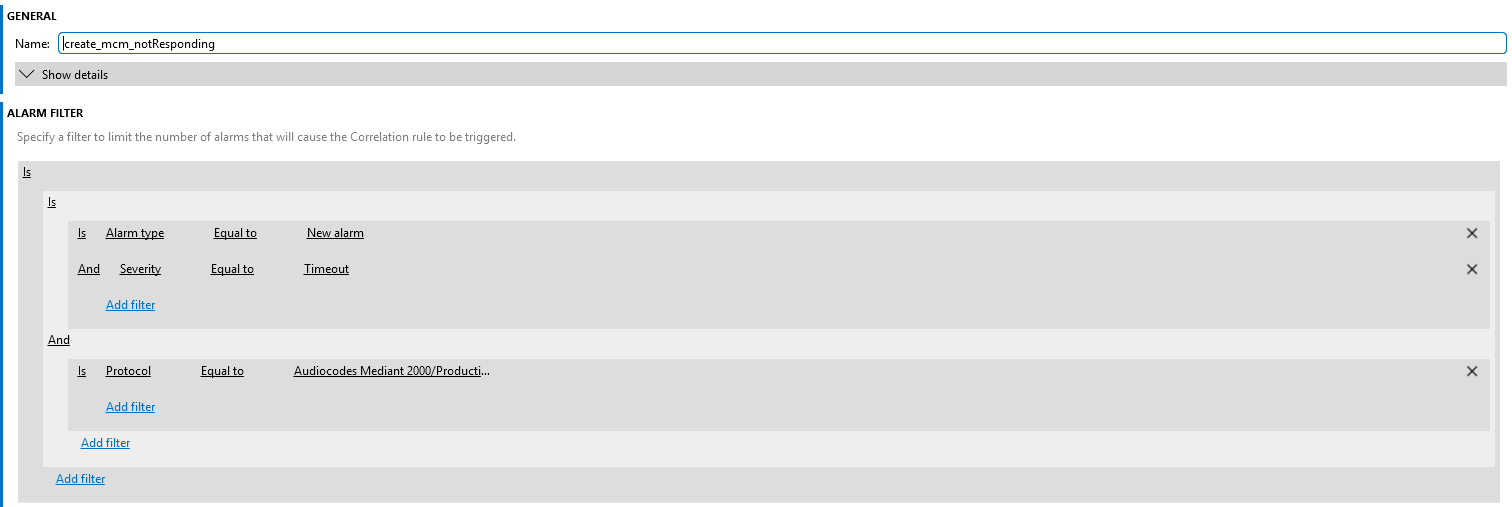
The timeout is captured correctly; however, during the return to normal, other events are also captured.

How can I create a rule that captures ONLY the events related to timeout?”

Zabdi Chavez Escamillla [DevOps Member] Answered question 6th July 2026

3 Answers

  • Active
  • Voted
  • Newest
  • Oldest
2
Zabdi Chavez Escamillla [DevOps Member]91 Posted 6th July 2026 0 Comments

The correlation rules for capturing timeout events under the "Severity = Timeout" rule are now working correctly.

What I need now is to be able to detect when those alarms are cleared. I need to apply actions to the alarm when it is cleared. How can I accomplish this?

Zabdi Chavez Escamillla [DevOps Member] Answered question 6th July 2026
2
Stefan Schedletzky [DevOps Advocate]2.75K Posted 3rd July 2026 0 Comments

Hi Arturo,

I have it running like this:
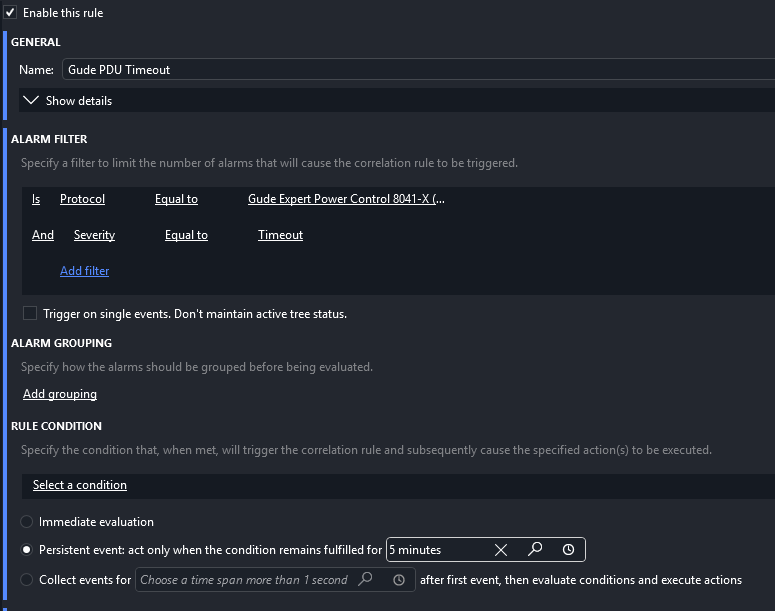
After the 5min I'm receiving an email.

Stefan Schedletzky [DevOps Advocate] Answered question 3rd July 2026
2
Miguel Obregon [SLC] [DevOps Catalyst]23.44K Posted 2nd July 2026 0 Comments

Hi Arturo,

Could you double check that neither the checkbox 'Autoclear' (for new correlated alarms) nor 'Execute on clear' (for 'Run Scripts') is selected?
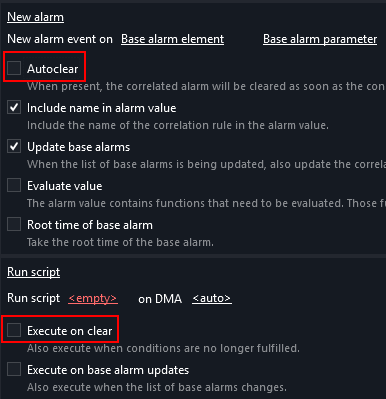
Hope it helps.

Miguel Obregon [SLC] [DevOps Catalyst] Answered question 2nd July 2026
Please login to be able to comment or post an answer.

My DevOps rank

DevOps Members get more insights on their profile page.

My user earnings

0 Dojo credits

Spend your credits in our swag shop.

0 Reputation points

Boost your reputation, climb the leaderboard.

Promo banner DataMiner DevOps Professiona Program
DataMiner Integration Studio (DIS)
Empower Katas
Privacy Policy • Terms & Conditions • Contact

© 2026 Skyline Communications. All rights reserved.

DOJO Q&A widget

Can't find what you need?

? Explore the Q&A DataMiner Docs

[ Placeholder content for popup link ] WordPress Download Manager - Best Download Management Plugin