

The dataminer element shows me the date of the equipment in hexadecimal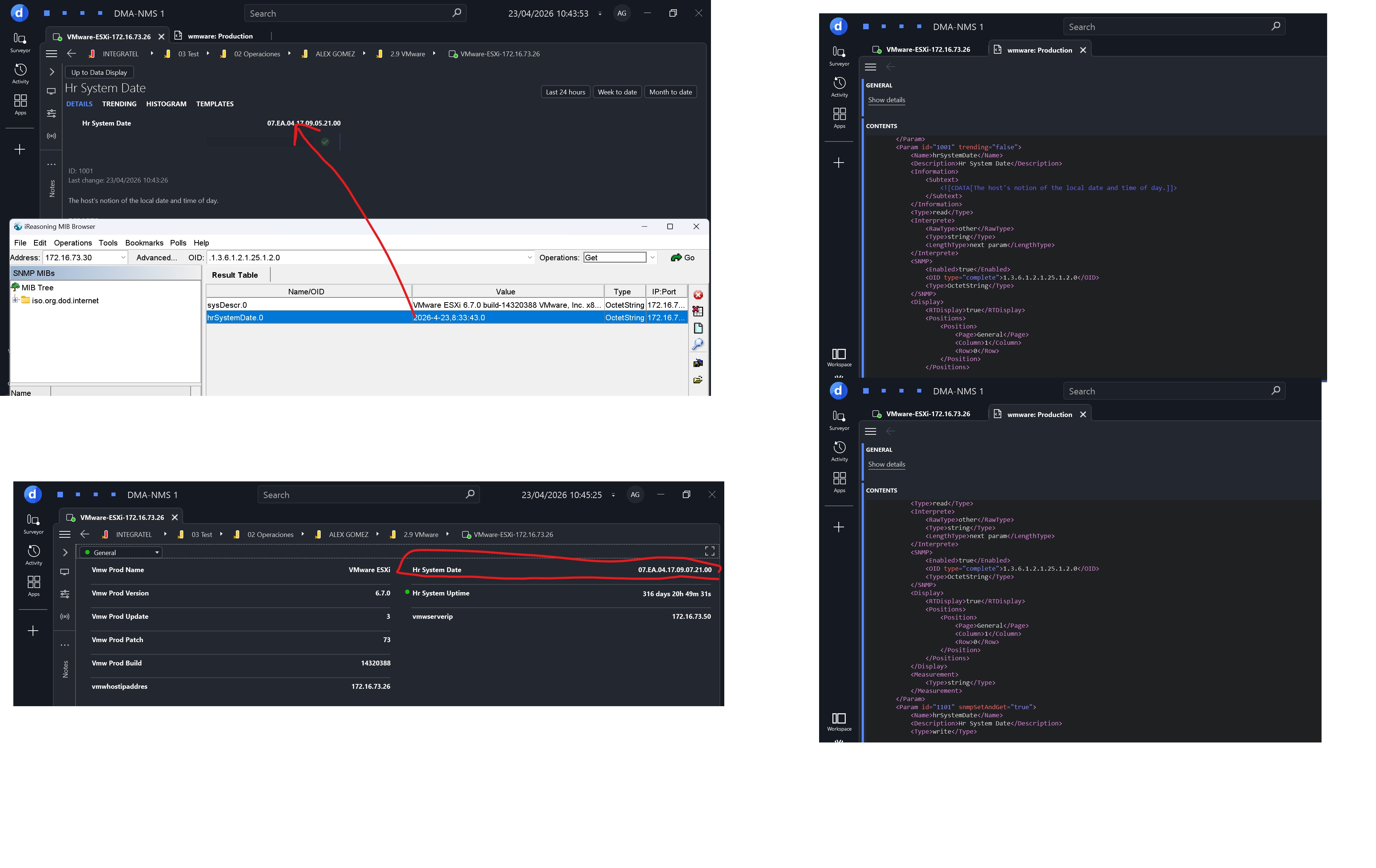

Hi Alex,
Can you try the suggestions described in these questions:
- Driver: convert hexadecimal value to letters
- Converting SNMP octetstrings to readable ASCII in xml code
Hope it helps.
Update:
Having a look at the OID definition:
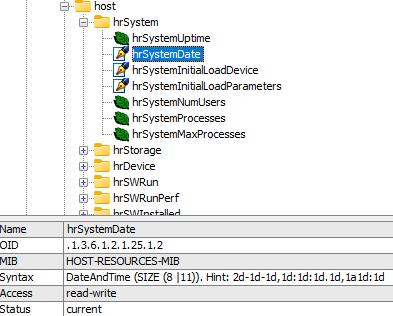
It seems that changing the type will not make a difference. Looking at other connectors that implement the same OID, I noticed that a QAction is required to parse the raw data so the datetime can be displayed correctly in the parameter.


Hi Alex,
See updated answer.

Hello,
You might have to leave the type as an octetstring and parse the hex value on a QAction to return a double value and then set that double value to another parameter of interprete type double with measurement type date number.
So for example: (a quick method made in copilot)
private static double ParseDateValue(SLProtocol protocol, string value)
{
if (string.IsNullOrWhiteSpace(value))
throw new ArgumentException("Invalid input");
value = value.Replace(".", "");
// Required: YYYYMMDD (hex)
if (value.Length < 8)
throw new FormatException("Invalid date format");
int year = Convert.ToInt32(value.Substring(0, 4), 16);
int month = Convert.ToInt32(value.Substring(4, 2), 16);
int day = Convert.ToInt32(value.Substring(6, 2), 16);
int hour = 0, min = 0, sec = 0, ms = 0;
if (value.Length >= 12)
{
hour = Convert.ToInt32(value.Substring(8, 2), 16);
min = Convert.ToInt32(value.Substring(10, 2), 16);
}
if (value.Length >= 16)
{
sec = Convert.ToInt32(value.Substring(12, 2), 16);
ms = Convert.ToInt32(value.Substring(14, 2), 16);
}
// Ignore timezone (same as original)
var dt = new DateTime(year, month, day, hour, min, sec, ms);
return dt.ToOADate();
}
And you want to set the return value to a parameter like this:
<Param id="1" trending="false">
		<Name>ParsedDatetime</Name>
		<Description>Parsed DateTime</Description>
		<Information>
			<Subtext></Subtext>
		</Information>
		<Type>read</Type>
		<Interprete>
			<RawType>numeric text</RawType>
			<LengthType>next param</LengthType>
			<Type>double</Type>
			<Decimals>8</Decimals>
		</Interprete>
		<Display>
			<RTDisplay>true</RTDisplay>
		</Display>
		<Measurement>
			<Type options="date">number</Type>
		</Measurement>
</Param>

The Interprete.Decimals and Display.Decimals tags of the parameter need to be set to 8 to avoid rounding errors. More info is available on https://docs.dataminer.services/develop/schemadoc/Protocol/Protocol.Params.Param.Measurement.Type-options.html#date

Hi Alex,
When dealing with such cases, I use the following method to convert the string to a DateTime. You can then use this method in a QAction to fill a new column with the DateTime values:
/// <summary>
/// Converts SNMP DateTime to System.DateTime.
/// </summary>
/// <param name="hexTimeString">SNMP DateTime with DateAndTime hex format.</param>
/// <param name="separator">Expected character that splits the hex parts.</param>
/// <returns>System.DateTime. If String is Empty or null returns Minimum DateTime Value.</returns>
public static DateTime HexToDateTime(string hexTimeString, char separator)
{
if (hexTimeString == null || hexTimeString == String.Empty)
{
return DateTime.MinValue;
}
string[] splitHex = hexTimeString.Trim(separator).Split(separator);
int[] splitHexNumbers = splitHex.Select((v) => Convert.ToInt32(Convert.ToUInt32(v, 16))).ToArray();
int year = (splitHexNumbers[0] << 8) + splitHexNumbers[1];
if (year == 0)
{
year = 1;
}
DateTime temp = new DateTime(
year,
splitHexNumbers[2],
splitHexNumbers[3],
splitHexNumbers[4],
splitHexNumbers[5],
splitHexNumbers[6],
splitHexNumbers[7] < 10 ? splitHexNumbers[7] * 100 : 0, // deci-seconds To Milliseconds
DateTimeKind.Utc);
if (splitHex.Length <= 8)
{
return temp;
}
if (Convert.ToChar(splitHexNumbers[8]) == '+')
{
return temp + new TimeSpan(splitHexNumbers[9], splitHexNumbers[10], 0);
}
else
{
return temp - new TimeSpan(splitHexNumbers[9], splitHexNumbers[10], 0);
}
}
OctetStringASCII or the OctetStringUTF8, It gives me the same result, Any suggestions?