
MediaOps continues to evolve as a platform for planning, scheduling, and automating media operations. With MediaOps Live 1.2 and MediaOps Plan 2.0, operations become easier to configure, more flexible to schedule, and more predictable to orchestrate.
MediaOps Plan 2.0 builds on Plan 1.6 by further separating the complexity of engineering a worfklow from what operators need to run it, while Live 1.2 strengthens the link between planning an operation and executing it.
Here’s what’s new. Click any topic to jump straight to it:
- 🎛️ Simpler configuration for operators: Operators see only the values they can act on, and engineers can still see the full setup.
- 🏷️ Your own job types: Label and filter jobs with categories that match how your team works.
- 🎯 Assign resources when the job is ready: Auto-assign once a job is configured, and return resources to the pool if plans change.
- 🛡️ Safer changes when workflows evolve: Clearer pool swaps, smarter parameter linking, and more context in node tooltips.
- 🚀 From planning to execution: Orchestration events only for confirmed jobs, plus background (asynchronous) execution in the DevPack and better CSV encoding.
- 🧭 The bigger picture: What these releases mean for engineers, operators, and developers.
Combined with MediaOps Live 1.2, this also further strengthens the connection between planning an operation and actually executing it.
Keeping complex configuration simple for operators
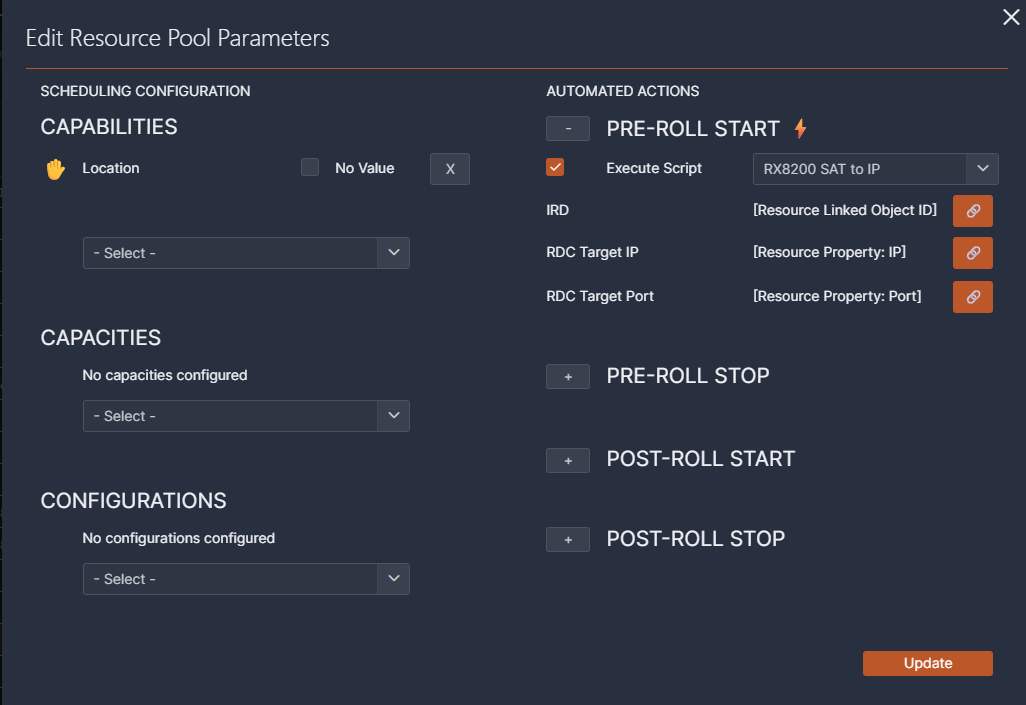
Media workflows can contain a lot of configuration. Parameters may be linked together, automated actions may invoke scripts, and script inputs may in turn depend on other values.
All of that information is important when engineering a workflow, but an operator configuring a job does not necessarily need to see it.
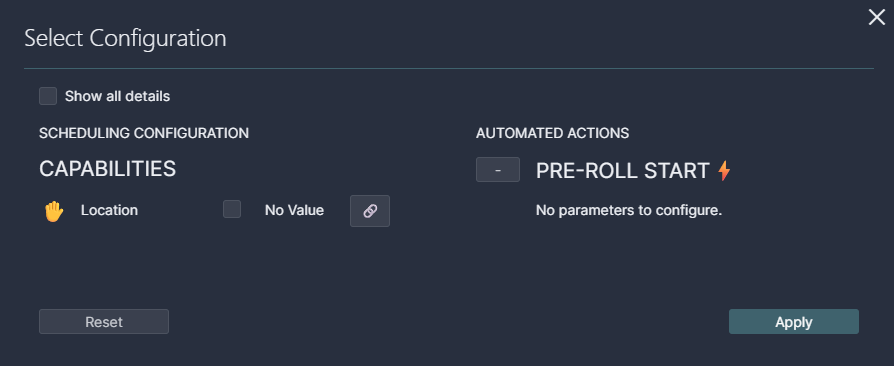
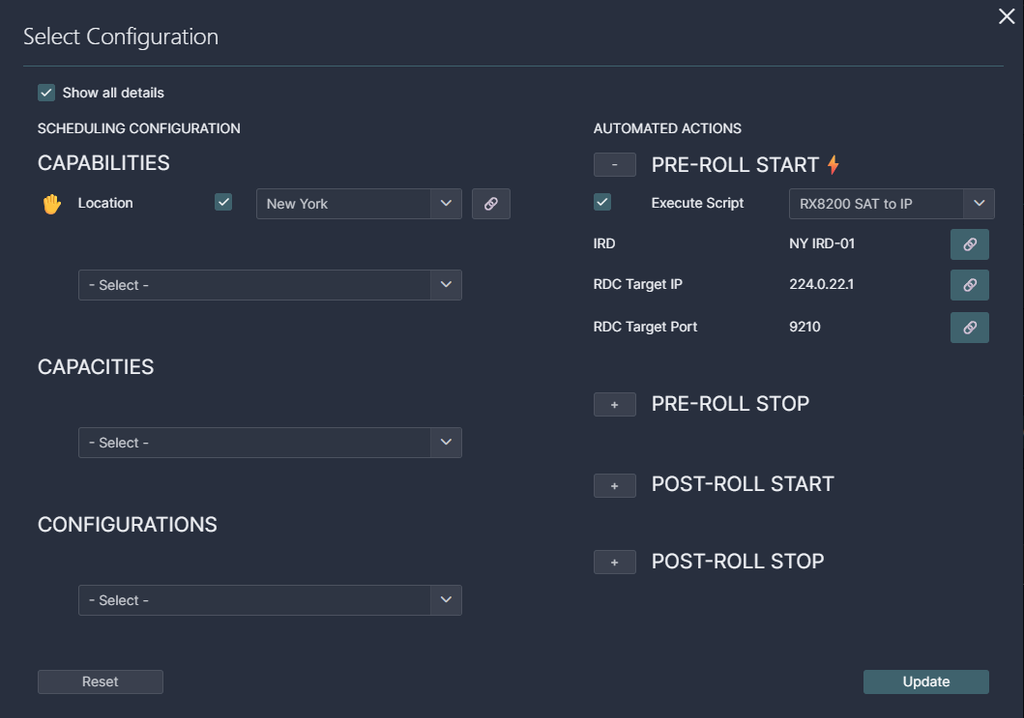
MediaOps Plan 2.0 therefore introduces a simplified operator view for configuration. By default, the Select Configuration dialog focuses on the values operators can actually act on. Linked parameters, inactive automated actions, selected scripts, and linked input arguments are hidden from the default view. Engineers can still access the complete configuration through the new Show all details option.
This gives the same configuration two useful perspectives:
- Operators get a cleaner interface focused on what still requires their attention.
- Engineers can inspect the complete configuration whenever they need to understand or modify the underlying setup.
Nothing is removed from the configuration itself. The change is purely about presenting the right level of detail for the task at hand. The result is a small but important shift: workflow complexity can grow without forcing the operator experience to grow equally complex.
Organize operations with your own job types
Not every scheduled operation represents the same kind of work. MediaOps Plan 2.0 therefore moves beyond treating every job simply as Scheduled.
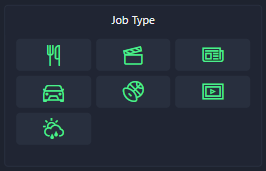
You can now define custom job types using the Categories app and assign these types when creating or editing jobs. When multiple job types are available, operators can select the appropriate type directly from the Scheduling app. These types can then be used to filter the job timeline, making it easier to focus on the operations that matter at that moment.
Job types can also be defined directly on a workflow. Every job created from that workflow will inherit its job type automatically, while operators can still override it for an individual job when needed.
This makes the scheduling model easier to adapt to the organization using it. Instead of forcing different operational processes into a single predefined classification, MediaOps can reflect the terminology and operational categories you already use.
Assign resources when the job is ready
Automatic resource selection is a key part of turning reusable workflows into actual scheduled operations. But the right moment to select a resource is not always when a job is first created.
A job may still require configuration before MediaOps has enough information to determine which resource is appropriate.
MediaOps Plan 2.0 addresses this with the new auto-assign resources action. While a job is in Draft or Tentative state, operators can trigger automatic assignment after configuring the job. MediaOps then evaluates the eligible resources using the configuration and time slot of the job. If assignment is not possible, the application indicates why, for example because required configuration is still missing or because no eligible resource is available during the scheduled time.
Resource selection also becomes reversible. A resource that was assigned to a job can now be returned to its resource pool while the job is still Draft or Tentative. For tentative jobs, doing so also releases the resource reservation so that the resource becomes available to other jobs again.
Together, these changes make resource assignment much better aligned with the actual lifecycle of a job:
Configure first. Assign when ready. Adjust when necessary. Confirm when complete.

Safer changes when workflows evolve
Operational plans change. Resources become unavailable, requirements change, or a node simply needs to use a different resource pool.
In Plan 2.0, swapping a node to another pool is safer when that pool has a different scheduling configuration. Instead of silently retaining configuration that might no longer match, MediaOps now explicitly asks whether you want to keep the existing configuration or revert to the configuration of the new pool.
Parameter linking has also been refined. The linking dialog now uses shorter labels, selects sensible default targets based on the type of link, and identifies preceding and following nodes with pre, post, and pre/post indicators. These changes make it easier to configure relationships between parameters without having to reconstruct the workflow topology yourself.
Nodes in both Workflow Designer and Scheduling now also expose their alias, resource name, and resource pool through a tooltip, providing additional context directly where you need it.
These improvements continue the direction established in Plan 1.6: workflows should not only automate operations, they should also become easier to understand and safer to modify as their complexity increases.
From planning to execution
MediaOps Plan defines what needs to happen and when. MediaOps Live takes care of executing the associated orchestration.
With Plan 2.0, that boundary becomes cleaner: orchestration events in MediaOps Live are now only created for confirmed jobs. Draft and tentative jobs no longer create events prematurely. If a confirmed job is moved back to Tentative, its corresponding events are removed again. This keeps MediaOps Live focused on work that is actually ready for execution and avoids unnecessary orchestration events while a job is still being prepared.
MediaOps Live 1.2 also expands the developer API with support for asynchronous execution of saved orchestration events. Through the MediaOps Live DevPack, developers can start one or more events in the background and immediately return control to the calling automation script. This is particularly useful when orchestration is initiated from another automation flow and the caller should not have to wait for the complete operation to finish.
And for environments where endpoint or virtual signal group information is exchanged through CSV, Live 1.2 improves encoding support as well. Imports now support both UTF-8 and Windows-1252, while exports use UTF-8 with a BOM so applications such as Microsoft Excel can correctly detect the encoding and preserve special characters.
A clearer separation between engineering and operations
Taken together, MediaOps Plan 2.0 and MediaOps Live 1.2 aren’t just about adding more functionality.
They continue a broader evolution of MediaOps:
- Engineers can model increasingly sophisticated workflows and automation.
- Operators see less of that complexity when it is not relevant to their task.
- Resource selection can happen at the right moment in the job lifecycle.
- Operational teams can organize jobs according to their own processes.
- Only confirmed work crosses the boundary from planning into orchestration.
- Developers get more flexibility when integrating orchestration into their own automation.
The result is a cleaner path from designing a reusable media workflow, to configuring and scheduling a job, to assigning the right resources, and ultimately executing the operation.
For the complete list of features, enhancements, and fixes, consult the MediaOps Plan 2.0.0 release notes and MediaOps Live 1.2.0 release notes.