
With every DataMiner Feature Release, we introduce improvements and new capabilities that help you get more value out of your system. In this post, we highlight the most noteworthy additions to DataMiner 10.6.12.
Below, you’ll find a list of the new or improved features that are worth highlighting in this release. Each item links to relevant documentation where you can find more details.
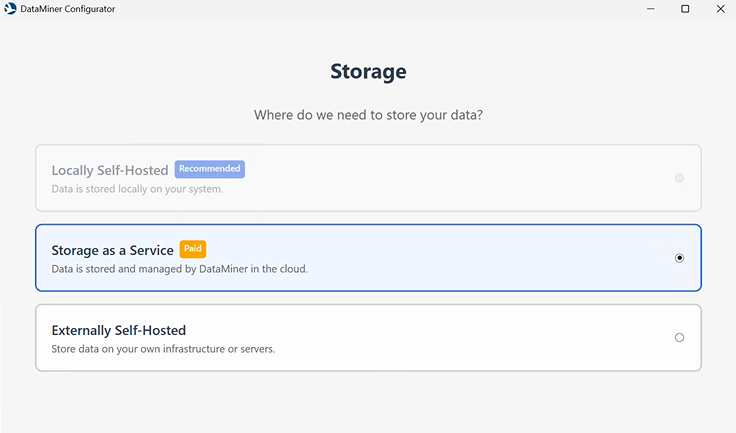
- The initial configuration wizard in the DataMiner Installer has been redesigned to provide a smoother, more guided setup experience, taking you through the relevant configuration steps for your setup, from choosing your commercial model and storage option to connecting to dataminer.services where needed.
- Interactive automation scripts in web apps now support a grid layout, allowing you to align keyboard navigation with the workflow of your dialog box, without changing how the dialog box looks. The components stay in their defined positions, while you can control the order in which users move through them using TAB.
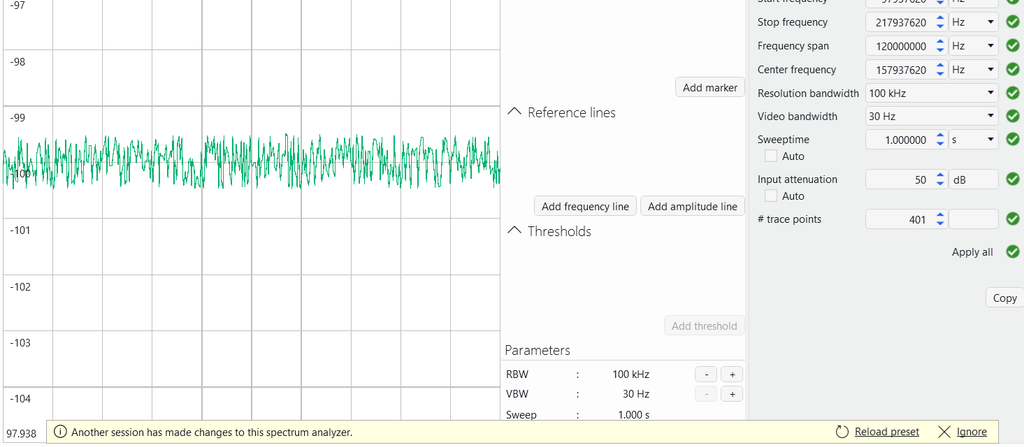
- Several improvements have been made to Spectrum Analysis in Cube:
- When using a spectrum card in shared mode, you now have more control over how configuration changes are shared between users. You can push your changes to other users, who can choose to be notified before applying them, ignore them, or have them applied automatically.
- Spectrum cards in shared mode will no longer automatically enter standby after the configured inactivity period. The standby options are also disabled while the card is in shared mode.
- Measurement point selections are now immediately synced between users in shared mode. When you select or deselect a measurement point, the change is pushed to the other connected clients right away, keeping everyone’s selection in sync.
- You can now configure the maximum number of concurrent GQI sessions, giving you more control over how many query sessions can run at the same time. The default limit remains 500, but you can set it anywhere from 1 to 10,000 depending on your system’s needs and available resources.
- If a firewall restricts outbound traffic from your DataMiner Agents, whitelisting STaaS traffic is now much simpler. You only need to whitelist https://*.dataminer.services/ when using hostnames or the applicable region IP address when using IP addresses. Additional hostnames and Microsoft Azure IP addresses no longer need to be whitelisted.
- You can now more easily spot version inconsistencies across your DataMiner cluster. The new DataMiner Agent Versions BPA test runs daily to verify that all DataMiner Agents are running the same version, including offline Failover Agents, and provides details if it detects a mismatch.
- Previously, only one element could receive incoming TCP data. Now, multiple elements can receive the same data by listening on the same server port and explicitly allowing the client’s IP address. Only one of these elements can respond to the client, making this feature particularly useful when multiple elements need to receive and process incoming data without responding.
- BrokerGateway now takes DMS.xml redirects into account for HTTPS communication, allowing the required API calls to work as intended in manually configured setups.
Time to move to .NET 10
Earlier this month, we published a blog post about the end of support for .NET 8 and why it’s important to move to a recent DataMiner version running on .NET 10. DataMiner 10.6.12 is a great choice if you’re planning that upgrade, allowing you to move to .NET 10 while also benefiting from the latest functionality. Read the blog post for more details.

Content expert: Seppe Dejonckheere
For a complete list of changes added in DataMiner 10.6.12, including technical details and fixes, refer to the official release notes.
Previous DataMiner releases

BLOG
What’s new in DataMiner 10.6.11?
Find out which new and improved features have been added in DataMiner version 10.6.11.

BLOG
What’s new in DataMiner 10.6.10?
Find out which new and improved features have been added in DataMiner version 10.6.10.