

Skip to content
DataMiner Dojo

More results...

Generic selectors
Exact matches only
Search in title
Search in content
Post Type Selectors
Search in posts
Search in pages
Search in posts
Search in pages
Log in
Menu
  • Updates & Insights
  • Questions
  • Learning
    • E-learning Courses
    • Tutorials
    • Open Classroom Training
    • Certification
      • DataMiner Fundamentals
      • DataMiner Configurator
      • DataMiner Automation
      • Scripts & Connectors Developer: HTTP Basics
      • Scripts & Connectors Developer: SNMP Basics
      • Visual Overview – Level 1
      • Verify a certificate
    • YouTube Videos
    • Solutions & Use Cases
      • Solutions
      • Use Case Library
    • Agility
      • Learn more about Agile
        • Agile Webspace
        • Everything Agile
          • The Agile Manifesto
          • Best Practices
          • Retro Recipes
        • Methodologies
          • The Scrum Framework
          • Kanban
          • Extreme Programming
        • Roles
          • The Product Owner
          • The Agile Coach
          • The Quality & UX Coach (QX)
      • Book your Agile Fundamentals training
      • Book your Kanban workshop
    • >> Go to DataMiner Docs
  • DevOps
    • About the DevOps Program
    • Sign up for the DevOps Program
    • DataMiner DevOps Support
    • Feature Suggestions
  • Downloads
  • Swag Shop
  • PARTNERS
    • Business Partners
    • Technology Partners
  • Contact
    • Sales, Training & Certification
    • DataMiner Support
    • Global Feedback Survey
  • >> Go to dataminer.services

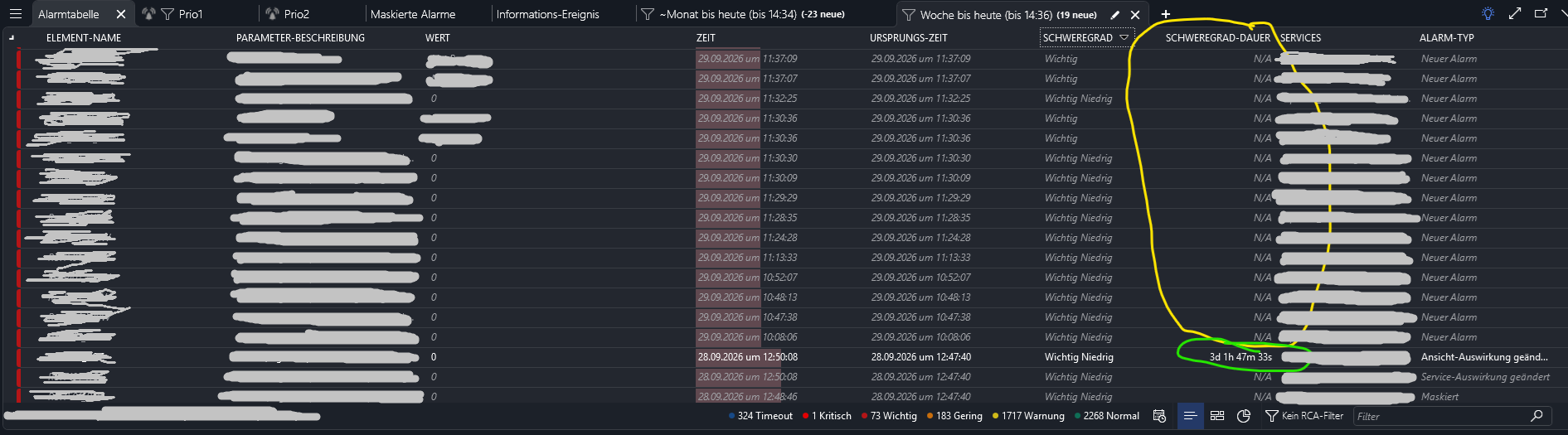
Severity duration is not available for cleared alarms

126 views2 hours agoAlarm Duration duration severity duration SeverityDuration
2
Simon Steinkamp [DevOps Advocate]156 4 days ago 0 Comments

Hi there,

I want to see, how long an alarm stayed active after this alarm gets cleared, but the duration isn't displayed in the table. Only active alarms have increasing durations displayed. How can i measure or better: see the duration of an alarm?
Thanks!

Pieter Van Compernolle [SLC] [DevOps Enabler] Answered question 2 hours ago

3 Answers

  • Active
  • Voted
  • Newest
  • Oldest
1
Pieter Van Compernolle [SLC] [DevOps Enabler]4.40K Posted 2 hours ago 0 Comments

Hi Simon,

Severity Duration represents the amount of time an alarm has been in its current severity state. For a cleared alarm, the current severity becomes Normal. Since the alarm is no longer evolving after it has been cleared, the Severity Duration is currently shown as N/A.

That explains the current behavior. However, I agree that for cleared alarms it would be more useful to display the duration of the last active severity period before the alarm was cleared. I'll create an investigation to determine whether we can support that scenario.

In the meantime, it may be possible to achieve similar behavior in Dashboards using a custom operator. One approach could be to first retrieve a filtered list of alarms and then apply a custom operator that calculates the duration for each alarm, likely using the alarm ID as input and retrieving the relevant alarm history.

Keep in mind that this approach would require accessing alarm history for every alarm, which can have a significant performance impact. Therefore, it is recommended to apply sufficient filtering first and only use it on relatively small result sets.

Pieter Van Compernolle [SLC] [DevOps Enabler] Answered question 2 hours ago
You are viewing 1 out of 3 answers, click here to view all answers.
Please login to be able to comment or post an answer.

My DevOps rank

DevOps Members get more insights on their profile page.

My user earnings

0 Dojo credits

Spend your credits in our swag shop.

0 Reputation points

Boost your reputation, climb the leaderboard.

Promo banner DataMiner DevOps Professiona Program
DataMiner Integration Studio (DIS)
Privacy Policy • Terms & Conditions • Contact

© 2026 Skyline Communications. All rights reserved.

DOJO Q&A widget

Can't find what you need?

? Explore the Q&A DataMiner Docs

[ Placeholder content for popup link ] WordPress Download Manager - Best Download Management Plugin