Skip to content
DataMiner Dojo

More results...

Generic selectors
Exact matches only
Search in title
Search in content
Post Type Selectors
Search in posts
Search in pages
Search in posts
Search in pages
Log in
Menu
  • Updates & Insights
  • Questions
  • Learning
    • E-learning Courses
    • Tutorials
    • Open Classroom Training
    • Certification
      • DataMiner Fundamentals
      • DataMiner Configurator
      • DataMiner Automation
      • Scripts & Connectors Developer: HTTP Basics
      • Scripts & Connectors Developer: SNMP Basics
      • Visual Overview – Level 1
      • Verify a certificate
    • YouTube Videos
    • Solutions & Use Cases
      • Solutions
      • Use Case Library
    • Agility
      • Learn more about Agile
        • Agile Webspace
        • Everything Agile
          • The Agile Manifesto
          • Best Practices
          • Retro Recipes
        • Methodologies
          • The Scrum Framework
          • Kanban
          • Extreme Programming
        • Roles
          • The Product Owner
          • The Agile Coach
          • The Quality & UX Coach (QX)
      • Book your Agile Fundamentals training
      • Book your Kanban workshop
    • >> Go to DataMiner Docs
  • DevOps
    • About the DevOps Program
    • Sign up for the DevOps Program
    • DataMiner DevOps Support
    • Feature Suggestions
  • Downloads
  • Swag Shop
  • PARTNERS
    • Business Partners
    • Technology Partners
  • Contact
    • Sales, Training & Certification
    • DataMiner Support
    • Global Feedback Survey
  • >> Go to dataminer.services

Elementstate when swarmed

Solved349 views16th October 2026swarming
8
Souhail Boucif [SLC] [DevOps Member]212 16th October 2026 0 Comments

In addition to the current ElementState defined values:

  • Active = 1
  • Deleted = 6
  • Error = 10
  • Hidden = 2
  • Masked = 12
  • Paused = 3
  • Restart = 11
  • Stopped = 4
  • Undefined = 0

is there a new value describing the element state "swarmed".

The purpose is to detect(Correlation rule) when a specific element is swarmed and run some automation.

Souhail Boucif [SLC] [DevOps Member] Selected answer as best 16th October 2026

2 Answers

  • Active
  • Voted
  • Newest
  • Oldest
4
Pieter Van Compernolle [SLC] [DevOps Enabler]4.53K Posted 16th October 2026 0 Comments

Hi Souhail,

Maybe you can trigger on the information event that is generated during a swarm action?

Your correlation rule should then be configured to accept information events and filter on the swarming parameter like this:
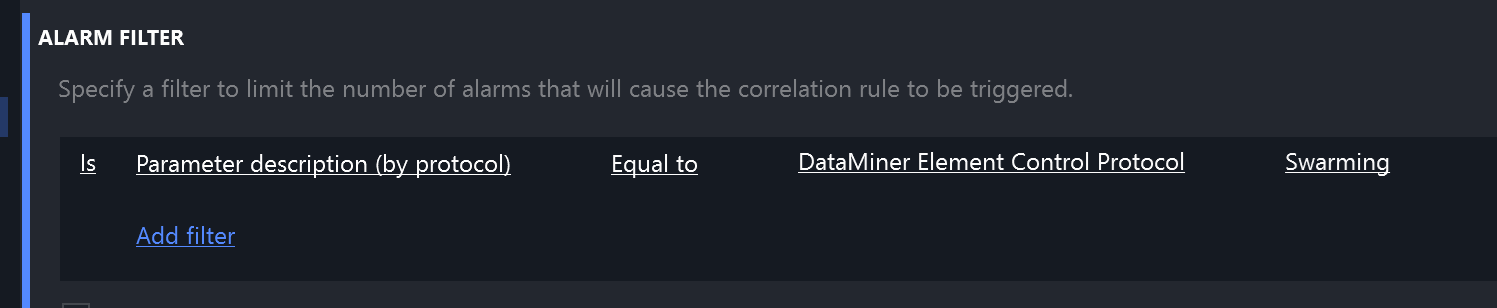
I also let it trigger on single events. Hope this helps?

Souhail Boucif [SLC] [DevOps Member] Selected answer as best 16th October 2026
6
Robbe De Ghein [SLC] [DevOps Advocate]1.51K Posted 16th October 2026 1 Comment

When an element swarms there is no new state describing Swarming.

As the element is restarting on another agent the state changes as follows:

Active -> Stopped -> Active (starting) -> Active (started)

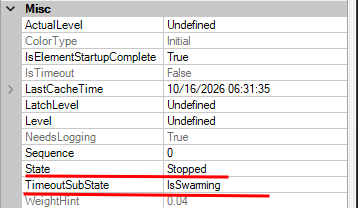
However you can catch the swarm on the Stopped event (ElementStateEventMessage) as it will specify the reason with a TimeoutSubState of IsSwarming.
I'm also curious to know what automation you will want to run on this?

Souhail Boucif [SLC] [DevOps Member] Posted new comment 16th October 2026
Souhail Boucif [SLC] [DevOps Member] commented 16th October 2026

Thanks Robbie for your update.

Mainly, the automation will update the trap ip address in some device to force it sending notification to the new host agent

Please login to be able to comment or post an answer.

My DevOps rank

DevOps Members get more insights on their profile page.

My user earnings

0 Dojo credits

Spend your credits in our swag shop.

0 Reputation points

Boost your reputation, climb the leaderboard.

Promo banner DataMiner DevOps Professiona Program
DataMiner Integration Studio (DIS)
Privacy Policy • Terms & Conditions • Contact

© 2026 Skyline Communications. All rights reserved.

DOJO Q&A widget

Can't find what you need?

? Explore the Q&A DataMiner Docs

[ Placeholder content for popup link ] WordPress Download Manager - Best Download Management Plugin