Skip to content
DataMiner Dojo

More results...

Generic selectors
Exact matches only
Search in title
Search in content
Post Type Selectors
Search in posts
Search in pages
Search in posts
Search in pages
Log in
Menu
  • Updates & Insights
  • Questions
  • Learning
    • E-learning Courses
    • Tutorials
    • Open Classroom Training
    • Certification
      • DataMiner Fundamentals
      • DataMiner Configurator
      • DataMiner Automation
      • Scripts & Connectors Developer: HTTP Basics
      • Scripts & Connectors Developer: SNMP Basics
      • Visual Overview – Level 1
      • Verify a certificate
    • YouTube Videos
    • Solutions & Use Cases
      • Solutions
      • Use Case Library
    • Agility
      • Learn more about Agile
        • Agile Webspace
        • Everything Agile
          • The Agile Manifesto
          • Best Practices
          • Retro Recipes
        • Methodologies
          • The Scrum Framework
          • Kanban
          • Extreme Programming
        • Roles
          • The Product Owner
          • The Agile Coach
          • The Quality & UX Coach (QX)
      • Book your Agile Fundamentals training
      • Book your Kanban workshop
    • >> Go to DataMiner Docs
  • DevOps
    • About the DevOps Program
    • Sign up for the DevOps Program
    • DataMiner DevOps Support
    • Feature Suggestions
  • Downloads
  • Swag Shop
  • PARTNERS
    • Business Partners
    • Technology Partners
  • Contact
    • Sales, Training & Certification
    • DataMiner Support
    • Global Feedback Survey
  • >> Go to dataminer.services

Element Alarm State

60 views6 hours ago
0
Stefan Schedletzky [DevOps Advocate]2.61K 9 hours ago 0 Comments

Hi,

how does this alarm get triggered?

I had to restart now the element to clear the alarm. It was not activated in the alarm template and even completely excluding it doesn't help.

Bert Vandenberghe [SLC] [DevOps Enabler] Answered question 6 hours ago

2 Answers

  • Active
  • Voted
  • Newest
  • Oldest
1
Miguel Obregon [SLC] [DevOps Catalyst]23.15K Posted 8 hours ago 0 Comments

Hi Stefan,

If you already double-checked that this general parameter is not monitored in the alarm template, then there is likely something else causing this behavior.

I would suggest contacting DataMiner Support (support@dataminer.services) so they can perform a more thorough investigation.

Hope it helps.

Miguel Obregon [SLC] [DevOps Catalyst] Answered question 8 hours ago
0
Bert Vandenberghe [SLC] [DevOps Enabler]10.07K Posted 6 hours ago 2 Comments

Hi Stefan,

Note that those general parameters (=parameters added by DataMiner to each element independent of the connector it is using) are a little bit more hidden away.

As indicated on the screenshot here below, those parameters are located under a special page 'General parameters' located at the very bottom of the navigation panel of the element card.

Also, in the alarm template those general parameters are not being shown by default. You need to click on the selection button at the top to select 'All parameters (protocol + general)' and then you will be able to see those general parameters towards the end of the list.
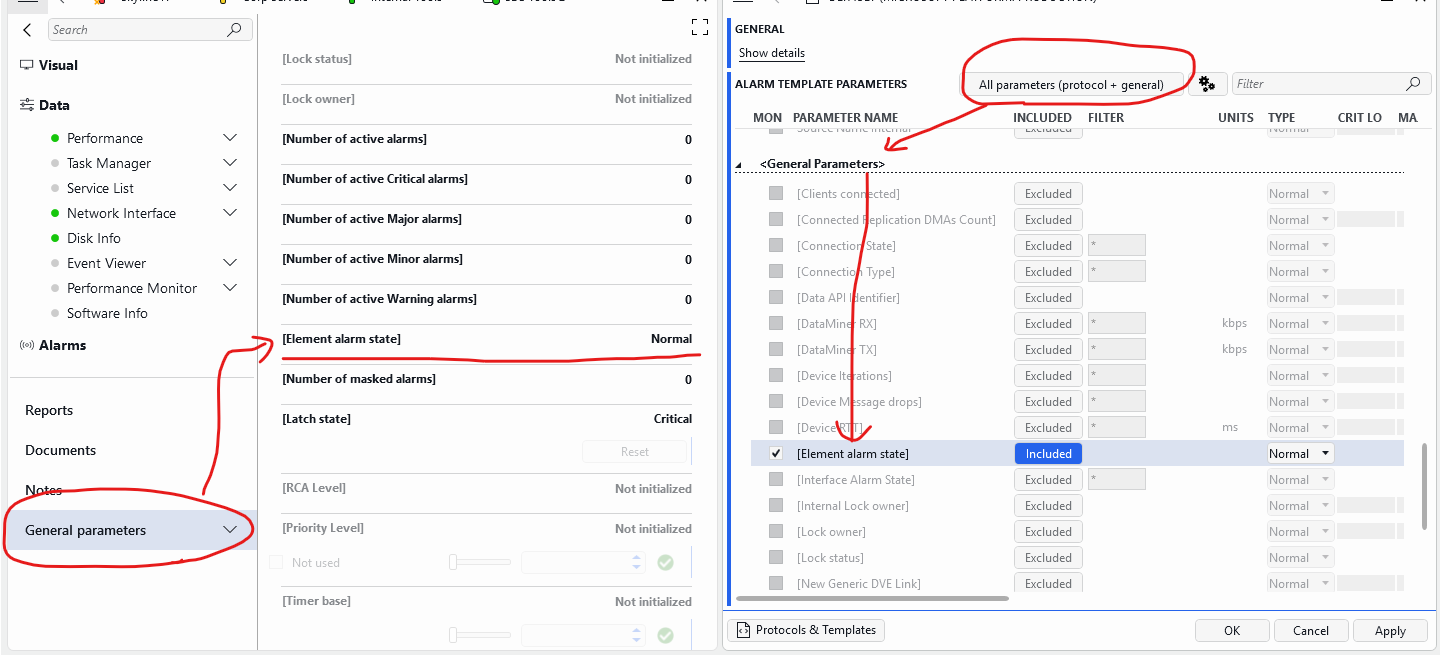
If you activate monitoring on this specific parameter 'Element alarm state', and you generate a major alarm when this parameter goes to the value 'Major'. Then you basically lock the alarm.

Imagine that a normal parameter goes into major alarm, then the element state will go into major state as well. So this means that this parameter will also generate a major alarm. Then if the original alarm clears, your element will remain in alarm forever because that alarm on the element state will never clear... I think you have to be very careful when activating alarming on this parameter, unless you want this kind of behavior.

Bert

Bert Vandenberghe [SLC] [DevOps Enabler] Posted new comment 3 hours ago
Stefan Schedletzky [DevOps Advocate] commented 5 hours ago

Hi Bert, the problem is I haven't enabled it. Also excluding this parameter hasn't helped (it was NOT activated). After a restart it was gone. But the alarm shouldn't have appeared in general, because it was never enabled.

Bert Vandenberghe [SLC] [DevOps Enabler] commented 3 hours ago

That's strange… Then I don't immediate have an explanation for this as well. Support can be contacted to dig a bit deeper and investigate how this alarm was generated.

Please login to be able to comment or post an answer.

My DevOps rank

DevOps Members get more insights on their profile page.

My user earnings

0 Dojo credits

Spend your credits in our swag shop.

0 Reputation points

Boost your reputation, climb the leaderboard.

Promo banner DataMiner DevOps Professiona Program
DataMiner Integration Studio (DIS)
Empower Katas
Privacy Policy • Terms & Conditions • Contact

© 2026 Skyline Communications. All rights reserved.

DOJO Q&A widget

Can't find what you need?

? Explore the Q&A DataMiner Docs

[ Placeholder content for popup link ] WordPress Download Manager - Best Download Management Plugin