
Skip to content
DataMiner Dojo

More results...

Generic selectors
Exact matches only
Search in title
Search in content
Post Type Selectors
Search in posts
Search in pages
Search in posts
Search in pages
Log in
Menu
  • Updates & Insights
  • Questions
  • Learning
    • E-learning Courses
    • Tutorials
    • Open Classroom Training
    • Certification
      • DataMiner Fundamentals
      • DataMiner Configurator
      • DataMiner Automation
      • Scripts & Connectors Developer: HTTP Basics
      • Scripts & Connectors Developer: SNMP Basics
      • Visual Overview – Level 1
      • Verify a certificate
    • YouTube Videos
    • Solutions & Use Cases
      • Solutions
      • Use Case Library
    • Agility
      • Learn more about Agile
        • Agile Webspace
        • Everything Agile
          • The Agile Manifesto
          • Best Practices
          • Retro Recipes
        • Methodologies
          • The Scrum Framework
          • Kanban
          • Extreme Programming
        • Roles
          • The Product Owner
          • The Agile Coach
          • The Quality & UX Coach (QX)
      • Book your Agile Fundamentals training
      • Book you Kanban workshop
    • >> Go to DataMiner Docs
  • DevOps
    • About the DevOps Program
    • Sign up for the DevOps Program
    • DataMiner DevOps Support
    • Feature Suggestions
  • Downloads
  • Swag Shop
  • PARTNERS
    • Business Partners
    • Technology Partners
  • Contact
    • Sales, Training & Certification
    • DataMiner Support
    • Global Feedback Survey
  • >> Go to dataminer.services

Data Aggregator unknown field error

Solved128 views2 days agoData Aggregator DxM
2
Gelber Mahecha [SLC] [DevOps Enabler]1.86K 7 days ago 0 Comments

Hi,

I’m configuring Data Aggregator on DaaS running version 10.6.1.0 with aggregator DxM version 3.2.0.7527, and every time the scheduler triggers the Job, it fails with the following error message in the SLDataAggregator.txt file:

[2026-02-05 22:29:00.016 ERR][localhost][job#915590921#Every minute] DataFetchQueueService failure: Unknown field: query[DataAggregator.Application.Services.DataFetchQueue.DataFetchQueueService]
[2026-02-05 22:29:00.016 ERR]DataSourceJob#915590921 failed: Unknown field: query[DataAggregator.Application.Services.Scheduler.Jobs.DataSourceJob]

I can confirm the same error on the Swagger page when checking the job status:
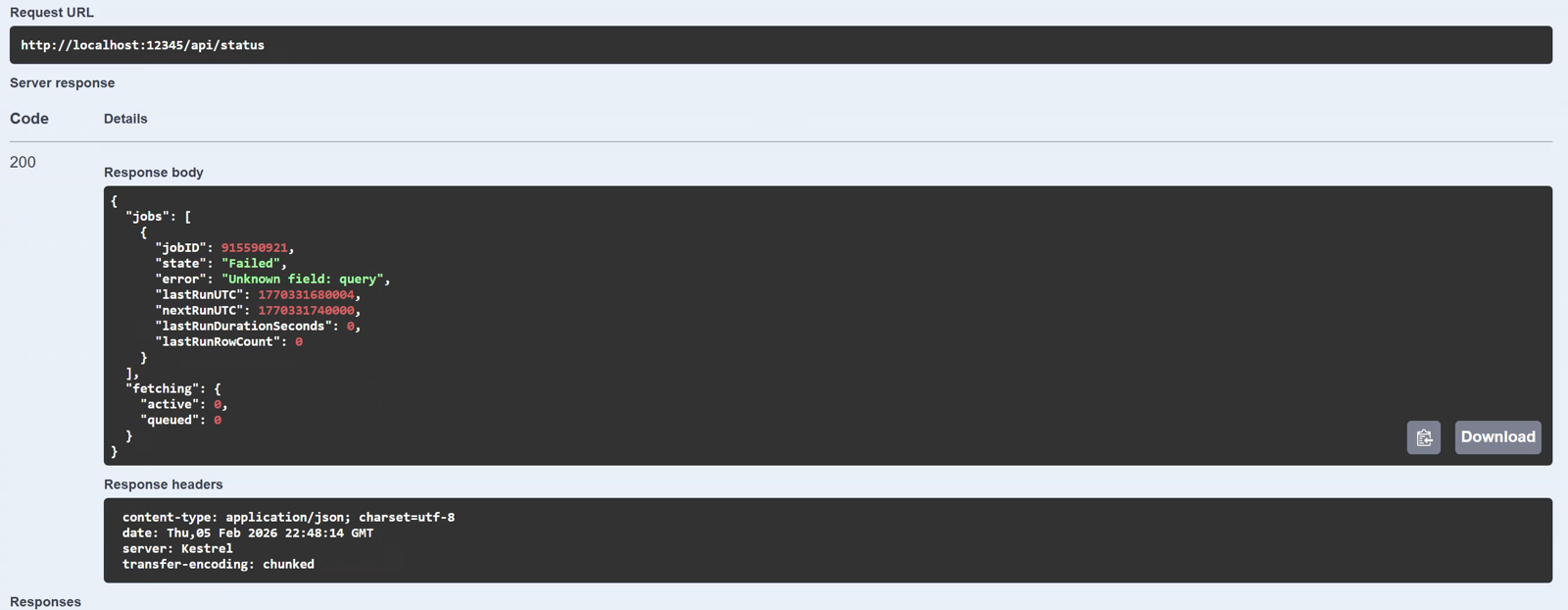
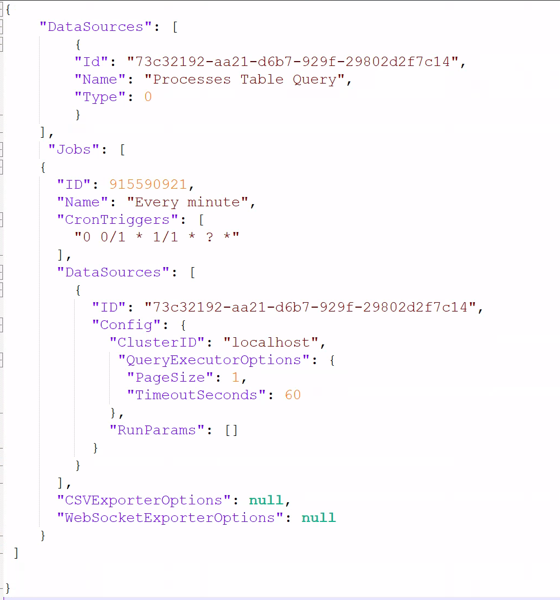
I configured my GQI query using the export method, following the documentation. The query utilizes a “Get Parameter Table by Id” data source and includes a Select statement to extract only specific columns. Here’s how I set up my Helper.json:
I’m aware that every minute execution may be excessive, but as this is my first test, I wanted to have some output as soon as possible. What could be the reason of this error?

Gelber Mahecha [SLC] [DevOps Enabler] Selected answer as best 2 days ago

2 Answers

  • Active
  • Voted
  • Newest
  • Oldest
3
Gelber Mahecha [SLC] [DevOps Enabler]1.86K Posted 2 days ago 0 Comments

The problem was caused by a mismatch between the default configuration of the Data Aggregator module and the GQI module.

From DataMiner version 10.6 onwards, GQI DxM is used by default, but the Data Aggregator still uses CoreGateway and SLHelper to execute the configured queries. To solve the mismatch, it would be advisable to configure the Data Aggregator to also use GQI DxM by setting the following:

  • In the appsettings.custom.json, enable the query execution via GQI DxM by adding the following section:

“QueryExecutorOptions”: {

“UseGQIDxM”: true

}

  • Configure the Data Sources in the Helper.json to use contract 1:

“DataSources”: [

{

“Id”: “608e37cf-398c-d2e5-4a38-0d4c7bc91fd0”,

“Name”: “Processes Table Query”,

“Type”: 0,

“Contract”: 1

}

]

The above settings are explained in the configuration section of our documentation.

Gelber Mahecha [SLC] [DevOps Enabler] Selected answer as best 2 days ago
0
Miguel Obregon [SLC] [DevOps Catalyst]21.75K Posted 7 days ago 1 Comment

Hi Gelber,

How did you configure the GQI for data aggregator? Did you convert it manually, or did you use the new export option? See Configuring GQI queries for Data Aggregator. It seems that there is an issue with the converted GQI query.

Regarding your cronTrigger expression, this can be simplify to”0 * * * * ?”

Hope it helps.

Gelber Mahecha [SLC] [DevOps Enabler] Posted new comment 7 days ago
Gelber Mahecha [SLC] [DevOps Enabler] commented 7 days ago

Hi Miguel, I used the Export button in the GQI UI, as per the documentation. Once exported, I coped the file to the data source folder and adjusted the Helper.json.

I also tried the manual configuration but I gave me same content as the exported one.

Please login to be able to comment or post an answer.

My DevOps rank

DevOps Members get more insights on their profile page.

My user earnings

0 Dojo credits

Spend your credits in our swag shop.

0 Reputation points

Boost your reputation, climb the leaderboard.

Promo banner DataMiner DevOps Professiona Program
DataMiner Integration Studio (DIS)
Empower Katas
Privacy Policy • Terms & Conditions • Contact

© 2026 Skyline Communications. All rights reserved.

DOJO Q&A widget

Can't find what you need?

? Explore the Q&A DataMiner Docs