

We are configuring a correlation rule that triggers when a situation occurs 3 times within 24 hours.
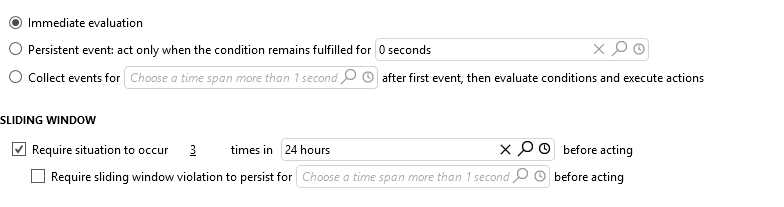
With a 24h window, up to 404 alarms can be included in the correlation.
Are there any risks, performance concerns, or correlation inaccuracies to consider when correlating against such a large number of alarms within a 24h window?


Hi. Thank to Jordy to have ask for me.
The correlation is not done for the moment. I think we will group alarms at least by element. These 404 alarms could be more than 10000 (start/stop) by day and by element in 24h.
I'm thinking about problems like large alarm trees.

Hi Jordy and Henri,
Two different things to separate here: what ends up in the correlated alarm, and what the rule does under high event volume.
The correlated alarm itself is less of a concern than you might expect. For a sliding window rule, the base alarms of the correlated alarm are taken per occurrence and per alarm tree, using the most recent event of each tree, not every individual matching alarm. So a 24h window does not mean hundreds of alarms get pulled into one correlated alarm.
The volume is the real concern. A correlation rule has a maximum number of active buckets (10.000 by default). When the option "Trigger on single events. Don't maintain active tree status" is enabled, each triggering event is handled in its own temporary bucket, which is cleaned up once its actions are completed and cleared. If actions stay open, these accumulate. Once the maximum is reached, a notice is generated and new alarms are no longer taken into account by that rule, which means you would silently miss events. With a volume in the range of 10.000 start/stop events per element per day, this is worth keeping in mind.
On accuracy, note that this option is also required for a sliding window rule to count correctly: only base alarms are counted, so without it, changes within the same alarm tree are not counted as separate events and the rule under-counts. But with it enabled and alarms flapping thousands of times per day, a "3 times in 24h" threshold will essentially always be met, so the rule stops being meaningful. It is worth checking whether the 3 occurrences threshold matches the real behavior of these alarms, or whether the flapping should be reduced first (hysteresis or an alarm template review).
Also check the clear mode. If the correlated alarm is configured to clear only after a first full timespan below the threshold, then with a 24h window and continuous events it will stay open for a very long time. Correlated alarms that remain open while ingesting many alarms are exactly what we recommend avoiding. Clearing as soon as possible, or periodically reviewing older correlated alarms, helps here.
Grouping per element is a good choice, as it keeps each correlated alarm scoped instead of collecting everything together.
Docs:
Adding rule conditions in correlation rules
Best practices for Correlation
Best practices for assigning alarm severity levels
Hi Jordy,
Can you elaborate a bit more about 'up to 404 alarms can be included in the correlation'? Based on the screenshot, they are not collected (the option 'Immediate evaluation' is selected). Are you grouping the alarms?