Skip to content
DataMiner Dojo

More results...

Generic selectors
Exact matches only
Search in title
Search in content
Post Type Selectors
Search in posts
Search in pages
Search in posts
Search in pages
Log in
Menu
  • Updates & Insights
  • Questions
  • Learning
    • E-learning Courses
    • Tutorials
    • Open Classroom Training
    • Certification
      • DataMiner Fundamentals
      • DataMiner Configurator
      • DataMiner Automation
      • Scripts & Connectors Developer: HTTP Basics
      • Scripts & Connectors Developer: SNMP Basics
      • Visual Overview – Level 1
      • Verify a certificate
    • YouTube Videos
    • Solutions & Use Cases
      • Solutions
      • Use Case Library
    • Agility
      • Learn more about Agile
        • Agile Webspace
        • Everything Agile
          • The Agile Manifesto
          • Best Practices
          • Retro Recipes
        • Methodologies
          • The Scrum Framework
          • Kanban
          • Extreme Programming
        • Roles
          • The Product Owner
          • The Agile Coach
          • The Quality & UX Coach (QX)
      • Book your Agile Fundamentals training
      • Book your Kanban workshop
    • >> Go to DataMiner Docs
  • DevOps
    • About the DevOps Program
    • Sign up for the DevOps Program
    • DataMiner DevOps Support
    • Feature Suggestions
  • Downloads
  • Swag Shop
  • PARTNERS
    • Business Partners
    • Technology Partners
  • Contact
    • Sales, Training & Certification
    • DataMiner Support
    • Global Feedback Survey
  • >> Go to dataminer.services

Alarm Type Properties Changed

125 views10 hours agoProperties Changed
1
Manuel Gallardo [DevOps Advocate]811 2 days ago 0 Comments

Hi Dojo,

We have an element generating numerous “Properties Changed” alarms, but apparently there are no properties actually being modified.

Is there any other source that could cause this type of alarm to appear?

Is there anywhere I can check which value triggered the change?

Thanks in advance!

Robin Devos [SLC] [DevOps Advocate] Answered question 10 hours ago

2 Answers

  • Active
  • Voted
  • Newest
  • Oldest
2
Robin Devos [SLC] [DevOps Advocate]2.95K Posted 10 hours ago 0 Comments

The below should be valid in general, which is why I'm still posting it, to help others. However in your case, something seems off, which is why a support ticket was opened to investigate.

A “Properties Changed” alarm event can be due to a change in alarm properties, but also element/service/view properties. To find which property got changed, you can check the Alarm Details (right pane “properties”) to figure out which property/properties got affected:
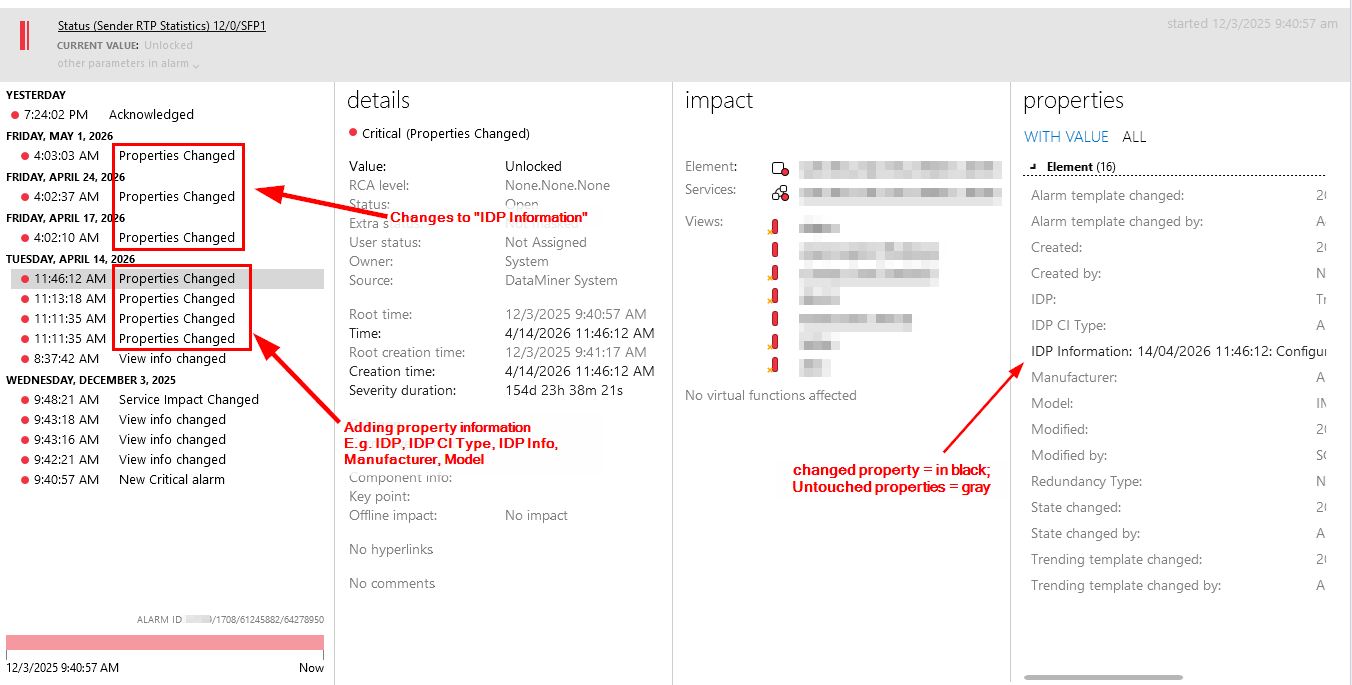
=> By checking the different alarms within the alarm tree, you should get an understanding what property changed and with which value.

Below, I’ll describe how to disable these alarm events, however a disclaimer:
There might be a reason these property changes trigger new alarm events, they might trigger a correlation rule for further actions, so please be aware of what you disable.

As mentioned there are different properties, each able to trigger such an alarm event. A quick summary how to check:

Alarm Properties

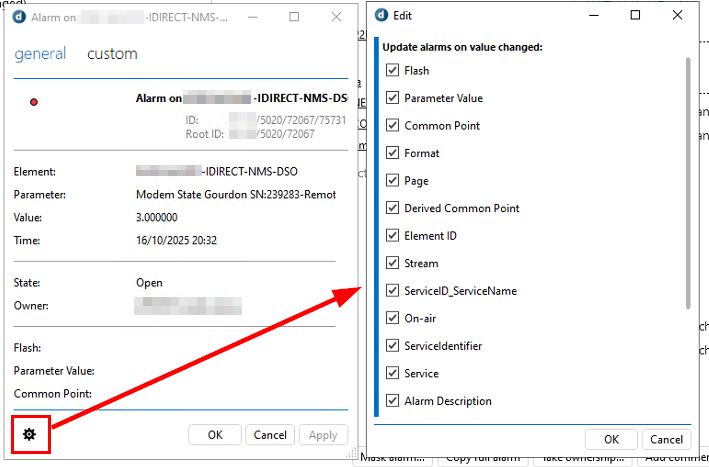
In the Alarm Console, right-click any alarm and go to properties:

  • General Alarm properties

    Disable the checkbox for any of the properties (right side) that shouldn’t generate an alarm update, when the property changes.
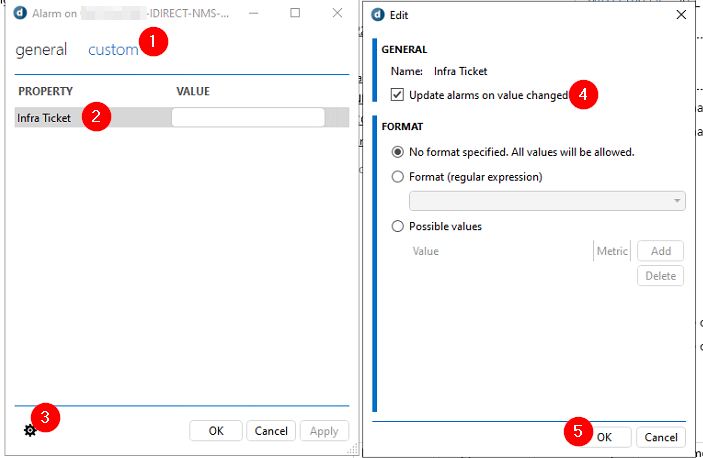
  • Custom alarm properties

    For every custom property (here only 1), you’ll want to edit the property (in step 3) and disable the checkbox in step 4.

Ref: Changing custom alarm properties | DataMiner Docs

Element/Service/View Properties

All other properties triggering such alarm events can be found via C:/Skyline Dataminer/propertyConfiguration.xml.
=> search for “doUpdateAlarmOnValueChange=”true””, via notepad++ is easiest, for example:

How to view these within Cube?
Right-click the element/service/view > Properties > Custom > select a property > Edit
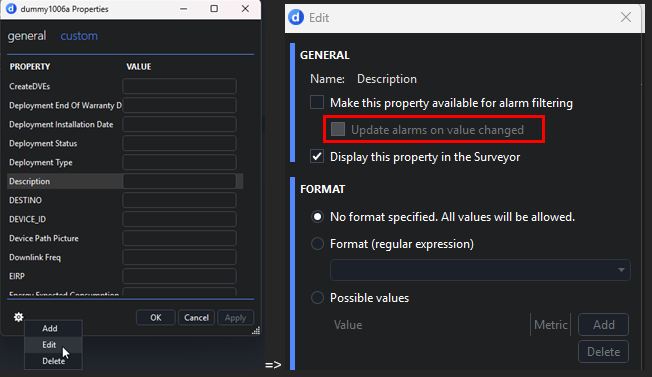
Ref: Managing custom properties | DataMiner Docs > Update alarms on value changed.

Robin Devos [SLC] [DevOps Advocate] Answered question 10 hours ago
You are viewing 1 out of 2 answers, click here to view all answers.
Please login to be able to comment or post an answer.

My DevOps rank

DevOps Members get more insights on their profile page.

My user earnings

0 Dojo credits

Spend your credits in our swag shop.

0 Reputation points

Boost your reputation, climb the leaderboard.

Promo banner DataMiner DevOps Professiona Program
DataMiner Integration Studio (DIS)
Empower Katas
Privacy Policy • Terms & Conditions • Contact

© 2026 Skyline Communications. All rights reserved.

DOJO Q&A widget

Can't find what you need?

? Explore the Q&A DataMiner Docs

[ Placeholder content for popup link ] WordPress Download Manager - Best Download Management Plugin