
Skip to content
DataMiner Dojo

More results...

Generic selectors
Exact matches only
Search in title
Search in content
Post Type Selectors
Search in posts
Search in pages
Search in posts
Search in pages
Log in
Menu
  • Updates & Insights
  • Questions
  • Learning
    • E-learning Courses
    • Tutorials
    • Open Classroom Training
    • Certification
      • DataMiner Fundamentals
      • DataMiner Configurator
      • DataMiner Automation
      • Scripts & Connectors Developer: HTTP Basics
      • Scripts & Connectors Developer: SNMP Basics
      • Visual Overview – Level 1
      • Verify a certificate
    • YouTube Videos
    • Solutions & Use Cases
      • Solutions
      • Use Case Library
    • Agility
      • Learn more about Agile
        • Agile Webspace
        • Everything Agile
          • The Agile Manifesto
          • Best Practices
          • Retro Recipes
        • Methodologies
          • The Scrum Framework
          • Kanban
          • Extreme Programming
        • Roles
          • The Product Owner
          • The Agile Coach
          • The Quality & UX Coach (QX)
      • Book your Agile Fundamentals training
      • Book you Kanban workshop
    • >> Go to DataMiner Docs
  • DevOps
    • About the DevOps Program
    • Sign up for the DevOps Program
    • DataMiner DevOps Support
    • Feature Suggestions
  • Downloads
  • Swag Shop
  • PARTNERS
    • Business Partners
    • Technology Partners
  • Contact
    • Sales, Training & Certification
    • DataMiner Support
    • Global Feedback Survey
  • >> Go to dataminer.services

Alarm conditioning on IRD Sync Status

63 views13 hours agoALARM CONDITIONS alarm template Alarm Template condition alarm templates IRD
0
Joao Candeias [SLC] [DevOps Member]131 1 day ago 0 Comments

Hi Dojo Community,

Our integration partner needs to set an alarm condition for a IRD receiver.

The IRD has 4 inputs if only one of the inputs is sync than we need to consider IRD is Ok/Good. If all 4 inputs are not sync than IRD is not working.

Moreover the expression example:

IF (COUNT([Row1, Row2, Row3, Row4] == "critical") == 4) THEN "Critical" ELSE "Normal"

Is it possible to deliver this using conditions on alarm template?
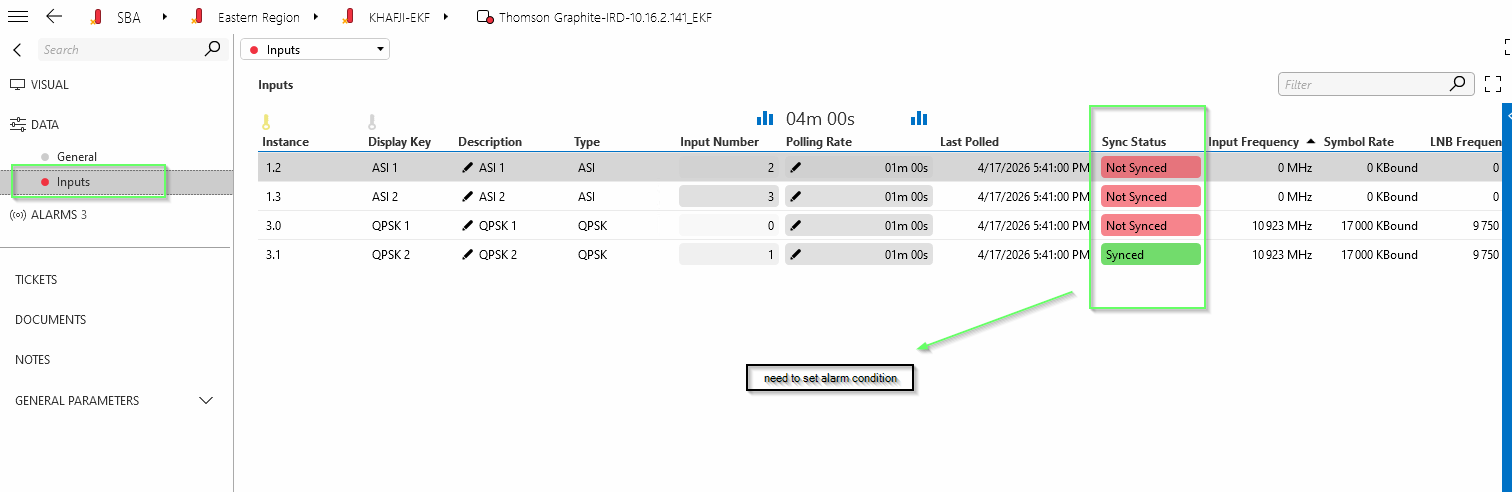
Correlation engine license is not available.

Thank you in advance.

Miguel Obregon [SLC] [DevOps Catalyst] Answered question 13 hours ago

2 Answers

  • Active
  • Voted
  • Newest
  • Oldest
0
Sam Stump [DevOps Advocate]880 Posted 17 hours ago 0 Comments

I think you will need a QACtion to count the number of "Synced" rows and set the value as a new standalone parameter.  Then you would be able to Alarm when this new parameter = 0, you have no Sync on any table row.   You could also add an exception to the Parameter Interprete tag show some meaningful text instead of the 0
https://docs.dataminer.services/develop/schemadoc/Protocol/Protocol.Params.Param.Interprete.Exceptions.Exception.html

c# by Claude AI, not validated, but gives you the idea, if Claude had the actual protocol it would do a much better job then the below.  Would need to trigger on whenever a cell in the Sync Status column changes.

using System;
using Skyline.DataMiner.Scripting;

public class QAction
{
public static void Run(SLProtocol protocol)
{
try
{
// Read the "Sync Status" column values
object[] syncStatusColumn = (object[])protocol.NotifyProtocol(321 /*NT_GET_TABLE_COLUMNS*/, tableId, new uint[] { syncStatusColumnIdx });

if (syncStatusColumn == null || syncStatusColumn.Length == 0)
{
protocol.SetParameter(syncStatusOkCountPid, 0);
return;
}

object[] values = (object[])syncStatusColumn[0];

int syncedCount = 0;

if (values != null)
{
foreach (object val in values)
{
if (Convert.ToString(val).Equals("Synced", StringComparison.OrdinalIgnoreCase))
{
syncedCount++;
}
}
}

// Set the summary parameter
protocol.SetParameter(syncStatusOkCountPid, syncedCount);
}
catch (Exception ex)
{
protocol.Log($"QA{protocol.QActionID}|Run|Error counting synced rows: {ex}", LogType.Error, LogLevel.NoLogging);
}
}

// ── Replace these with your actual parameter IDs ──

/// <summary>PID of the table.</summary>
private const int tableId = 1000;

/// <summary>0-based column index of the "Sync Status" column within the table.</summary>
private const uint syncStatusColumnIdx = 7;

/// <summary>PID of the standalone "Sync Status OK Count" parameter.</summary>
private const int syncStatusOkCountPid = 10;
}

Sam Stump [DevOps Advocate] Answered question 17 hours ago
You are viewing 1 out of 2 answers, click here to view all answers.
Please login to be able to comment or post an answer.

My DevOps rank

DevOps Members get more insights on their profile page.

My user earnings

0 Dojo credits

Spend your credits in our swag shop.

0 Reputation points

Boost your reputation, climb the leaderboard.

Promo banner DataMiner DevOps Professiona Program
DataMiner Integration Studio (DIS)
Empower Katas
Privacy Policy • Terms & Conditions • Contact

© 2026 Skyline Communications. All rights reserved.

DOJO Q&A widget

Can't find what you need?

? Explore the Q&A DataMiner Docs

[ Placeholder content for popup link ] WordPress Download Manager - Best Download Management Plugin