

Hi Dojo Community,
Our integration partner needs to set an alarm condition for a IRD receiver.
The IRD has 4 inputs if only one of the inputs is sync than we need to consider IRD is Ok/Good. If all 4 inputs are not sync than IRD is not working.
Moreover the expression example:
IF (COUNT([Row1, Row2, Row3, Row4] == “critical”) == 4) THEN “Critical” ELSE “Normal”
Is it possible to deliver this using conditions on alarm template?
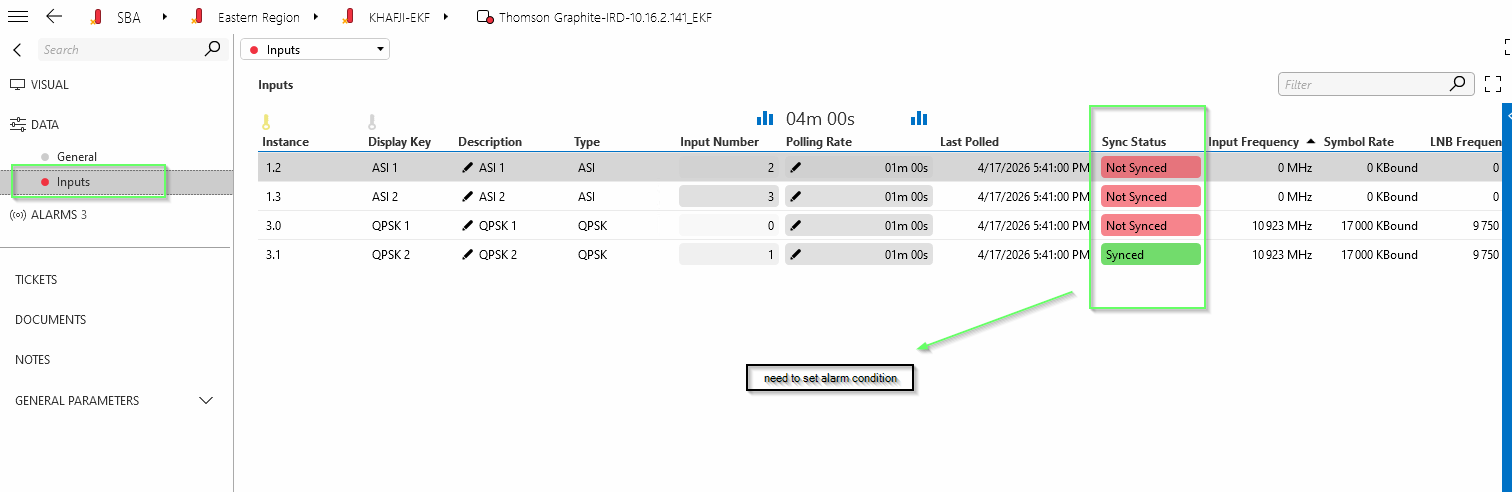 Correlation engine license is not available.
Thank you in advance.

Hi Joao,
Another option could be aggregation rules.
You could create an aggregation rule that will count the number for rows in a table based on a condition. The only drawback is that by default the aggregation rules will group by view (not by element). From here there are to possible alternatives:
- Place each element in a specific view.
- Group by element property. You could set an element property with the element name (recommended).
Hope it helps.

I think you will need a QACtion to count the number of “Synced” rows and set the value as a new standalone parameter. Then you would be able to Alarm when this new parameter = 0, you have no Sync on any table row. You could also add an exception to the Parameter Interprete tag show some meaningful text instead of the 0
https://docs.dataminer.services/develop/schemadoc/Protocol/Protocol.Params.Param.Interprete.Exceptions.Exception.html
c# by Claude AI, not validated, but gives you the idea, if Claude had the actual protocol it would do a much better job then the below. Would need to trigger on whenever a cell in the Sync Status column changes.
using System;
using Skyline.DataMiner.Scripting;public class QAction
{
public static void Run(SLProtocol protocol)
{
try
{
// Read the “Sync Status” column values
object[] syncStatusColumn = (object[])protocol.NotifyProtocol(321 /*NT_GET_TABLE_COLUMNS*/, tableId, new uint[] { syncStatusColumnIdx });if (syncStatusColumn == null || syncStatusColumn.Length == 0)
{
protocol.SetParameter(syncStatusOkCountPid, 0);
return;
}object[] values = (object[])syncStatusColumn[0];
int syncedCount = 0;
if (values != null)
{
foreach (object val in values)
{
if (Convert.ToString(val).Equals(“Synced”, StringComparison.OrdinalIgnoreCase))
{
syncedCount++;
}
}
}// Set the summary parameter
protocol.SetParameter(syncStatusOkCountPid, syncedCount);
}
catch (Exception ex)
{
protocol.Log($”QA{protocol.QActionID}|Run|Error counting synced rows: {ex}”, LogType.Error, LogLevel.NoLogging);
}
}// ── Replace these with your actual parameter IDs ──
/// <summary>PID of the table.</summary>
private const int tableId = 1000;/// <summary>0-based column index of the “Sync Status” column within the table.</summary>
private const uint syncStatusColumnIdx = 7;/// <summary>PID of the standalone “Sync Status OK Count” parameter.</summary>
private const int syncStatusOkCountPid = 10;
}