

Hi Team,
after having upgraded a single DMA to 10.6 (CU2), we cannot connect with a certain Cube client anymore (while other clients would still connect).
ConnectionSettings.txt entry "type" is set to "type=GRPCConnection", Cube logon option "Connection type" is set to "Auto".
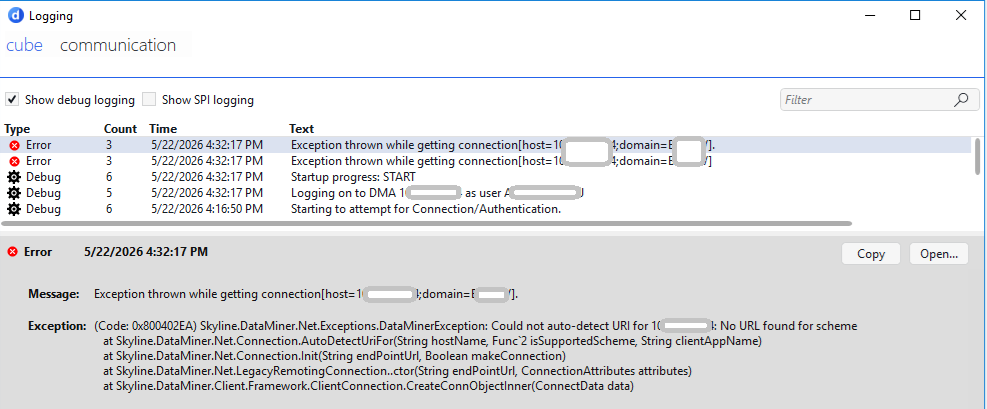
Exception messages as shown in the screenshot:
I have also played around with
- ConnectionSettings.txt entry "type" set to RemotingConnection
- together with <EnableDotNetRemoting>true</EnableDotNetRemoting> in MaintenanceSettings.xml and
- Cube logon option "Connection type" set accordingly to "Remoting"
but without any effect. Is it true that changing those settings (ConnectionsSettings.txt, MaintenanceSettings.xml) do not require a DMA restart?
The monitoring app under http://1.2.3.4/monitoring/ is shown up and working properly. And, by the way, an older Cube installation (based on 10.4) on the same client can also connect to its DMA.
Actually I assume some firewall/port issue for GRPC with this client, but I am wondering what hint I should give the IT team.
Can anyone give some advice?
Thanks and Regards
Jörg
Hi Jörg,
Regarding the bit about changing connectionsettings/maintenancesettings without a restart.
Connectionsettings can be changed without a DataMiner restart.
MaintenanceSettings, it depends on the setting. For the "EnableDotNetRemoting" a restart is needed. DataMiner only checks this during startup and configures the necessary endpoints based on this info. (Which may be part of the problem here).
That being said, the exception you are showing indicates that the connection does attempt to use the RemotingConnection, so it seems the cube settings and the connectionsettings are ok.
However "could not autodetect URI" indicates that the client fails to find the endpoint that is used for remoting. The autodetection tries to read this from http://<ip>/endpoints.txt (which is empty when DotNetRemoting is disabled). You can access this through a browser to see if it contains entries like http(s)://<ip>:8004/SLNetService.
If it is empty, it likely means there has been no restart since <EnableDotNetRemoting> was set to true, and this should be the first thing to try.
If this file contains entries like http(s)://<ip>:8004/SLNetService Then the DMA should be listening for RemotingConnections.
Things to check here:
- On the dma, run a "netstat -ano | findstr 8004" using an elevated command prompt: Check if there is anything listening on port 8004, and if it processID is the same as SLNet. If not, SLNet did not initialize the port correctly, which can be due to errors such as incorrect casing in the MaintenanceSettings, or check the /Logging/SLNet/StartupLog.txt for errors related to RemotingConnection.
- Open a powershell on the same host as the failing cube, and run "Test-NetConnection ip -port 8004" If the TCP test fails it likely means there is some firewall blocking the communication to port 8004.
- If both succeeds try opening a browser and surf to one of the endpoints mentioned in the endpoints.txt, the expected result is an exception stating "System.InvalidOperationException: Cannot accept GET requests.". If this is not the case, then again check the StartupLog for errors.
If all these succeed, then in theory RemotingConnection should work.
Hi Jörg,
The shortlist of what needs to be configured:
-DMA must be configured to use HTTPS
-Port 443 needs to be reachable for the clients
-Clients need to trust the HTTPS-certificate of the DMA
-MaintenanceSettings.xml needs to have EnableDotNetRemoting set to false
-ConnectionSettings.txt needs replace the "type=RemotingConnection;…" line with type=GRPCConnection
-Cube needs to use "Auto" or "gRPC" as Connection Type (small caveat here, this setting is not per-connection, but will be applied for all future connections even to other dmas, best to keep it on Auto)
Common issues causing some clients to not after grpc are:
-The client cannot reach port 443 on the DMA-server (you can use the Test-NetConnection <DMAip> -port 443 to check if there is a connection issue)
-The client-pc does not accept/trust the HTTPS-certificate of the dma-server.
-The cube is not configured to connect through GRPConnection, (be aware that the connectionSetting in cube is not per connection, but for all connections, even to a different DMA), best is to keep this on Auto.
Sources:
https://docs.dataminer.services/dataminer/Administrator_guide/DataMiner_Agents/Configuring_a_DMA/Configuring_the_IP_network_ports.html
https://docs.dataminer.services/dataminer/Administrator_guide/Security/DataMiner_hardening_guide.html?tabs=tabid-1#secure-cube-server-communication
https://docs.dataminer.services/dataminer/Administrator_guide/DataMiner_Agents/Configuring_a_DMA/Setting_up_HTTPS_on_a_DMA.html#common-issues-after-configuring-https
https://docs.dataminer.services/dataminer/Getting_started/The_DataMiner_User_Interface/DataMiner_Cube/Opening_DataMiner_Cube/Overriding_Cube_connection_type.html
If you could share an exception one of the Cubes throw when trying to connect using gRPC we may be able to point into the right direction
Hi Brent,
Thanks for elaborating this. A quick check showed, that some of the checkpoints are obviously not fulfilled by our DMA. So we'll work on configuring DMA and environment for gRPC. In the meantime, we'll live with the DotNetRemoting option. So I'll mark your answer as best in order to close this question.
Thanks again
Jörg
Hi Brent,
Thank you very much for your quick response.
The information that DataMiner requires a restart when changing "EnableDotNetRemoting" in MaintenanceSettings.xml was crucial.
Restart solved the situation and we are getting client connection (with "type=RemotingConnection;polling=500;zip=true" in ConnectionSettings.txt).
Now there is one question left: Initially we were trying to connect with gRPC "type=gRPCConnection" in ConnectionSettings.txt, and that didn't work on some clients. So we were wondering what could have caused this problem, and if there is anything we should tell the IT department on customer side in order to open port or enable somthing for gRPC. Asking this because Skyline recommends gRPC as the method of choice for now and the future and we would like to use it for all clients.
Could you or anyone also bring some more light into this? In the docs we found something, but not so specific.
Thanks!
Jörg