Skip to content
DataMiner Dojo

More results...

Generic selectors
Exact matches only
Search in title
Search in content
Post Type Selectors
Search in posts
Search in pages
Search in posts
Search in pages
Log in
Menu
  • Updates & Insights
  • Questions
  • Learning
    • E-learning Courses
    • Tutorials
    • Open Classroom Training
    • Certification
      • DataMiner Fundamentals
      • DataMiner Configurator
      • DataMiner Automation
      • Scripts & Connectors Developer: HTTP Basics
      • Scripts & Connectors Developer: SNMP Basics
      • Visual Overview – Level 1
      • Verify a certificate
    • YouTube Videos
    • Solutions & Use Cases
      • Solutions
      • Use Case Library
    • Agility
      • Learn more about Agile
        • Agile Webspace
        • Everything Agile
          • The Agile Manifesto
          • Best Practices
          • Retro Recipes
        • Methodologies
          • The Scrum Framework
          • Kanban
          • Extreme Programming
        • Roles
          • The Product Owner
          • The Agile Coach
          • The Quality & UX Coach (QX)
      • Book your Agile Fundamentals training
      • Book your Kanban workshop
    • >> Go to DataMiner Docs
  • DevOps
    • About the DevOps Program
    • Sign up for the DevOps Program
    • DataMiner DevOps Support
    • Feature Suggestions
  • Downloads
  • Swag Shop
  • PARTNERS
    • Business Partners
    • Technology Partners
  • Contact
    • Sales, Training & Certification
    • DataMiner Support
    • Global Feedback Survey
  • >> Go to dataminer.services

Visual Overview – Page navigation not working for data pages containing “/” in their names

28 views5 hours ago#MSVisio @Visual Overview element view Visio Buttons
0
Daniel Silva [DevOps Member]392 8 hours ago 0 Comments

Hi everyone,

I'm experiencing an issue with page navigation in DataMiner Cube using the Page shape data field in Visual Overview.

I've created several clickable shapes in Microsoft Visio to navigate directly to specific data pages of an element. Most of them work correctly, but navigation fails for pages containing a forward slash (/) in their names, such as ASI I/O and SDI I/O.

For example, the following Shape Data configuration works correctly, navigating to the "Decoder Services - Overview" page:

Working configuration:
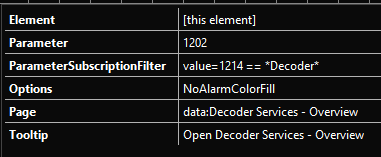
The shape is recognized as clickable, but nothing happens when I click it. The target page exists and can be accessed normally through the element's DATA menu.

Environment:

  • DataMiner Server 10.6.11
  • DataMiner Cube Client 10.6.x

My questions are:

  1. Is there a known limitation or issue with the Page shape data field when the target data page name contains a forward slash (/)?
  2. Is there a supported way to escape special characters or reference the target data page differently, without modifying the connector?

Any guidance would be appreciated.

Thanks in advance!

Thijs Vanovenacker [SLC] [DevOps Advocate] Answered question 5 hours ago

2 Answers

  • Active
  • Voted
  • Newest
  • Oldest
1
Thijs Vanovenacker [SLC] [DevOps Advocate]2.73K Posted 5 hours ago 0 Comments

Hi Daniel,

I've done a quick test on my side and can confirm the behavior you're seeing.

Based on the documented navigation logic, a forward slash is used to reference sub-pages. Since your regular page name already contains a forward slash, this creates an ambiguous navigation path.

I reproduced the problem here, with some additional context:

  • Navigation to my page “SDI (In/Out)” shows the same behavior you described.
  • Navigation to a regular page works as expected. Navigating to a sub-page also works when using “/” between the main page and sub-page names.
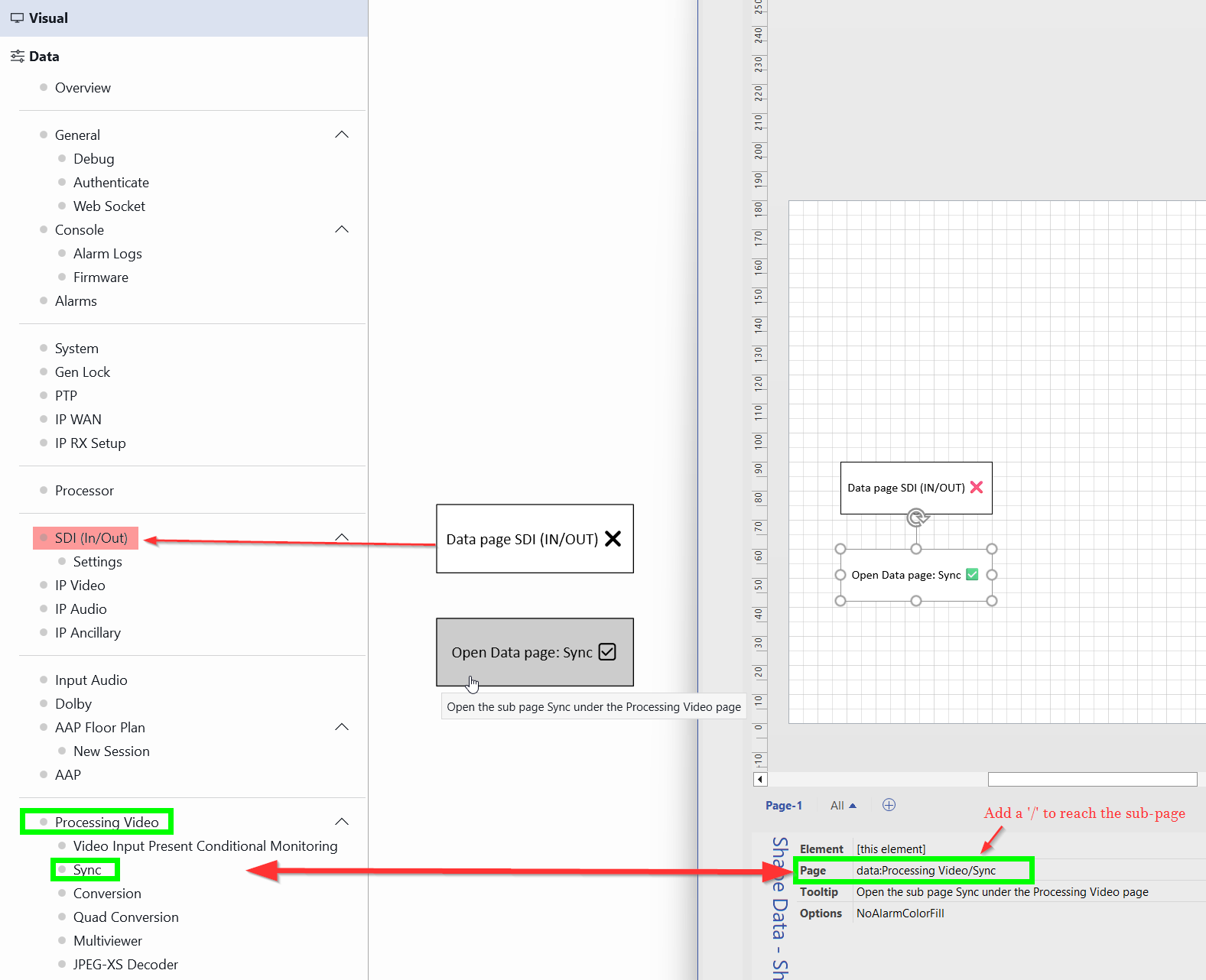
Unfortunately, this edge case isn't supported today, so navigation won't work in this scenario.
(My assumption is that the UI interprets the “/” in “SDI (In/Out)” as a separator, and therefore looks for a sub-page named “Out)” under a main page named “SDI (In”. Neither of those pages exists.)

I'd suggest reaching out to your account manager to report the issue and explore whether renaming the page could be an option. Alternatively, you could consider exposing the most important KPIs or configuration options directly in the visual, potentially removing the need for page navigation altogether.

I realize neither option is an immediate fix, but hopefully this gives you some additional context and practical ways forward.

Kind regards,

Thijs Vanovenacker [SLC] [DevOps Advocate] Edited answer 5 hours ago
You are viewing 1 out of 2 answers, click here to view all answers.
Please login to be able to comment or post an answer.

My DevOps rank

DevOps Members get more insights on their profile page.

My user earnings

0 Dojo credits

Spend your credits in our swag shop.

0 Reputation points

Boost your reputation, climb the leaderboard.

Promo banner DataMiner DevOps Professiona Program
DataMiner Integration Studio (DIS)
Privacy Policy • Terms & Conditions • Contact

© 2026 Skyline Communications. All rights reserved.

DOJO Q&A widget

Can't find what you need?

? Explore the Q&A DataMiner Docs

[ Placeholder content for popup link ] WordPress Download Manager - Best Download Management Plugin