

Hi Community,
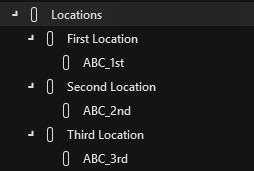
given is the following view structure as an example:
>Locations
>>First Location
>>>ABC_1st
>>Second Location
>>>ABC_2nd
>>Third Location
>>>ABC_3rd
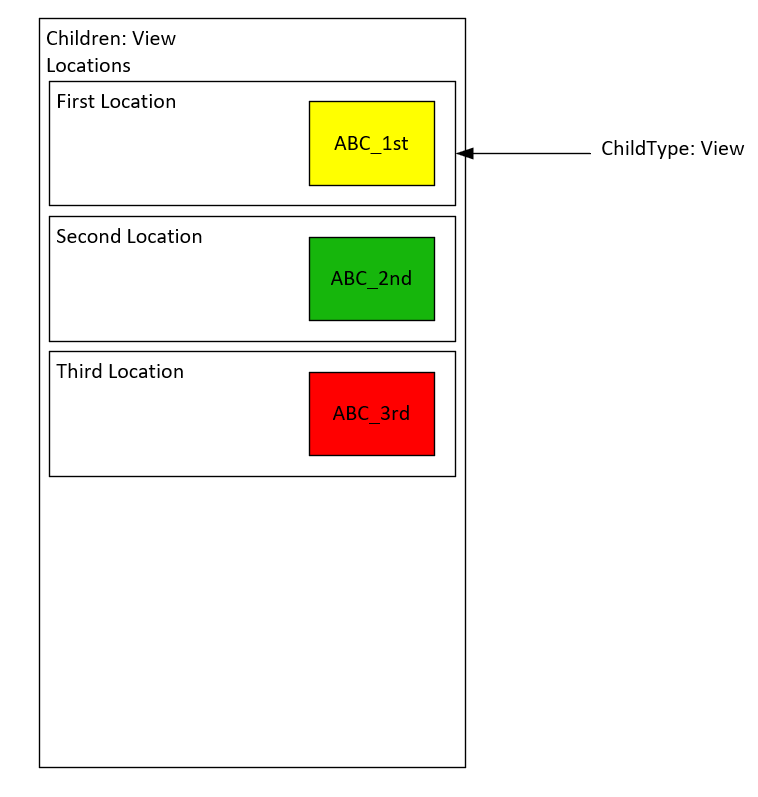
I have already have a children container successfully displaying 3 shapes dynamically for the 3 Locations of the example.
The subview values e.g. "1st" are part of a property of the Location View (e.g. "First Location" has the property "Short Name" with value "1st").
Now I would like to place another shape inside the child shape, referring to the "ABC_" subview.
How can I do this?
I already tried e.g. "View" with value "ABC_[property:Short Name]" but it doesn't work.

Hi Felix,
You’re definitely on the right track. The behavior you’re seeing comes down to how context is handled in Visio shapes versus property placeholders.
When you use things like Shape Data linked to Objects (e.g. View, Element, etc.), you are effectively changing the context of that shape and all underlying subshapes.
However, property placeholders behave a bit differently:
- By default,
[property:...]resolves against the object the Visio (or subview) is linked to (ref docs: [property:PropertyName]) - This is independent from the shape context you may have overridden with Shape Data
- You can explicitly override this behavior for property placeholders only
In your case, you want the property (Short Name) from the parent Location view, not from the current (child) context.
To achieve that, add this Shape Data field on the inner shape:
- Name:
Options - Value:
forcePropertyFromParent
This ensures that your placeholder:
ABC_[property:Short Name]
is resolved using the parent context, which is exactly what you need for your nested subview setup.
For completeness, there are a couple of related options:
- ForcePropertyFromParent → use parent context
forcePropertyFromShape→ use the shape’s own context
So the key takeaway:
- Shape Data changes the shape context
- Property placeholders have their own context logic, which you can override when needed
That distinction is what makes this scenario work.
Hope this helps!
Jarno
You probably need to 'clear' first the inheritance it gets from the parent shape. On the sub shape, can you try to add another Options shape data with 'AllowInheritance=False'
Indeed, that did the trick:
Options: ForcePropertyFromParent|AllowInheritance=False
Thank you very much Jarno!
Hi Jarno,
I think this is what I already did.
Maybe something else is wrong:
>Childen-Container Group:
>View: Locations
>Children: View
>ChildrenPanel: …
>ChildrenSort: …
>>Child-Shape Group:
>>ChildType: View
>>Property: Short Name (to display the short name instead of the views name)
>>>Subshape for ABC_ View
>>>View: ABC_[property:Short Name]
>>>Options: ForcePropertyFromParent
>>>Info: View Name
For me this results in displaying and linking the subshape to the view of the parent (First Location) instead to the subview (ABC_1st).
Any idea what I did wrong?