

Hello Experts,
I would really appreciate your guidance on how to update an element’s colour based on alarm severity.
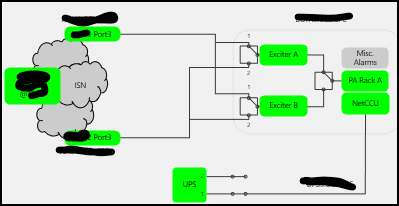
For example, Critical alarm is triggered for Exciter A and i would expect the corresponding box to change to red. but in my current setup, the box remains unchanged even though I can see the active alarm in the Alarm Console.
We have a parent view where the overall site correctly appears in red. When I click the site box, it opens the detailed visual. However, in the detailed visual the affected element does not change colour, so it is difficult to identify which element has the problem.
Could you please advise what configuration or settings I need to check to make the element colour update automatically based on the active alarm severity?
Please note that I am coming from experience with other monitoring tools, so some of my terminology may be different. Thank you for your patience.

Hi Gourav,
Without looking in more detail at the Visio drawing and the shape data, it is difficult to determine why the color of the "Exciter A" shape is not following its alarm state as expected.
I recommend reviewing the following section of our documentation, which provides an overview of Visio drawings and the different options available:
Visio drawings | DataMiner Docs
More specifically, please have a look at:
Linking a shape to an element, a service or a redundancy group | DataMiner Docs
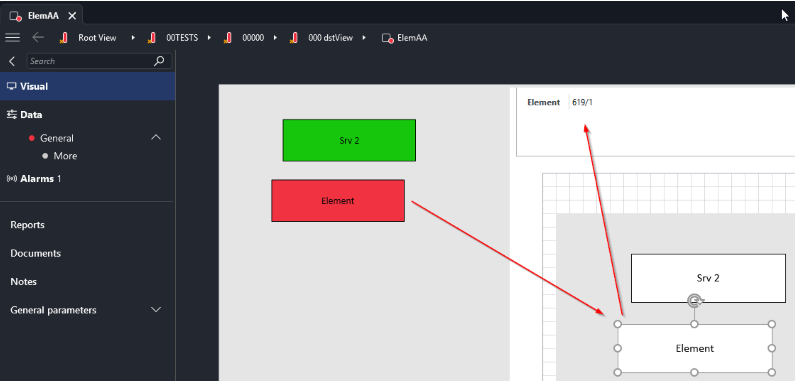
In the example below, the "Element" shape (highlighted in red) reflects a critical alarm currently open on the linked element. You can also see how the shape data is configured in this case:
I hope this helps you move forward.
Regards,
Paulo
Thank you, Paulo. The links you shared helped me understand the correct way to handle the conditions.
I will do some testing and come back to you if I need any further help.
Thanks again.