
Skip to content
DataMiner Dojo

More results...

Generic selectors
Exact matches only
Search in title
Search in content
Post Type Selectors
Search in posts
Search in pages
Search in posts
Search in pages
Log in
Menu
  • Updates & Insights
  • Questions
  • Learning
    • E-learning Courses
    • Tutorials
    • Open Classroom Training
    • Certification
      • DataMiner Fundamentals
      • DataMiner Configurator
      • DataMiner Automation
      • Scripts & Connectors Developer: HTTP Basics
      • Scripts & Connectors Developer: SNMP Basics
      • Visual Overview – Level 1
      • Verify a certificate
    • YouTube Videos
    • Solutions & Use Cases
      • Solutions
      • Use Case Library
    • Agility
      • Learn more about Agile
        • Agile Webspace
        • Everything Agile
          • The Agile Manifesto
          • Best Practices
          • Retro Recipes
        • Methodologies
          • The Scrum Framework
          • Kanban
          • Extreme Programming
        • Roles
          • The Product Owner
          • The Agile Coach
          • The Quality & UX Coach (QX)
      • Book your Agile Fundamentals training
      • Book your Kanban workshop
    • >> Go to DataMiner Docs
  • DevOps
    • About the DevOps Program
    • Sign up for the DevOps Program
    • DataMiner DevOps Support
    • Feature Suggestions
  • Downloads
  • Swag Shop
  • PARTNERS
    • Business Partners
    • Technology Partners
  • Contact
    • Sales, Training & Certification
    • DataMiner Support
    • Global Feedback Survey
  • >> Go to dataminer.services

Update Service View generated with service template

56 views5 hours agoservice template
1
Daniel Mainha [DevOps Member]404 2 days ago 0 Comments

Is there a way of via a script re-apply settings to a service generated by a service template.

My service template doesn't have a defined view. That is set as an input parameter when loading the csv to create in bulk.

I have several services created on a view but now I want to move to another view. I can do it by following these steps to re-apply the service template and modify the settings: Managing service templates | DataMiner Docs.

It's easy for 5 or 10 but when they are much more would be nice to do it via a script. Is there a method to do it? I can create them with a csv but not modify them the same way.

thanks

Wouter Demuynck [SLC] [DevOps Advocate] Answered question 5 hours ago

1 Answer

  • Active
  • Voted
  • Newest
  • Oldest
0
Wouter Demuynck [SLC] [DevOps Advocate]7.09K Posted 5 hours ago 0 Comments

Hi Daniel,

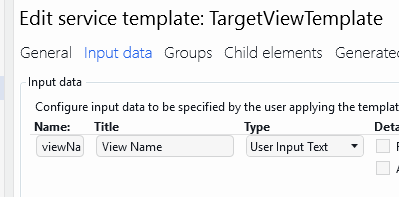
I'm guessing your setup looks a bit like this:

Input data configured to enter the view name
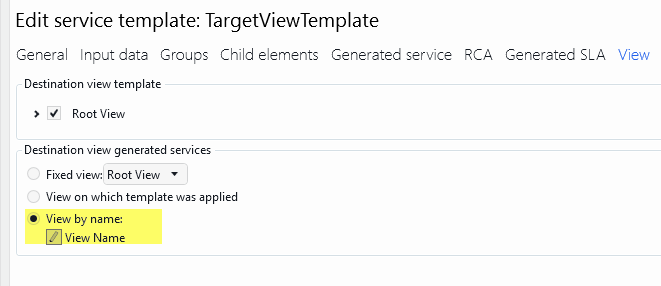
Generated services ending up in the view specified by this input data
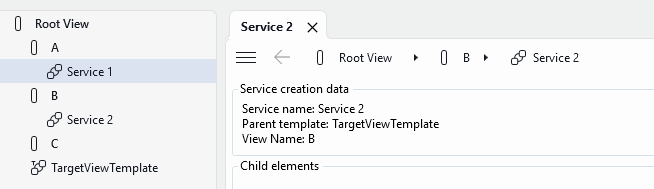
Then if you have services generated in some views
You can then right-click the service template and use "export configuration..." to create a CSV file with all generated services and their configuration.

There's a column "data:viewName" in there with the configured view name.
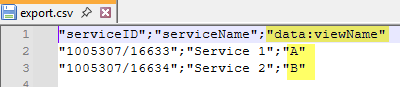
If you update the values in these columns (e.g. all to "C") and then right-click service template -> apply -> import from CSV. This should re-apply the service template for all services in the CSV file, moving them to the new view

Hope this helps

Wouter Demuynck [SLC] [DevOps Advocate] Answered question 5 hours ago
Please login to be able to comment or post an answer.

My DevOps rank

DevOps Members get more insights on their profile page.

My user earnings

0 Dojo credits

Spend your credits in our swag shop.

0 Reputation points

Boost your reputation, climb the leaderboard.

Promo banner DataMiner DevOps Professiona Program
DataMiner Integration Studio (DIS)
Privacy Policy • Terms & Conditions • Contact

© 2026 Skyline Communications. All rights reserved.

DOJO Q&A widget

Can't find what you need?

? Explore the Q&A DataMiner Docs

[ Placeholder content for popup link ] WordPress Download Manager - Best Download Management Plugin