Skip to content
DataMiner Dojo

More results...

Generic selectors
Exact matches only
Search in title
Search in content
Post Type Selectors
Search in posts
Search in pages
Search in posts
Search in pages
Log in
Menu
  • Updates & Insights
  • Questions
  • Learning
    • E-learning Courses
    • Tutorials
    • Open Classroom Training
    • Certification
      • DataMiner Fundamentals
      • DataMiner Configurator
      • DataMiner Automation
      • Scripts & Connectors Developer: HTTP Basics
      • Scripts & Connectors Developer: SNMP Basics
      • Visual Overview – Level 1
      • Verify a certificate
    • YouTube Videos
    • Solutions & Use Cases
      • Solutions
      • Use Case Library
    • Agility
      • Learn more about Agile
        • Agile Webspace
        • Everything Agile
          • The Agile Manifesto
          • Best Practices
          • Retro Recipes
        • Methodologies
          • The Scrum Framework
          • Kanban
          • Extreme Programming
        • Roles
          • The Product Owner
          • The Agile Coach
          • The Quality & UX Coach (QX)
      • Book your Agile Fundamentals training
      • Book your Kanban workshop
    • >> Go to DataMiner Docs
  • DevOps
    • About the DevOps Program
    • Sign up for the DevOps Program
    • DataMiner DevOps Support
    • Feature Suggestions
  • Downloads
  • Swag Shop
  • PARTNERS
    • Business Partners
    • Technology Partners
  • Contact
    • Sales, Training & Certification
    • DataMiner Support
    • Global Feedback Survey
  • >> Go to dataminer.services

Slack Alerts, correlation rule Not Retrieving IP for All Faults

Solved112 views14 hours ago#correlationrule Slack
2
Juan Chavez514 4 days ago 2 Comments

Hello everyone,

Has anyone encountered an issue with Slack notifications where a correlation rule successfully retrieves the device IP address for one fault parameter, but fails to retrieve it for another fault on the same element?

In our Slack integration run script, we have a field reserved for Extended Info. We use the following syntax to retrieve the device IP address:

*TEXT-Bold "IP":*[parameter(field(dmaid),field(eid),2003,field(idx))]</span>

This pulls the IP address from the Element, device IDX table using Parameter ID 2003.

What I’m seeing is intermittent behavior where testing a fault on one parameter correctly displays the IP address in the Slack alert, but testing a fault on a different parameter does not display the IP at all.

Has anyone seen similar behavior related to correlation rules, IDX context, or parameter scope differences between alarms?

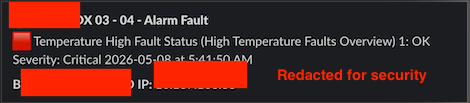
Please see the below examples
Juan Chavez Selected answer as best 14 hours ago
Dino Landucci IV commented 3 days ago

Hey Juan! I believe the issue is the 2003 parameter is not using the same index as the alarm that is not showing the IP.

The syntax of [parameter(field(dmaid),field(eid),2003,field(idx))] means show the value of the 2003 parameter, using the DMA ID, Element ID, and IDX of the intital alarm.

In the case of the Temperature Fault, the IDX is "1", which I believe matches up with the IDX of the table you're grabbing the IP from (2000). In contrast, the Input Video Source fault appears to be using "Proc #2" as the IDX which in this case does not match the IDX of the 2000 table.

If the IP you're wanting to display is always going to use the IDX of "1" I suggest hardcoding the IDX into the syntax, making it appear as follows:

[parameter(field(dmaid),field(eid),2003,1)]

Juan Chavez commented 3 days ago

Thank you @dino that solved the issue and I can now confirm IP address displays in the slack notification for every fault condition.

1 Answer

  • Active
  • Voted
  • Newest
  • Oldest
0
Marieke Goethals [SLC] [DevOps Catalyst]7.35K Posted 20 hours ago 1 Comment

I get the impression that this question has already been answered in the comments. If this is indeed the case, could you select this answer to indicate that the question can be closed and no further follow-up is needed?

Juan Chavez Selected answer as best 14 hours ago
Juan Chavez commented 15 hours ago

Yes, this question has been resolved.

TY

You are viewing 1 out of 1 answers, click here to view all answers.
Please login to be able to comment or post an answer.

My DevOps rank

DevOps Members get more insights on their profile page.

My user earnings

0 Dojo credits

Spend your credits in our swag shop.

0 Reputation points

Boost your reputation, climb the leaderboard.

Promo banner DataMiner DevOps Professiona Program
DataMiner Integration Studio (DIS)
Empower Katas
Privacy Policy • Terms & Conditions • Contact

© 2026 Skyline Communications. All rights reserved.

DOJO Q&A widget

Can't find what you need?

? Explore the Q&A DataMiner Docs

[ Placeholder content for popup link ] WordPress Download Manager - Best Download Management Plugin