

I am encountering and issue when using an Automation script to copy elements from an existing view into a new view.
The basic code I am using in the script, where the source and new views are selected from drop down lists of the views on the system is:
// Get source and new views
var dms = engine.GetDms();
IDmsView sourceView = dms.GetView(dialog.SourceViewDropDown.Selected);
IDmsView newView = dms.GetView(dialog.newViewDropDown.Selected);
// Copy elements to new view
var elements = sourceView.Elements;
foreach (var element in elements)
{
ISet<IDmsView> views = element.Views;
if (!views.Contains(newView))
{
views.Add(newView);
element.Update();
}
}
Now the script works in that the element end up in both the source and new views.
However the problem is that if the element is using an entry from the credentials library for say the SNMP community strings rather than having them specified directly, then once the element has been updated, the credentials selection is unticked.
Before running the script the element settings look as follows:
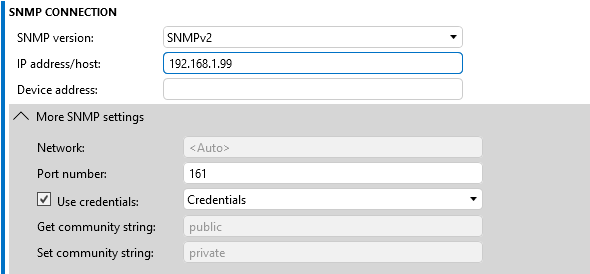
But after the script completes, the element settings look as follows:
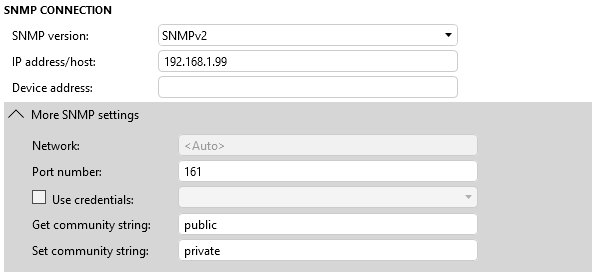
As a result the element then goes into timeout and I have to manually use Cube to reselect the credentials and apply it, which rather defeats the purpose of writing a script to copy elements into a view.
Is there something I am missing or is this indeed a bug?
(The issue is present on both a system running 10.3.0.0-15940-CU22 as well as on running 10.5.12.0-16623-CU1)

Hi Paul,
I’m executing exactly the code you shared above, but on my DMA (currently running version 10.6.6) I don’t encounter any issues. The SNMPv3 elements using the credentials library retain all their properties.
I also did a quick check of the release notes to see if there might have been a related bug fix, but I didn’t find anything relevant.
Is this happening consistently for every element?
What happens if you manually edit the element properties and add the destination view to the list? Does it work in that case?

Hi Paul,
While testing earlier, I mistakenly mixed up SNMPv2 and SNMPv3 and ended up testing with SNMPv3, which worked as expected, my apologies for the confusion.
After retesting with SNMPv2 elements, I’m now seeing the exact same behavior you described. I agree this appears to be a bug that we’ll need to address.
Could you please open a new ticket with us at support@dataminer.services and report this issue? You can copy your original message and include a link to this post.
Thanks!
Hi Paulo, I have raised ticket #15536
Hi Paulo, thanks for checking.
This is happening consistently for elements with credentials for SNMPv2. I will have to test for SNMPv3.
If I manually edit the element using Cube, then I can add the additional view to the element, without an issue.
I can also use drap and drop in the surveyor to copy an element to another view, but both options are a lot more labour intensive to have to edit or drag every element individually.
Hence why I wrote a simple automation script to allow me to select the source and destination views and copy all all elements from one to the other.
The copy works, but if it is using credentials for SNMPv2 then they are cleared after the copy.