

Skip to content
DataMiner Dojo

More results...

Generic selectors
Exact matches only
Search in title
Search in content
Post Type Selectors
Search in posts
Search in pages
Search in posts
Search in pages
Log in
Menu
  • Updates & Insights
  • Questions
  • Learning
    • E-learning Courses
    • Tutorials
    • Open Classroom Training
    • Certification
      • DataMiner Fundamentals
      • DataMiner Configurator
      • DataMiner Automation
      • Scripts & Connectors Developer: HTTP Basics
      • Scripts & Connectors Developer: SNMP Basics
      • Visual Overview – Level 1
      • Verify a certificate
    • YouTube Videos
    • Solutions & Use Cases
      • Solutions
      • Use Case Library
    • Agility
      • Learn more about Agile
        • Agile Webspace
        • Everything Agile
          • The Agile Manifesto
          • Best Practices
          • Retro Recipes
        • Methodologies
          • The Scrum Framework
          • Kanban
          • Extreme Programming
        • Roles
          • The Product Owner
          • The Agile Coach
          • The Quality & UX Coach (QX)
      • Book your Agile Fundamentals training
      • Book your Kanban workshop
    • >> Go to DataMiner Docs
  • DevOps
    • About the DevOps Program
    • Sign up for the DevOps Program
    • DataMiner DevOps Support
    • Feature Suggestions
  • Downloads
  • Swag Shop
  • PARTNERS
    • Business Partners
    • Technology Partners
  • Contact
    • Sales, Training & Certification
    • DataMiner Support
    • Global Feedback Survey
  • >> Go to dataminer.services

LCA – Dynamic Notes Panel Based on Table Row Selection

Solved211 views26th May 2026iDirect iDirect Platform LCA
2
Alexandre Picquenet [DevOps Advocate]355 21st May 2026 0 Comments

Hello everyone,

I am currently developing an LCA application for an iDirect project.

So far, I have created GQIs to filter my results dynamically.

This part is fully functional.
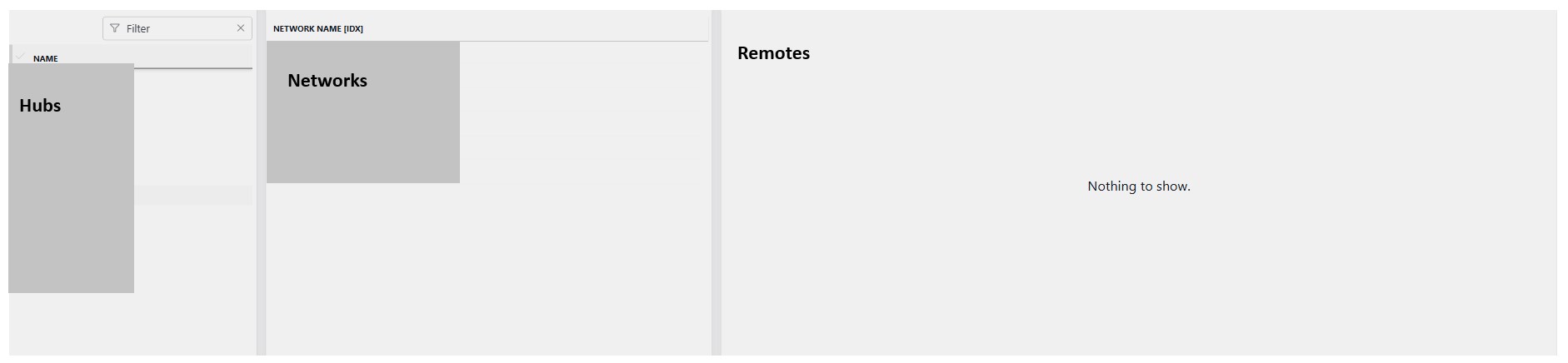
Initially, this displays all the hubs on the left side, then the networks associated with each hub in the middle, and finally, when I select a network, it displays the remote terminals on that network in the right side.

All the information comes from the same element.

Now, I have a question, as I would like to display a box that allows me to enter notes on the remote constantly.

I’m thinking of a box that appears only when I click on a remote, for example.

And the content of this box is filtered by the index of the table where the remotes are located, for example (the table index).

Is there a way to meet my requirement?

Thanks in advance !

Alexandre Picquenet [DevOps Advocate] Selected answer as best 26th May 2026

1 Answer

  • Active
  • Voted
  • Newest
  • Oldest
1
Robin Debel [SLC] [DevOps Enabler]2.36K Posted 22nd May 2026 1 Comment

Hi Alexandre,

Yes, this should be possible by stringing a few features together.

One possible approach could be:

  1. Add a notes column to your data source (for example via an ad hoc datasource if needed (using a join based on ID, the notes can then be saved however you prefer).
  2. When a user clicks a remote, open a panel showing a text input or rich text editor (available in 10.6.6) and on that panel use a Set Value action linked to the component row data to populate the input with the notes value from the clicked row
  3. You can then edit the note by typing anything in the text box.
  4. On save with a button or close of the panel, execute an Automation script that updates the note for that specific remote.
  5. Refresh or reload the remote datasource so the updated value is reflected in the Ui when opening the notes again.

So the flow would be:

Click row → Open panel & Set value → Edit → Save via script → Reload data

Kind regards
Robin

Alexandre Picquenet [DevOps Advocate] Selected answer as best 26th May 2026
Alexandre Picquenet [DevOps Advocate] commented 26th May 2026

Hello Robin,
Right, thanks for the suggestion; I’ll look into that.
Have a nice day!

You are viewing 1 out of 1 answers, click here to view all answers.
Please login to be able to comment or post an answer.

My DevOps rank

DevOps Members get more insights on their profile page.

My user earnings

0 Dojo credits

Spend your credits in our swag shop.

0 Reputation points

Boost your reputation, climb the leaderboard.

Promo banner DataMiner DevOps Professiona Program
DataMiner Integration Studio (DIS)
Empower Katas
Privacy Policy • Terms & Conditions • Contact

© 2026 Skyline Communications. All rights reserved.

DOJO Q&A widget

Can't find what you need?

? Explore the Q&A DataMiner Docs

[ Placeholder content for popup link ] WordPress Download Manager - Best Download Management Plugin