

Hi Dojo,
In a GQI ad hoc data source, I iterate over AlarmEventMessage.Properties to extract the value of a custom property named "PS ID".
This property is defined at both the service level and the element level. Both entries appear in the Properties array with the exact same Name ("PS ID") — there is no visible way to tell which entry comes from which source.
The only difference is in the value format:
- Service-level: single CFS or comma-separated (e.g. CFSXXXXXX,CFSXXXXXX)
- Element-level: slash-separated, listing all services of the element (e.g. CFSXXXXXX/CFSXXXXXX/CFSXXXXXX)
I currently work around this by skipping any property value that contains a "/" character, assuming it's the element-level entry. This works in practice but it relies on a format convention that isn't documented and could break silently.
I know that AlarmFilterField.PropertyValue uses typed prefixes ("service.PS ID", "element.PS ID") to distinguish sources when filtering alarms. But this only controls which alarms are returned — it doesn't help identify the source of each entry when iterating AlarmEventMessage.Properties.
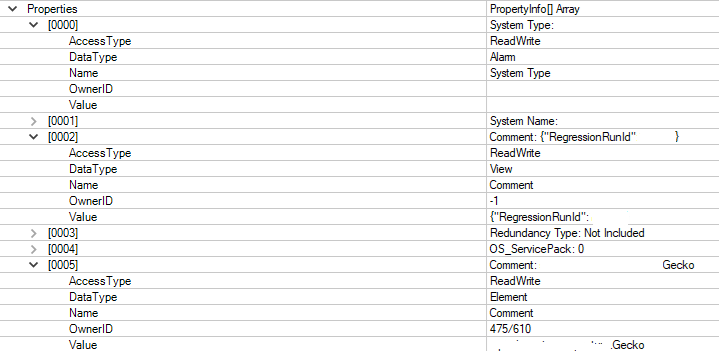
My question: Is there a field on the individual property entries in AlarmEventMessage.Properties (e.g. Type, Source, or similar) that indicates whether the property comes from the service, element, view, or alarm level? Or is there an alternative message/API that returns properties with their source type clearly identified?
Thanks!

Hi Alexandre,
You can use the DataType to make the distinction between the different property types.
Please let us know if this approach works for you.
Regards,

Hi Klaas,
That's exactly what I needed, thank you!
Really appreciate the quick and clear answer!
Best regards,
Alexandre