

I’m trying to automatically mask only one specific table row alarm during a fixed time window and would appreciate guidance on the correct implementation.
Scenario:
- I have an element with a table where each row represents a source/channel.
- One table column, for example Administrative Status, generates an alarm when it goes Down.
- I only want to mask the alarm for one specific row, identified by its table index/display key.
- I do not want to mask the full element, table, or parameter.
- The masking should only apply during a fixed window, for example 1:00 PM to 2:00 PM.
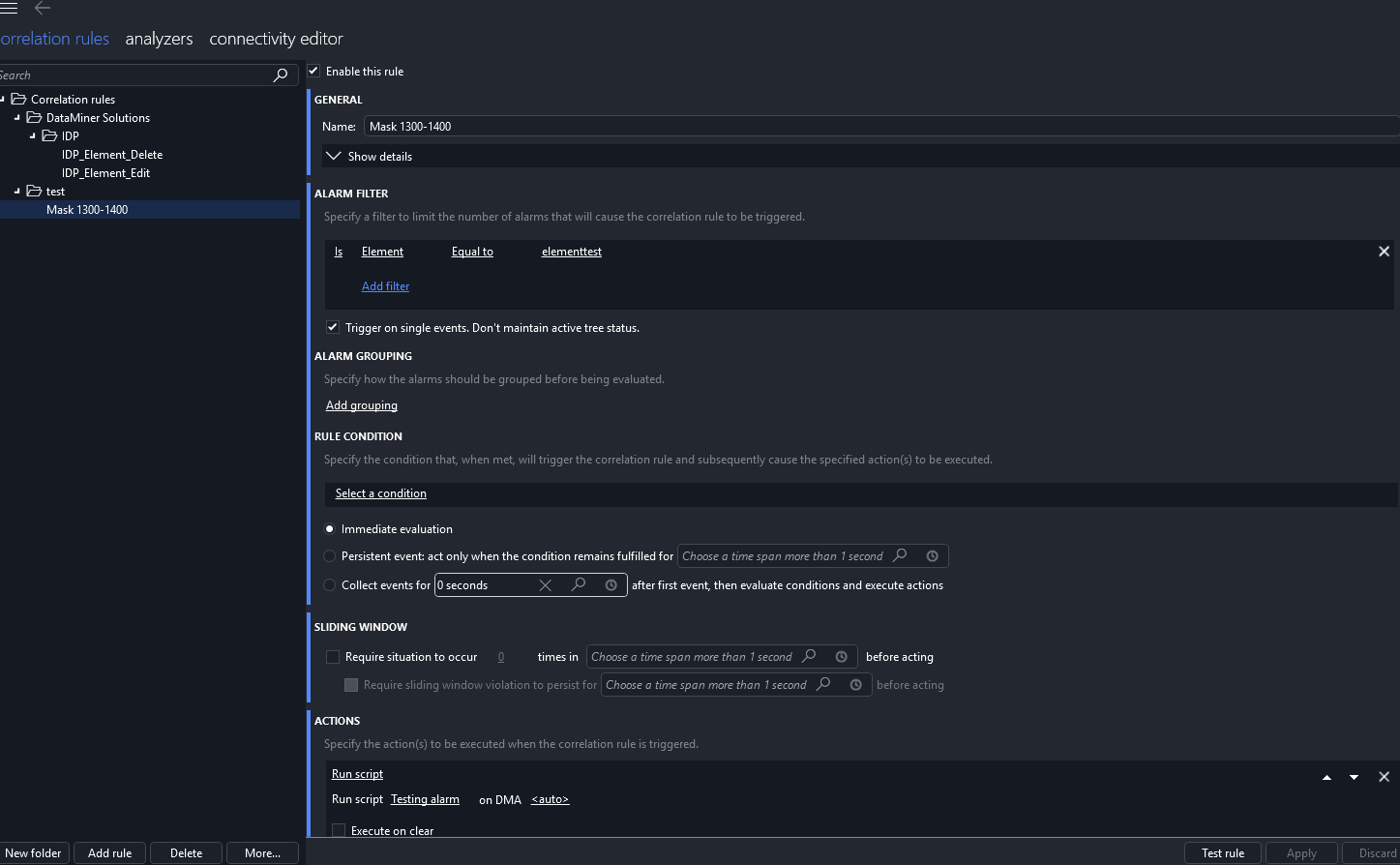
How should I configure the Correlation rule so that it triggers an Automation script, and how do I link the script to the rule?
Inside the Automation script, how can I retrieve the triggering alarm’s table index / display key?
Once the correct table row/value is identified, what is the correct method to mask only that specific alarm instance, without masking the full element, table, or parameter?
I keep getting this error. I am not sure what I am doing wrong.
The following was returned from the script:
EXIT: "Something went wrong: (Code: 0x80131500) Skyline.DataMiner.Automation.ScriptAbortException: Script parameter 65006 exists, but no value was passed from Correlation.
at Skyline.DataMiner.Automation.Engine.ExitFail(String reason)
at MaskSpecificRowAlarm.Script.RunSafe(IEngine engine)
at MaskSpecificRowAlarm.Script.Run(IEngine engine)"
script below:
namespace MaskSpecificRowAlarm
{
using System;
using Skyline.DataMiner.Automation;
using Skyline.DataMiner.Net;
using Skyline.DataMiner.Net.Enums;
using Skyline.DataMiner.Net.Messages;
public class Script
{
public void Run(IEngine engine)
{
try
{
RunSafe(engine);
}
catch (Exception e)
{
engine.ExitFail("Something went wrong: " + e);
}
}
private void RunSafe(IEngine engine)
{
ScriptParam correlationInfoParam = engine.GetScriptParam(65006);
if (correlationInfoParam == null)
{
engine.ExitFail("Script parameter 65006 does not exist in the Automation script. Please add it as a string parameter.");
return;
}
if (string.IsNullOrWhiteSpace(correlationInfoParam.Value))
{
engine.ExitFail("Script parameter 65006 exists, but no value was passed from Correlation.");
return;
}
string alarmInfo = correlationInfoParam.Value;
string[] parts = alarmInfo.Split('|');
if (parts.Length < 21)
{
engine.ExitFail("Invalid Correlation Alarm Info format: " + alarmInfo);
return;
}
int dmaID = Convert.ToInt32(parts[1]);
int elementID = Convert.ToInt32(parts[2]);
int parameterID = Convert.ToInt32(parts[3]);
string parameterIdx = parts[4];
int rootAlarmID = Convert.ToInt32(parts[5]);
string alarmValue = parts[10];
int targetParameterID = 9003;
string targetRowIndex = "0";
engine.GenerateInformation($"Received alarm - DMA: {dmaID}, Element: {elementID}, Parameter: {parameterID}, IDX: {parameterIdx}, Value: {alarmValue}, RootAlarmID: {rootAlarmID}");
if (parameterID != targetParameterID || parameterIdx != targetRowIndex)
{
engine.ExitSuccess($"Skipped: ParameterID={parameterID}, IDX={parameterIdx}");
return;
}
var connection = engine.GetUserConnection();
AlarmTreeID treeId = new AlarmTreeID(dmaID, elementID, rootAlarmID);
var maskRequest = new SetAlarmStateMessage(
treeId,
AlarmUserStatus.Mask,
"Automatically masked by Correlation Automation script.");
connection.HandleMessage(maskRequest);
engine.ExitSuccess($"Successfully masked alarm for ParameterID={parameterID}, IDX={parameterIdx}, Value={alarmValue}");
}
}
}

Hi Deema,
To rule out any potential issue in your automation script, can you perform a test with the snippet available in the documentation (https://docs.dataminer.services/dataminer/Functions/Automation_module/FAQ/How_do_I_parse_Correlation_Alarm_Info_data.html)?
You can just copy/paste the code snippet and generate an information event for any alarm attribute (e.g. the AlarmID)
Keep in mind that the script can only be executed through a correlation rule. If you execute manually the automation script, an exception will be throw.