

I'm working with a Grid visualization in an LCA but the default behavior of the Grid appears to be populating left to right for the max width of the grid and then moving to the next line below - is there a way to change this behavior to force the Grid to populate vertically instead? I want this Grid to be tall and thin, not wide and thin.
Michiel Vanthuyne [SLC] [DevOps Advocate] Answered question

Hi Matt,
The Grid component doesn't have an option for this at the moment. Feel free to create a feature suggestion for this.
Wout Mahieu [SLC] [DevOps Catalyst] Answered question

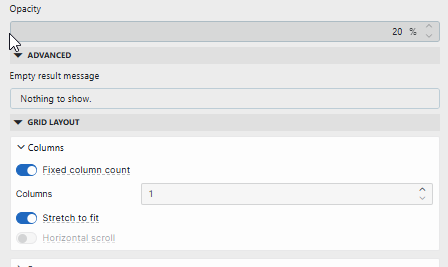
Hi Matt, this might not be exactly what you are looking for, but by setting a fixed number of columns on the grid component, you can force it to be tall and thin.
This is the configuration I've used in an LCA to stack the tiles vertically:
Michiel Vanthuyne [SLC] [DevOps Advocate] Answered question