

I would like to display a parameter with a shape that is dependent on another element, but also outputs an alternative table column (cell).
In detail:
1. A value (number) changes in element A.
2. The value (number) of element A should be used for comparison to search for the row with the same value (number) in element B in a table.
3. If the same value (number) is found in element B, an adjacent cell (text in adjacent column) should be displayed in a shape.
Is it possible to implement something like this directly in Visio without extensive automation scripts or correlation rules?
Many thanks in advance and best regards!
Daniel

Hi Daniel,
Fortunately, you don’t need an automation script or anything similar to achieve what you want. There are several ways to get the same result, and the best approach depends on your exact use case.
1. When the column you need to compare in Element B is not a display key or primary key
In that case, you will need to use a subscription filter.
You can use the SubscriptionFilter shape data, which is commonly used when filtering data. The filter references the first column in Element B and compares it with a value from Element A (via a param placeholder) (e.g. value=304 == [param:172/87,21]). After applying the correct filter, you can use the same placeholder in the shape text to display the second column from Element B (e.g. [param:172/240,302,]).
Alternatively, you can use ParameterSubscriptionFilter, which is a more specific variant. This allows you to use the Parameter shape data directly, so you don’t need to use param placeholders in the shape text. A benefit of this method is that you can use Options (e.g. HideUnit) as well as the |Alarm suffix to show the alarm color of the parameter.
Important note:
When your filter matches multiple rows, the behavior differs between the two filter types:
- SubscriptionFilter returns all matching values, joined with a pipe.
For example: West|South - ParameterSubscriptionFilter only returns the first matching result.
For example: West
You can find more info on the syntax here: Dynamic table filter syntax | DataMiner Docs.
2. When the comparison column in Element B is a display key or primary key
In that case, things are easier: you can directly reference the parameter of Element A in the Parameter shape data to point to the right row.
Example:
302,[param:172/87,21]
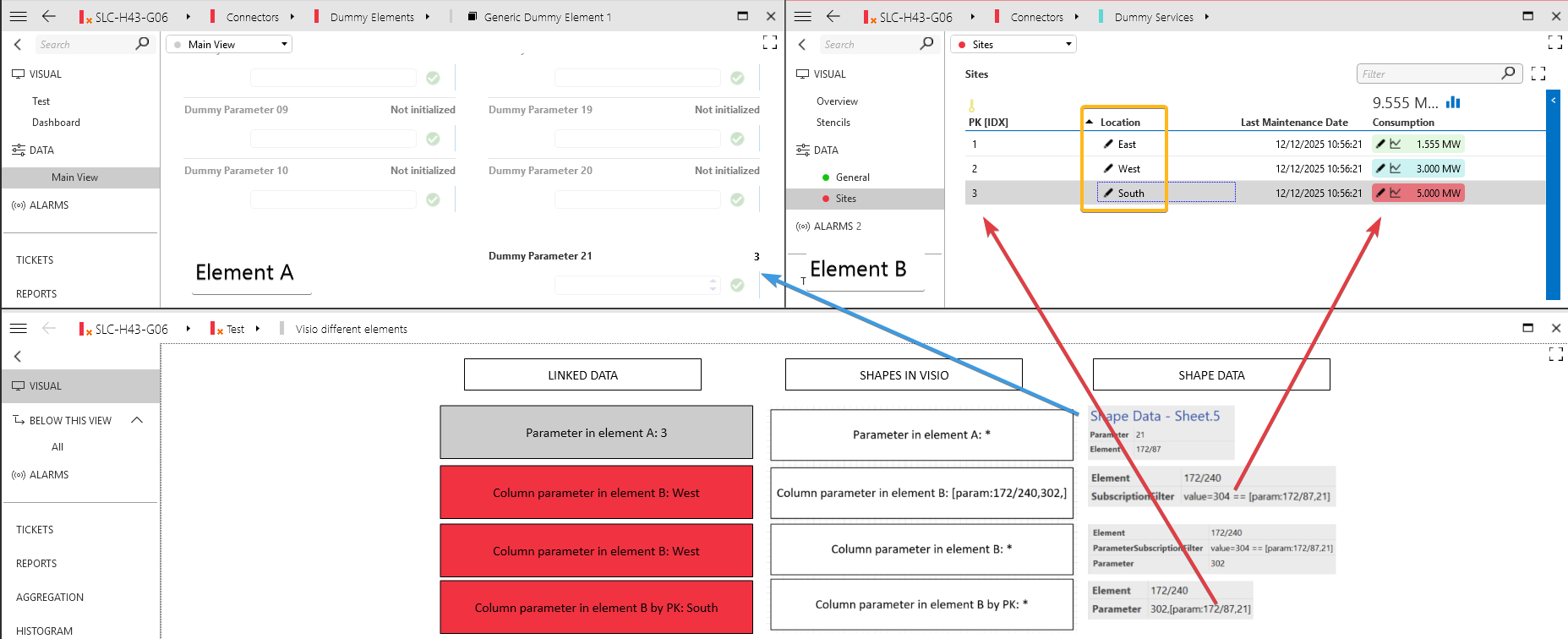
Hope this helps you further!
Jarno
Hi Daniel, you need to use a comma as described in the documentation ([param:DmaID/ElementID,ParameterID,TableRow] (https://docs.dataminer.services/dataminer/Operator_guide/Visio/reference/Placeholders_for_variables_in_shape_data_values.html?#paramdmaidelementidparameteridtablerow)
Small cause, big mistake
Thank you very much for your support, that was the solution!
BR, Daniel
Thank you for the detailed explanation. I was able to reproduce it with other elements.
However, I have now realized that I don't just have a single value in element A, but need to take a value from a table.
That should be the goal:
Element: [cardvar:ElemIDPresetTableIPData]
ParameterSubscriptionFilter: value=205==[param:[cardvar:ElemID_MRD7000_SRF],22005:1.6.1]
Parameter: 202
Is there a way to do this?
BR, Daniel
EDIT FOR ALL OTHER USERS:
The following Shape Data was the solution
Element: [cardvar:ElemIDPresetTableIPData]
ParameterSubscriptionFilter: value=205==[param:[cardvar:ElemID_MRD7000_SRF],22005,1.6.1]
Parameter: 202