

Hi Dojo,
I would like to publish a single script to my local agent. However, DIS does not allow this because the script is included in multiple packages.
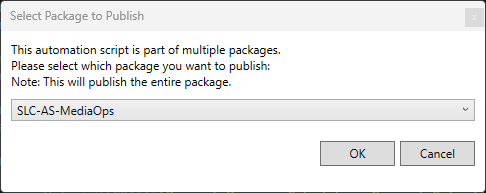
Is there a way to configure DIS so that only this specific script can be published?
DIS version: 3.1.25
Thanks in advance.

Hi Jens,
If this script is built using the SDK, you can configure it to Generate a DataMiner Package in the csproj file when you run dotnet build on the project. You can find this in the bin/Debug/net48/DataMinerBuild folder in the script folder and then upload the dmapp to your local agent using SLNet Client tool.
Note that configuring a script to Generate a DataMiner Package will mean the Dotnet Publish will try to publish it to Catalog so be sure to disable it when you no longer need to test that script.
Here's the link to the documentation: Skyline DataMiner SDK project properties | DataMiner Docs
I hope this helps,
Bauti

Hi Jens,
The reason DIS behaves this way is to ensure that a script is always published with the same runtime context and dependencies that it will have when deployed as part of the full solution package. Scripts that share the same DataMinerSolutionId have unified NuGet dependencies and run in a dedicated DataMiner process. Publishing only a single script could therefore hide dependency-related issues that would only surface once the complete package is deployed.
For that reason, in DIS 3.1.23 and later, this behavior is intentional and cannot be disabled. There is currently no DIS setting that allows publishing only an individual script while it remains part of a solution package.
When an automation script is part of a solution package (i.e. the script's .csproj contains a DataMinerSolutionId), clicking Publish will publish the entire solution package rather than only that script.
If the script belongs to a single solution package, DIS will show a confirmation dialog before publishing the package. In your case, the script is referenced by multiple solution packages, so DIS prompts you to select which package to publish. The selected package determines which NuGet dependency set will be used during deployment. This ensures that the script is deployed to the agent with the same dependency context it would have when the complete package is deployed, helping to avoid dependency-related issues going unnoticed during development
Source: DIS 3.1.23 Release Notes

Sure, you're welcome.
The behavior has already been documented in https://docs.dataminer.services/develop/TOOLS/DIS/Editors/XML_editor.html#publish
Thank you for the detailed explanation. Would it be possible to have this added to the docs so that others can easily find this back?