
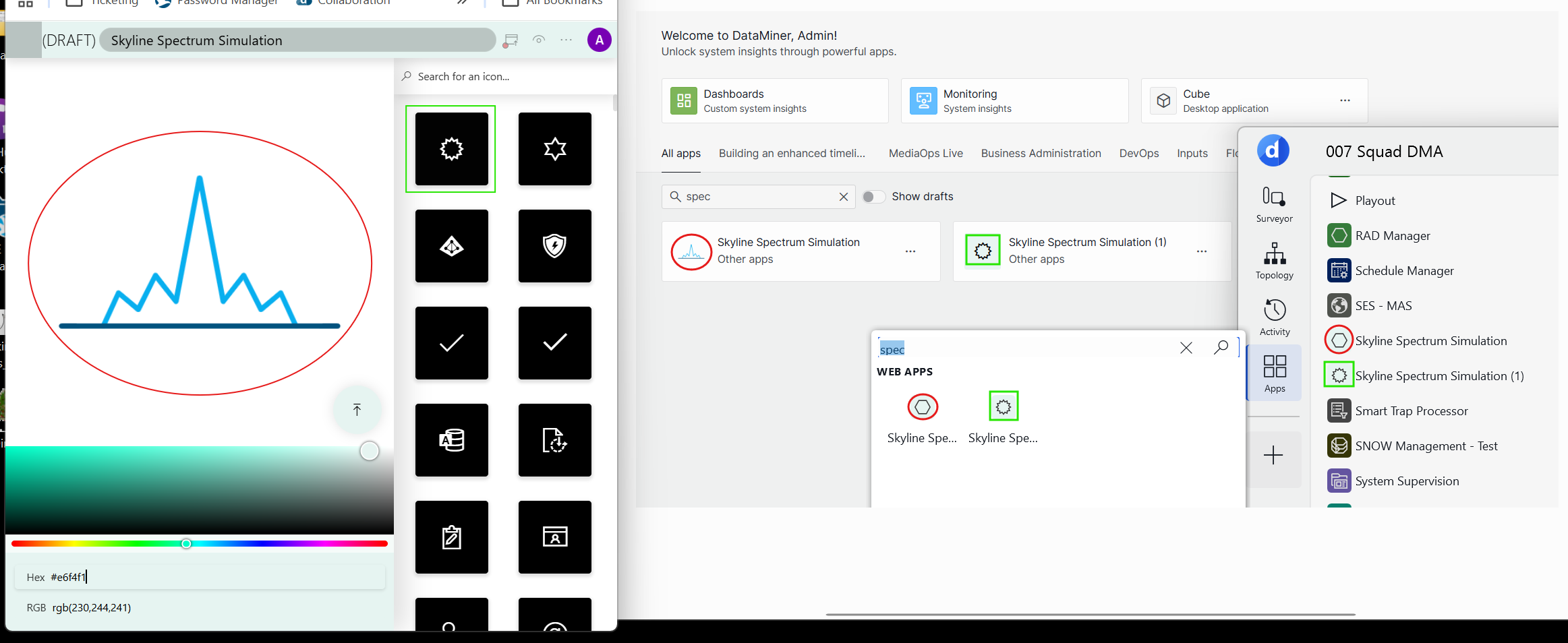
It seems that only built-in low-code app icons are correctly being displayed in Cube and custom ones are being replaced by the default hexagon icon.
The below picture is self-explanatory:

Hi Conan,
By design, Cube currently resolves low-code app icons against the FabricMDL2Icons set (over 2000 glyphs).
If an icon name is outside that mapped set, then Cube falls back to the default hexagon.
What likely happened is a parity gap:
Web icon handling was expanded/ or changed (supports newer or broader icon definitions) without updating the Cube, while Cube icon resolution remained tied to the original FabricMDL2 mapping.

Hi Thijs,
To make it completely unequivocal: No, there is no workaround.
As mentioned implicitly, The core issue is an underlying architectural difference. Web supports custom images, whereas Cube exclusively expects Fabric glyph text strings. Because the capability to render image-based icons was never implemented in Cube, Cube literally lacks the code to process them.
Therefore, a feature request is your only path forward.
Hopefully, this provides the absolute clarity you were looking for!
If any part of how a text-based system failing to read custom image files remains confusing, I kindly suggest opening a ticket with Skyline Tech Support for further guidance.
I do hope this will help you further.
Can you please make clear if there is a way to workaround to still allow custom icons to appear correctly in Cube?
Or will that have to go through a feature request…?