

Hello Team,
I have created an automation script, which does some background process and creates a reference id and the concatenate it at the end of the URL. I would need it to be auto opened on the users machine who has triggered this automation script via Dataminer cube.
Lets take an example I want to redirect the user to https://docs.dataminer.services/index.html on their browser after completion of the automation script.
As of now I am using a pop up to show this URL to the users. And they manually copy paste it on browser. Also not sure if the URL can be made clickable on popup.
Could you please help me to find how to achieve redirection and if it's not possible what is other alternative to make it user friendly

Hi Ramesh, make sure that the 'NoConfirmation' option is set in the Hyperlink.xml for that hyperlink, otherwise the pop-up will be shown as you mentioned.
When I trigger such an interactive script from a hyperlink in the alarm console with that option set, it should open the link immediately. This is how my hyperlink value is structured 'MyAutomationScript||AlarmId=[ALARMID]||Tooltip|NoConfirmation,CloseWhenFinished'.
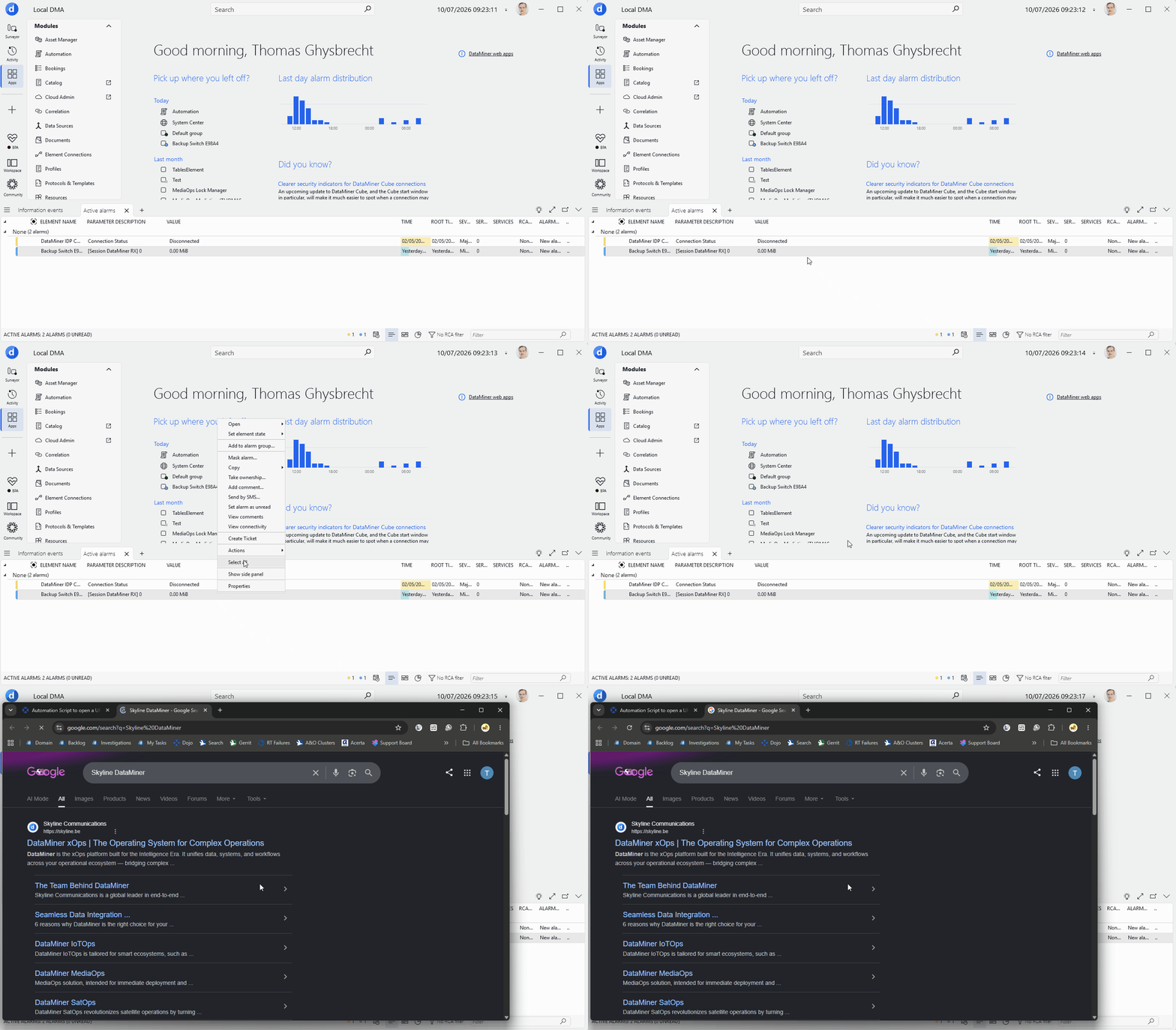

Thanks for sharing the hyperlink and code. I redid my testing with exactly what you provided, and this seems to be working on my end. Could you confirm the DataMiner version you are using? (My testing was done on the latest version)
The only way I can reproduce the pop-up, is to remove the 'NoConfirmation' option. But that pop-up is then shown before the script actually runs. If I understood your experience correctly, it only shows after the script was executed. Could you scroll down the list of parameters in that pop-up and check what is says at the bottom? I would assume that it says 'Completed: SUCCEEDED' with an 'Execute now' button next to it.
This behavior you are seeing does not seem correct. My current assumption is that this may be behaving faulty on an older version that you may be running. (to be confirmed)
Yes after clicking the checkbox it does work and this pop up doesn't appear. But it also open's the automation script execution popup screen behind it. I don't want the screen behind it to be visible to the user. We will be triggering this script by right clicking an alarm on alarm console and selecting a custom hyperlink tab to trigger this script. So, how to hide the screen that is behind. 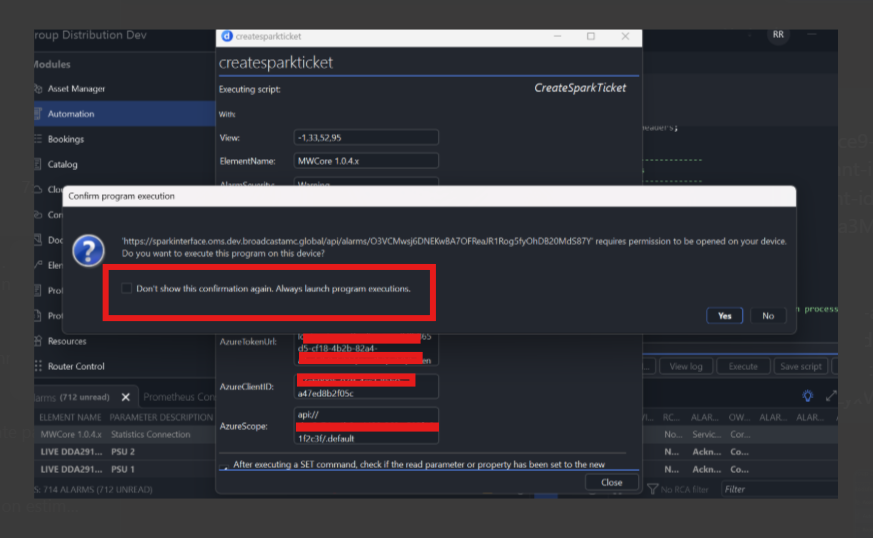
Thanks for the screenshot, I have added another response with a possible fix and a GIF.

Since an automation script actually runs server-side I don't think there is any other way in achieving this than using ShowUI.
Does this work for you?
using System;
using System.Collections.Generic;
using System.Globalization;
using System.Text;
using Skyline.DataMiner.Automation;
/// <summary>
/// DataMiner Script Class.
/// </summary>
class Script
{
/// <summary>
/// The Script entry point.
/// </summary>
/// <param name="engine">Link with SLAutomation process.</param>
public void Run(Engine engine)
{
UIBuilder uib = new UIBuilder();
UIBlockDefinition uibd = new UIBlockDefinition();
uibd.Type = UIBlockType.Executable;
uibd.Extra = @"http://www.google.be";
uib.AppendBlock(uibd);
var result = engine.ShowUI(uib);
}
}
Yes Now I am able to redirect to the browser. But Since we are using ShowUI I got the executable screen where we enter input data on the background. I would like to hide it. I just want to show the URL UI which redirects to browser
and if you show it as a button on your UI and start this script after pressing the button?
On Alarm console we have added a hyperlink which triggers the automation script with respective inputs.
The Automation Script is launched from an Alarm Console hyperlink. The script creates a Spark ticket and uses UIBlockType.Executable to open the returned URL. Is there a supported way to launch the URL on the Cube client without displaying the Automation execution dialog (engine.ShowUI) or using an alternative client-side API?
Hi Ramesh, the example of Peter should work. There may be a small window that appears briefly, but this should disappear once the instruction to open the web page has been approved by the user & handled by the browser. There will be a confirmation screen in Cube for security reasons, but it is possible to check a box so it is not shown anymore in the future for that user. After approving & checking that box, the subsequent triggers of the script should Could you elaborate on what would prevent you from using this approach?
Hello Thomas,
On hyperlink file we have already configured the below code
<HyperLink id="71" version="2" name="Test" menu="root" type="script" alarmColumn="false" alarmAction="true">
CreateRecord||View=[VID];ElementName=[ENAME];AlarmSeverity=[SEVERITY];AlarmParameter=[PNAME];AlarmValue=[VALUE];AlarmRootTime=[ROOTTIME];||Tooltip|NoConfirmation,CloseWhenFinished
</HyperLink>
On automation script, I have added the below code
UIBuilder uib = new UIBuilder();
UIBlockDefinition uibd = new UIBlockDefinition();
uibd.Type = UIBlockType.Executable;
uibd.Extra = apiResponse;
uib.AppendBlock(uibd);
engine.ShowUI(uib);
If I don't call engine.ShowUI(uib);, the background popup shown in the screenshot does not appear. However, once engine.ShowUI(uib); is executed, Redirection is working but DataMiner displays the Automation execution popup after the code completes successfully. Is there a supported way to suppress or disable this popup while still using UIBuilder?