

a {
text-decoration: none;
color: #464feb;
}
tr th, tr td {
border: 1px solid #e6e6e6;
}
tr th {
background-color: #f5f5f5;
}
I had set a “hysteresis on” at value:"1202" after 50.000 seconds, and this only for “minor Hi” and an alarm if value:"1201" is warning hi as usual. In the element, you can see that it turns blue for H14xx1, but when I check the alarm, I don’t see it. It only appears after the hysteresis has disappeared.
As shown below:
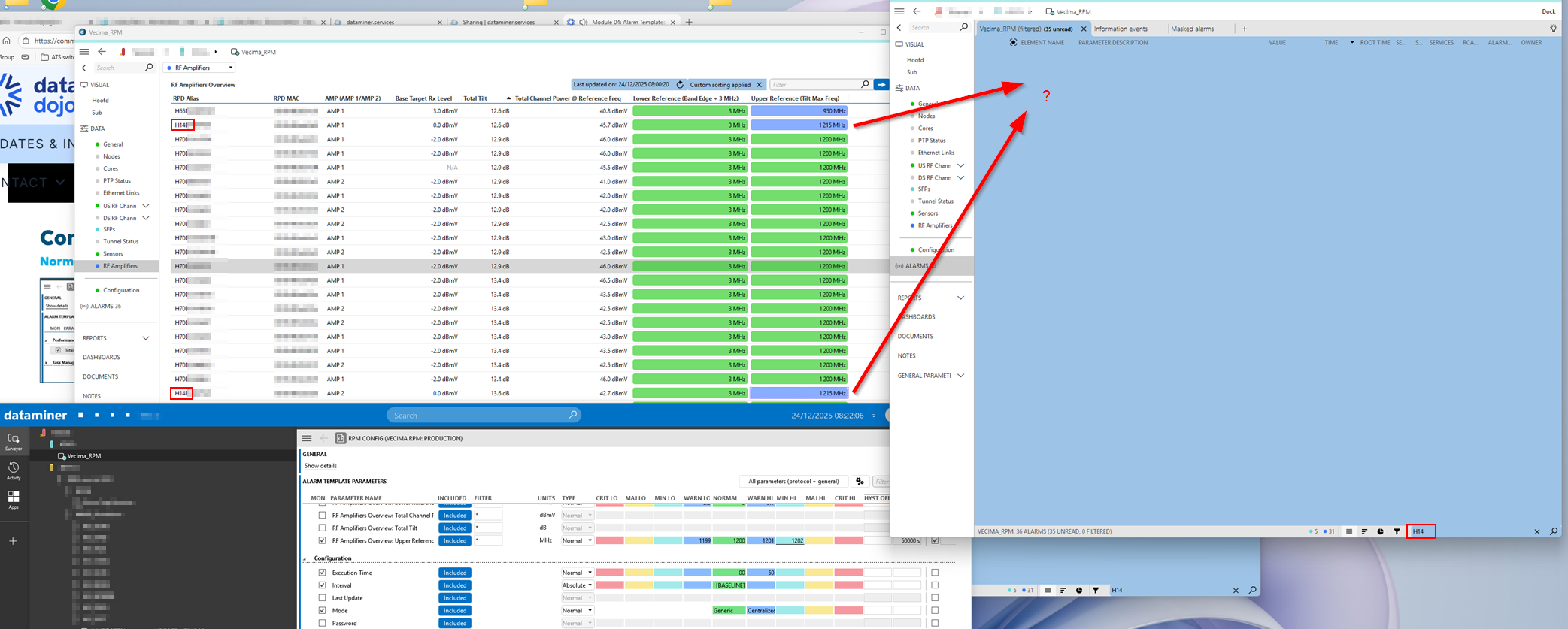 I actually wanted to create an alarm that starts as just a warning and then, after 50,000 seconds, should update to a minor—without generating a new alarm. And that’s when I noticed this behavior.

That filter doesn’t matter here; I’ve added information template to these alarms.
I set an alarm on “1201” as a warning and set the value “1202” as minor with a hysteresis of 50,000 seconds. The value in my problem is “1215”. When I activate this, I would expect the alarm to be blue (Warning) for the first 50,000 seconds and then turn blue-green (Minor) after 50,000 seconds.
But what actually happens is that only after 50,000 seconds the alarm turns blue-green (Minor). You don’t see anything of the warning.
What I actually want is to create an alarm on a certain value with severity “Warning,” and if this value persists longer than 50000 seconden, I want to change it to “Minor” without creating a new alarm.
Thanks in advance.
I see that this question has been inactive for some time. Do you still need help with this? If not, could you select the answer that has been most helpful for you (using the ✓ icon)?