

Skip to content
DataMiner Dojo

More results...

Generic selectors
Exact matches only
Search in title
Search in content
Post Type Selectors
Search in posts
Search in pages
Search in posts
Search in pages
Log in
Menu
  • Updates & Insights
  • Questions
  • Learning
    • E-learning Courses
    • Tutorials
    • Open Classroom Training
    • Certification
      • DataMiner Fundamentals
      • DataMiner Configurator
      • DataMiner Automation
      • Scripts & Connectors Developer: HTTP Basics
      • Scripts & Connectors Developer: SNMP Basics
      • Visual Overview – Level 1
      • Verify a certificate
    • YouTube Videos
    • Solutions & Use Cases
      • Solutions
      • Use Case Library
    • Agility
      • Learn more about Agile
        • Agile Webspace
        • Everything Agile
          • The Agile Manifesto
          • Best Practices
          • Retro Recipes
        • Methodologies
          • The Scrum Framework
          • Kanban
          • Extreme Programming
        • Roles
          • The Product Owner
          • The Agile Coach
          • The Quality & UX Coach (QX)
      • Book your Agile Fundamentals training
      • Book your Kanban workshop
    • >> Go to DataMiner Docs
  • DevOps
    • About the DevOps Program
    • Sign up for the DevOps Program
    • DataMiner DevOps Support
    • Feature Suggestions
  • Downloads
  • Swag Shop
  • PARTNERS
    • Business Partners
    • Technology Partners
  • Contact
    • Sales, Training & Certification
    • DataMiner Support
    • Global Feedback Survey
  • >> Go to dataminer.services

Updating Element Colour Based on Alarm Severity

50 views8 hours ago#visiodashboards alarm severity Visulisation
2
Gourav Jain [DevOps Member]42 2 days ago 0 Comments

Hello Experts,

I would really appreciate your guidance on how to update an element’s colour based on alarm severity.

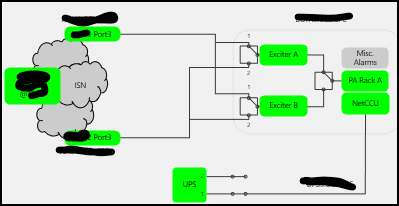
For example, Critical alarm is triggered for Exciter A  and i would expect the corresponding box to change to red. but in my current setup, the box remains unchanged even though I can see the active alarm in the Alarm Console.

We have a parent view where the overall site correctly appears in red. When I click the site box, it opens the detailed visual. However, in the detailed visual the affected element does not change colour, so it is difficult to identify which element has the problem.

Could you please advise what configuration or settings I need to check to make the element colour update automatically based on the active alarm severity?

Please note that I am coming from experience with other monitoring tools, so some of my terminology may be different. Thank you for your patience.

Paulo Henriques [SLC] [DevOps Advocate] Answered question 8 hours ago

1 Answer

  • Active
  • Voted
  • Newest
  • Oldest
0
Paulo Henriques [SLC] [DevOps Advocate]1.60K Posted 8 hours ago 0 Comments

Hi Gourav,

Without looking in more detail at the Visio drawing and the shape data, it is difficult to determine why the color of the "Exciter A" shape is not following its alarm state as expected.

I recommend reviewing the following section of our documentation, which provides an overview of Visio drawings and the different options available:

Visio drawings | DataMiner Docs

More specifically, please have a look at:
Linking a shape to an element, a service or a redundancy group | DataMiner Docs

In the example below, the "Element" shape (highlighted in red) reflects a critical alarm currently open on the linked element. You can also see how the shape data is configured in this case:
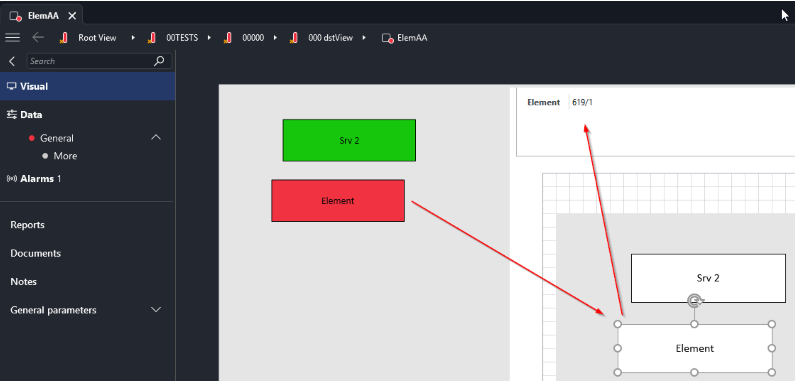
I hope this helps you move forward.

Regards,
Paulo

Paulo Henriques [SLC] [DevOps Advocate] Answered question 8 hours ago
Please login to be able to comment or post an answer.

My DevOps rank

DevOps Members get more insights on their profile page.

My user earnings

0 Dojo credits

Spend your credits in our swag shop.

0 Reputation points

Boost your reputation, climb the leaderboard.

Promo banner DataMiner DevOps Professiona Program
DataMiner Integration Studio (DIS)
Empower Katas
Privacy Policy • Terms & Conditions • Contact

© 2026 Skyline Communications. All rights reserved.

DOJO Q&A widget

Can't find what you need?

? Explore the Q&A DataMiner Docs

[ Placeholder content for popup link ] WordPress Download Manager - Best Download Management Plugin