

Skip to content
DataMiner Dojo

More results...

Generic selectors
Exact matches only
Search in title
Search in content
Post Type Selectors
Search in posts
Search in pages
Search in posts
Search in pages
Log in
Menu
  • Updates & Insights
  • Questions
  • Learning
    • E-learning Courses
    • Tutorials
    • Open Classroom Training
    • Certification
      • DataMiner Fundamentals
      • DataMiner Configurator
      • DataMiner Automation
      • Scripts & Connectors Developer: HTTP Basics
      • Scripts & Connectors Developer: SNMP Basics
      • Visual Overview – Level 1
      • Verify a certificate
    • YouTube Videos
    • Solutions & Use Cases
      • Solutions
      • Use Case Library
    • Agility
      • Learn more about Agile
        • Agile Webspace
        • Everything Agile
          • The Agile Manifesto
          • Best Practices
          • Retro Recipes
        • Methodologies
          • The Scrum Framework
          • Kanban
          • Extreme Programming
        • Roles
          • The Product Owner
          • The Agile Coach
          • The Quality & UX Coach (QX)
      • Book your Agile Fundamentals training
      • Book your Kanban workshop
    • >> Go to DataMiner Docs
  • DevOps
    • About the DevOps Program
    • Sign up for the DevOps Program
    • DataMiner DevOps Support
    • Feature Suggestions
  • Downloads
  • Swag Shop
  • PARTNERS
    • Business Partners
    • Technology Partners
  • Contact
    • Sales, Training & Certification
    • DataMiner Support
    • Global Feedback Survey
  • >> Go to dataminer.services

What are the three shades of grey in tha alarmconsole?

92 views4 hours ago
1
Jan-Terje Larsen184 5 hours ago 0 Comments

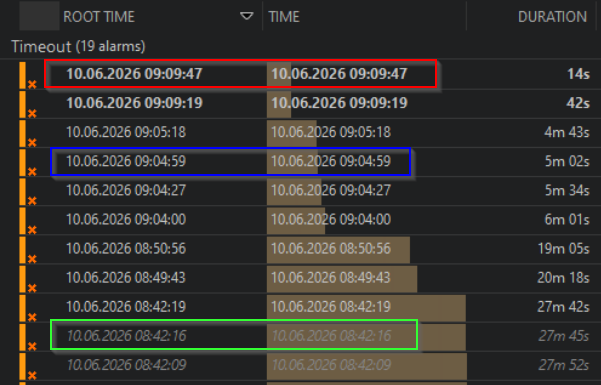
In the screenshot I have three different shades of grey.

The first is a new unread alarm, but what are the two other? Both are old/and read - but different grey
Brent [SLC] Answered question 4 hours ago

1 Answer

  • Active
  • Voted
  • Newest
  • Oldest
4
Brent [SLC]2.56K Posted 4 hours ago 3 Comments

Hi,

The bold white ones (such as in the red box) are indeed new, unread alarms as you mentioned

The white grey ones (such as in the blue box) are read alarms and are the most recent alarm in an alarm tree.

The darker grey, such as in the green box is for alarmevents for which there has been a newer event in the tree (i.e. a change in severity). Meaning these alarms do not reflect the most up to date info.

See this example, you can see the different colours are all part of the same alarm tree (same root alarm). But the older ones have the dark grey colour.

The difference can be useful in custom alarm tabs where "History Tracking" is turned off and alarms are not grouped into their respective trees. This way you still have a visual representation of which alarms are new, current or had updates.

Using the same example, with "history tracking" turned on. It shows the relation a bit better where the dark greys are historic events within a tree.

Hope this clarified the differences a bit

Jan-Terje Larsen Edited comment 2 minutes ago
Jan-Terje Larsen commented 3 hours ago

Thank you Brent for explaining

We have "Histroy Tracking" turned on, but the first line in the alarm tree has that darker and italic text (as in the green box) for some of the alarms. It is not clear from my screenshot, but all the alarms were from different elements.

Brent [SLC] commented 2 hours ago

Peculiar. I am unsure how to explain the discrepancy observed. Is this on the Active alarms tab, or on a tab with filters applied (either alarm filter, or the filterbox/severity toggles) which could hide events?

Jan-Terje Larsen commented 11 minutes ago

This is observed both in the Active Alarms tab and filtered alarm tabs.

Please login to be able to comment or post an answer.

My DevOps rank

DevOps Members get more insights on their profile page.

My user earnings

0 Dojo credits

Spend your credits in our swag shop.

0 Reputation points

Boost your reputation, climb the leaderboard.

Promo banner DataMiner DevOps Professiona Program
DataMiner Integration Studio (DIS)
Empower Katas
Privacy Policy • Terms & Conditions • Contact

© 2026 Skyline Communications. All rights reserved.

DOJO Q&A widget

Can't find what you need?

? Explore the Q&A DataMiner Docs

[ Placeholder content for popup link ] WordPress Download Manager - Best Download Management Plugin