

Hi Dojo Community,
I need some help.
The customer would like to create a trending diagram with multiple individual Aggregation Rules. In short, each individual Aggregation Rule represents the Processor Max Load for a Linux Platform element.
I wanted to create a trend group, but I was surprised to see that there is no Save option after adding multiple trend graphs.
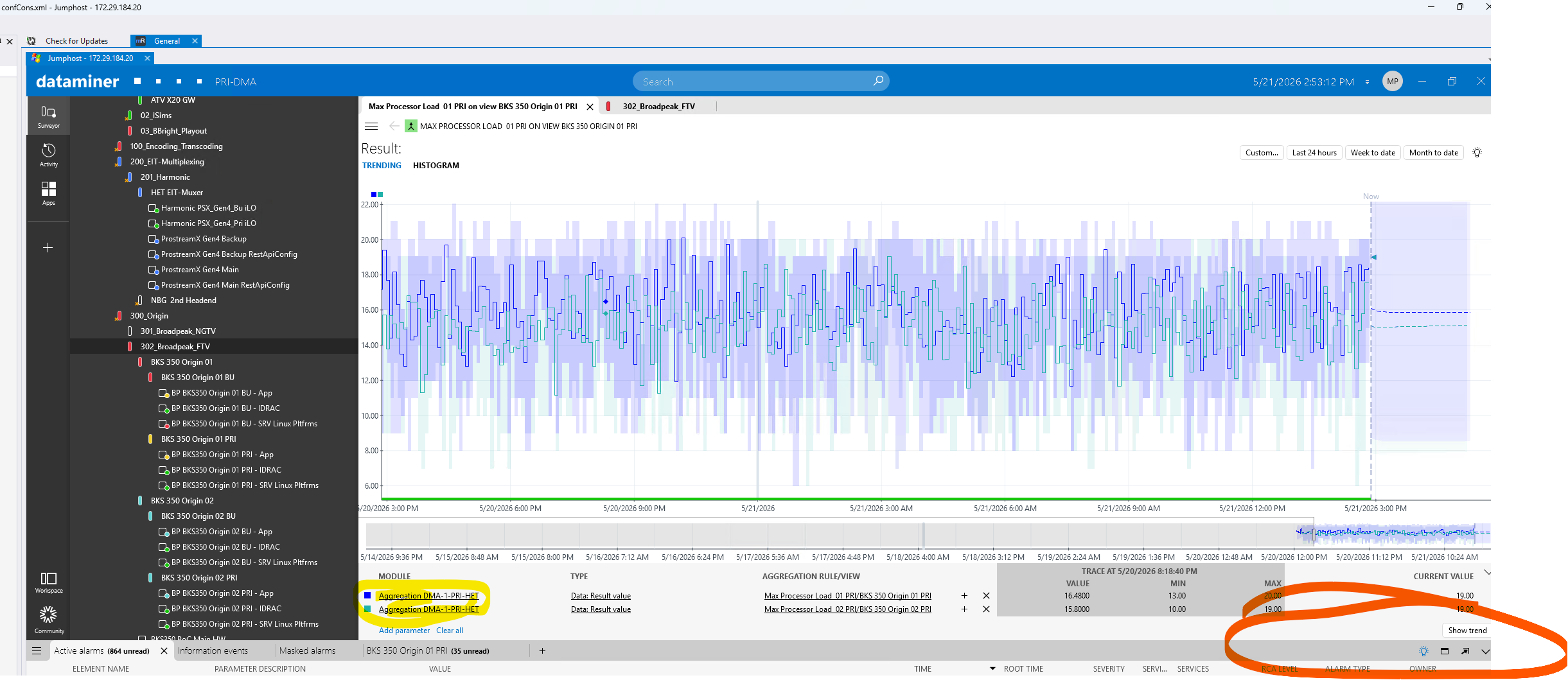
Is it possible at all to create a trend group based on aggregation rules ?

Hi Matej,
I was able to reproduce the behavior. As far I can see, you are displaying trend graphs from aggregation rules. My guess is that since the element that exposes the aggregated values is hidden, Cube doesn't allow you to save the trend group.
When you are trying to build a trend group from scratch, you will notice that the aggregated element is not available.
A possible workaround is to build a dashboard that displays these trend graphs. To add results from aggregation rules to a trend chart, you will need to use the data source:
Parameters -> Views
Hope it helps.
I will try to offer them the option of creating a dashboard.
I checked and tried to access the hidden "Skyline Generic Aggregator <DMAID>” element, but I was not able to, even though I found on the DMA server that the element folder had been created correctly.
So, we can conclude that a trend group is not possible for Aggregation Rules.
Thank you, Miguel!