

Skip to content
DataMiner Dojo

More results...

Generic selectors
Exact matches only
Search in title
Search in content
Post Type Selectors
Search in posts
Search in pages
Search in posts
Search in pages
Log in
Menu
  • Updates & Insights
  • Questions
  • Learning
    • E-learning Courses
    • Tutorials
    • Open Classroom Training
    • Certification
      • DataMiner Fundamentals
      • DataMiner Configurator
      • DataMiner Automation
      • Scripts & Connectors Developer: HTTP Basics
      • Scripts & Connectors Developer: SNMP Basics
      • Visual Overview – Level 1
      • Verify a certificate
    • YouTube Videos
    • Solutions & Use Cases
      • Solutions
      • Use Case Library
    • Agility
      • Learn more about Agile
        • Agile Webspace
        • Everything Agile
          • The Agile Manifesto
          • Best Practices
          • Retro Recipes
        • Methodologies
          • The Scrum Framework
          • Kanban
          • Extreme Programming
        • Roles
          • The Product Owner
          • The Agile Coach
          • The Quality & UX Coach (QX)
      • Book your Agile Fundamentals training
      • Book your Kanban workshop
    • >> Go to DataMiner Docs
  • DevOps
    • About the DevOps Program
    • Sign up for the DevOps Program
    • DataMiner DevOps Support
    • Feature Suggestions
  • Downloads
  • Swag Shop
  • PARTNERS
    • Business Partners
    • Technology Partners
  • Contact
    • Sales, Training & Certification
    • DataMiner Support
    • Global Feedback Survey
  • >> Go to dataminer.services

Show element Data page in Visio shape, specifically Data:Spectrum Analyzer

Solved261 views2nd June 2026spectrum Visio Shape Data
3
Steve Purcell [SLC] [DevOps Advocate]2.47K 19th May 2026 0 Comments

We have a use case where we would like to have a button launch a popup to an element's Data:Spectrum Analyzer page, giving the user full access to the Spectrum analyzer in a popup window.  We tried using the Component function; however, this does not show the Spectrum top menu bar needed to fully control the Spectrum capabilities.   Is there a way to have a Visio shape show a specific element data: page so we can show as a popup window using vdxpage?

Thanks,

Steve

Steve Purcell [SLC] [DevOps Advocate] Selected answer as best 2nd June 2026

3 Answers

  • Active
  • Voted
  • Newest
  • Oldest
1
Michaël Pincket [SLC] [DevOps Advocate]2.08K Posted 2nd June 2026 0 Comments

Hi Steve,

There is indeed a problem with the option ShowRibbon=true. We have already a task to fix it and the task should be picked up soon.

Steve Purcell [SLC] [DevOps Advocate] Selected answer as best 2nd June 2026
1
Michaël Pincket [SLC] [DevOps Advocate]2.08K Posted 20th May 2026 1 Comment

Hi Steve,

In your component function you can add options. If you add the option ShowRibbon=true you will get the top menu bar. You can also check the example in the docs: Embedding a Spectrum Analysis component | DataMiner Docs

Thomas Rich [SLC] [DevOps Advocate] Posted new comment 21st May 2026
Thomas Rich [SLC] [DevOps Advocate] commented 21st May 2026

Hello Michaël, I've added some context in a separate answer below. thanks.

0
Thomas Rich [SLC] [DevOps Advocate]1.23K Posted 21st May 2026 0 Comments

Hello Michaël,
In this case, we already have an embedded spectrum component that does not show the ribbon as desired. We want the real element card to popup in a window when a shape is clicked. Below is a mockup of what we want the end result to be:
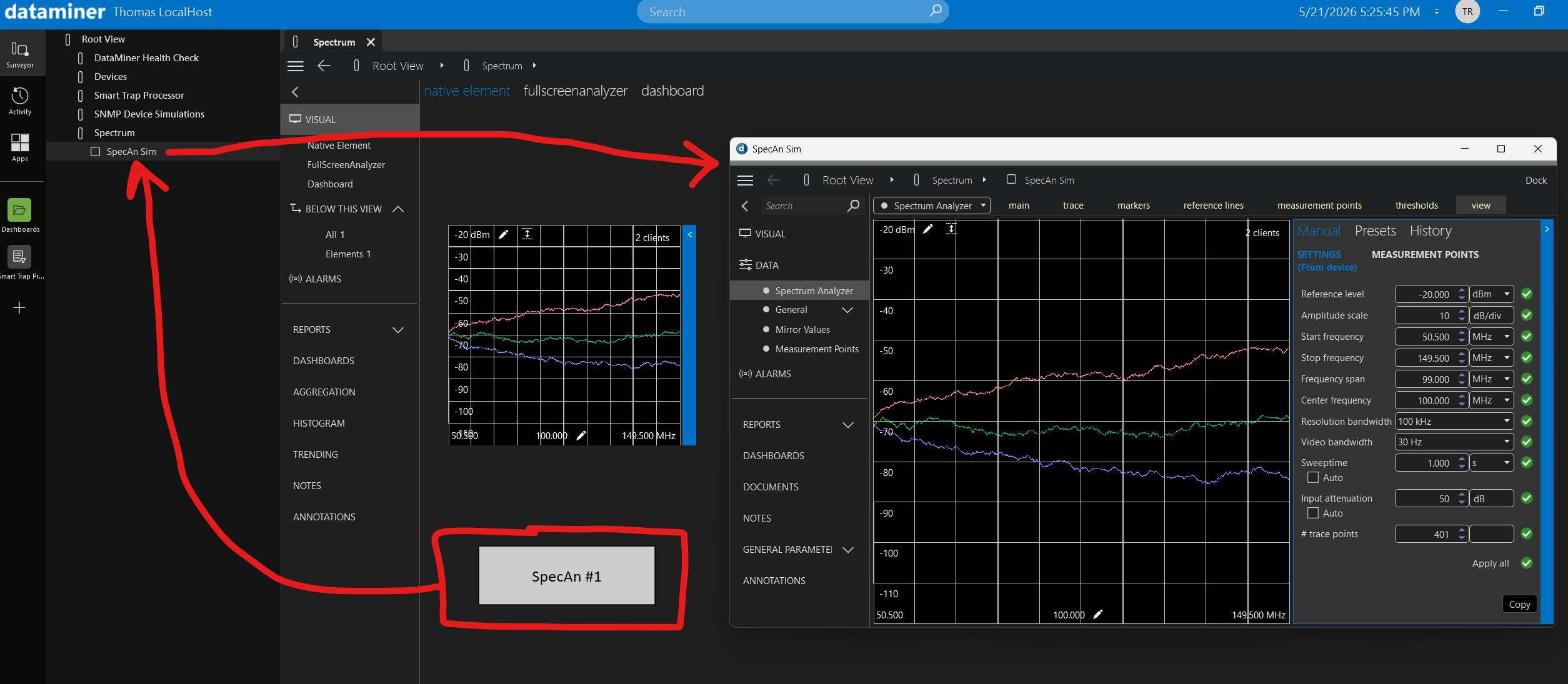
As a workaround, I've tried to embed a bigger spectrum shape on a Visio page with the intention of using VdxPage to popup the bigger panel for full parameter control, but ShowRibbon=true does not seem to make any difference on the shape. The embedded spectrum element never has the ribbon displayed.

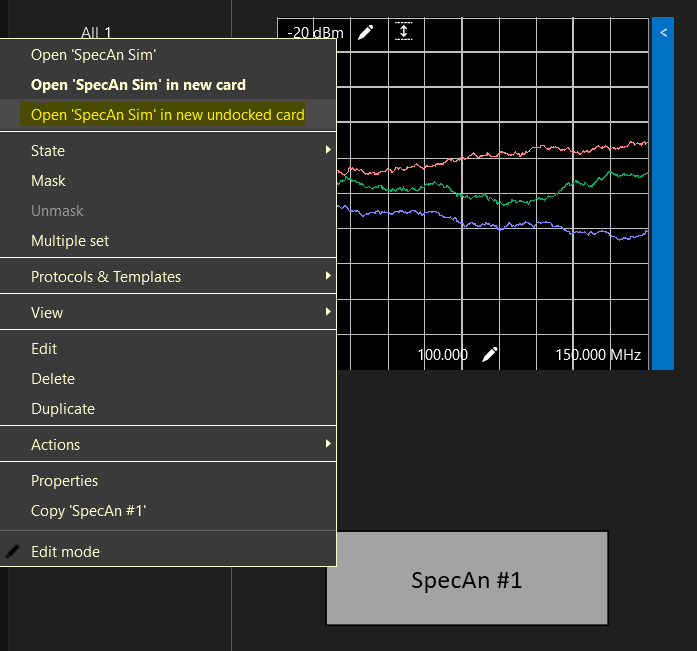
It does appear to be an option to right-click on the shape and open the element in an undocked card or using shift-click, but we'd like this to occur by default when clicking this shape. Is this possible to achieve?
Thank you,

Thomas Rich [SLC] [DevOps Advocate] Edited answer 21st May 2026
Please login to be able to comment or post an answer.

My DevOps rank

DevOps Members get more insights on their profile page.

My user earnings

0 Dojo credits

Spend your credits in our swag shop.

0 Reputation points

Boost your reputation, climb the leaderboard.

Promo banner DataMiner DevOps Professiona Program
DataMiner Integration Studio (DIS)
Empower Katas
Privacy Policy • Terms & Conditions • Contact

© 2026 Skyline Communications. All rights reserved.

DOJO Q&A widget

Can't find what you need?

? Explore the Q&A DataMiner Docs

[ Placeholder content for popup link ] WordPress Download Manager - Best Download Management Plugin