
Skip to content
DataMiner Dojo

More results...

Generic selectors
Exact matches only
Search in title
Search in content
Post Type Selectors
Search in posts
Search in pages
Search in posts
Search in pages
Log in
Menu
  • Updates & Insights
  • Questions
  • Learning
    • E-learning Courses
    • Tutorials
    • Open Classroom Training
    • Certification
      • DataMiner Fundamentals
      • DataMiner Configurator
      • DataMiner Automation
      • Scripts & Connectors Developer: HTTP Basics
      • Scripts & Connectors Developer: SNMP Basics
      • Visual Overview – Level 1
      • Verify a certificate
    • YouTube Videos
    • Solutions & Use Cases
      • Solutions
      • Use Case Library
    • Agility
      • Learn more about Agile
        • Agile Webspace
        • Everything Agile
          • The Agile Manifesto
          • Best Practices
          • Retro Recipes
        • Methodologies
          • The Scrum Framework
          • Kanban
          • Extreme Programming
        • Roles
          • The Product Owner
          • The Agile Coach
          • The Quality & UX Coach (QX)
      • Book your Agile Fundamentals training
      • Book you Kanban workshop
    • >> Go to DataMiner Docs
  • DevOps
    • About the DevOps Program
    • Sign up for the DevOps Program
    • DataMiner DevOps Support
    • Feature Suggestions
  • Downloads
  • Swag Shop
  • PARTNERS
    • Business Partners
    • Technology Partners
  • Contact
    • Sales, Training & Certification
    • DataMiner Support
    • Global Feedback Survey
  • >> Go to dataminer.services

How to distinguish service-level from element-level properties in AlarmEventMessage.Properties?

Solved85 views1 day agoAd Hoc data source alarm properties AlarmEventMessage low code app
1
Alexandre Bonnet [DevOps Advocate]469 1 day ago 0 Comments

Hi Dojo,

In a GQI ad hoc data source, I iterate over AlarmEventMessage.Properties to extract the value of a custom property named "PS ID".

This property is defined at both the service level and the element level. Both entries appear in the Properties array with the exact same Name ("PS ID") — there is no visible way to tell which entry comes from which source.

The only difference is in the value format:
- Service-level: single CFS or comma-separated (e.g. CFSXXXXXX,CFSXXXXXX)
- Element-level: slash-separated, listing all services of the element (e.g. CFSXXXXXX/CFSXXXXXX/CFSXXXXXX)

I currently work around this by skipping any property value that contains a "/" character, assuming it's the element-level entry. This works in practice but it relies on a format convention that isn't documented and could break silently.

I know that AlarmFilterField.PropertyValue uses typed prefixes ("service.PS ID", "element.PS ID") to distinguish sources when filtering alarms. But this only controls which alarms are returned — it doesn't help identify the source of each entry when iterating AlarmEventMessage.Properties.

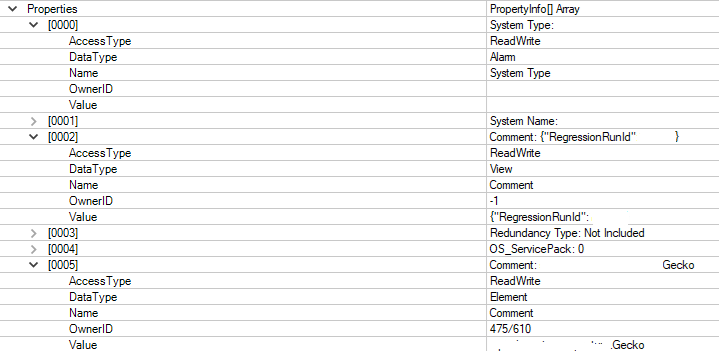
My question: Is there a field on the individual property entries in AlarmEventMessage.Properties (e.g. Type, Source, or similar) that indicates whether the property comes from the service, element, view, or alarm level? Or is there an alternative message/API that returns properties with their source type clearly identified?

Thanks!

Alexandre Bonnet [DevOps Advocate] Selected answer as best 1 day ago

1 Answer

  • Active
  • Voted
  • Newest
  • Oldest
2
Debeuf Klaas [SLC] [DevOps Member]1.82K Posted 1 day ago 1 Comment

Hi Alexandre,

You can use the DataType to make the distinction between the different property types.
Please let us know if this approach works for you.

Regards,
Alexandre Bonnet [DevOps Advocate] Selected answer as best 1 day ago
Alexandre Bonnet [DevOps Advocate] commented 1 day ago

Hi Klaas,

That's exactly what I needed, thank you!

Really appreciate the quick and clear answer!

Best regards,
Alexandre

Please login to be able to comment or post an answer.

My DevOps rank

DevOps Members get more insights on their profile page.

My user earnings

0 Dojo credits

Spend your credits in our swag shop.

0 Reputation points

Boost your reputation, climb the leaderboard.

Promo banner DataMiner DevOps Professiona Program
DataMiner Integration Studio (DIS)
Empower Katas
Privacy Policy • Terms & Conditions • Contact

© 2026 Skyline Communications. All rights reserved.

DOJO Q&A widget

Can't find what you need?

? Explore the Q&A DataMiner Docs

[ Placeholder content for popup link ] WordPress Download Manager - Best Download Management Plugin