

Hello Dojo!
On my Visio page, I’m able to retrieve and display a column value from a specific row by using the Parameter shape data to hold the id of the column I want, and the ParameterSubscriptionFilter to filter the exact row. For example:

However, although the value is displaying as expected in the *, I'm failing to pass this value as a input parameter for Automation Script triggered by a shape button that looks like this:
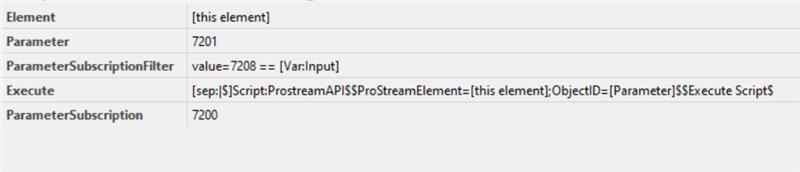
The [this element] placeholder is sending the correct info to the script, but the [Parameter] placeholder is not.
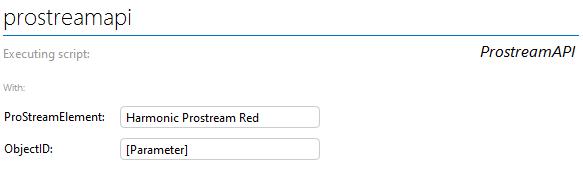
In another attempt I tried to remove the Parameter shape data and use [param:*,7201] in the place holder instead:
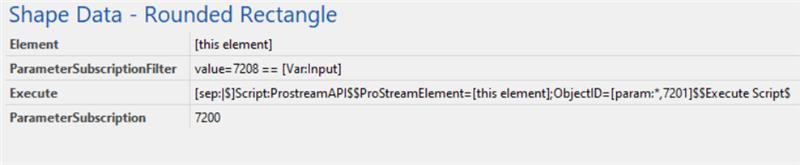
But with this approach, it seems the filter isn’t being applied. I’m getting values from a completely different column (ID 7211 instead of 7201), and they’re returned for every row in the table, separated by a ‘|’:
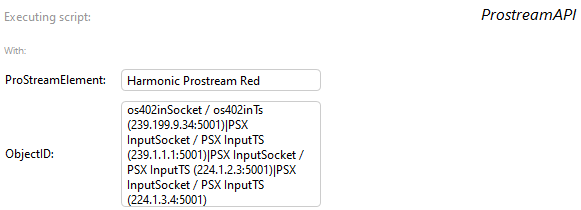
Is there a way to achieve what I'm trying to? What am I missing?
Thanks in advance!


Hi Mariana,
For the second setup, the parametersubscriptionfilter does not work for the [param] placeholder, could you try using the "SubscriptionFilter" shape data with the same value and see if this provides the correct response like this:
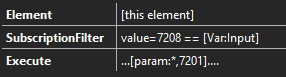
For the first setup, there is no placeholder "[parameter]", the correct way to get that parameter value is with the [param] placeholder as you did in the second setup

Hello Klaas! Thanks for your reply. The filter now is working using SubscriptionFilter as you suggested, and I'm getting the value from the correct row. However, I'm still not retrieving the value I was expecting (column 7201, which is the row primary key), but I'm still retrieving column 7211 instead.

Hi Mariana,
The only reason that I can see that this could occur is that the 7211 is the display key column. When requesting the primary key value the display value will be set to the display key, and this is the value that Visio will show in the param placeholder.
Could you confirm if the 7211 is the display column of the table?
Depending on what the value is later used for, there might be support for providing both the PK and DK but that depends on what occurs within the automation script.
I see that this question has been inactive for some time. Do you still need help with this? If not, could you select the answer (using the ✓ icon) to indicate that no further follow-up is needed?