

Hi All.
While upgrading the DMA agent from version 10.4.x to version 10.5.x, we're experiencing a problem with the central database in MSSQL, as shown below.
DataMiner Agent 'dma-test-03': 1 error(s) and 6 notice(s)
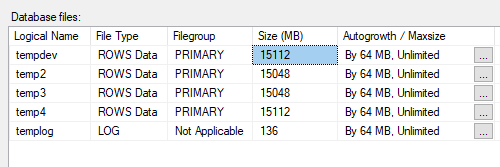
Errors - Exception during unicode conversion for table alarm_property : Could not allocate space for object 'dbo.SORT temporary run storage: 141116269658112' in database 'tempdb' because the 'PRIMARY' filegroup is full due to lack of storage space or database files reaching the maximum allowed size. Note that UNLIMITED files are still limited to 16TB. Create the necessary space by dropping objects in the filegroup, adding additional files to the filegroup, or setting autogrowth on for existing files in the filegroup.
The upgrade succeeds, but with errors.
This is an upgrade for a single DMA test agent in a lab without a DMA cluster.
Do you know what's happening underneath? Does it transfer the entire alarm_property table to tempdb? If so, even 200 GB won't be enough, as this table is approximately 230 GB in size. Is there a different way to perform this upgrade? Following this approach, the tempdb database will require half the space of the entire DMA database, or even more if it loads the other tables in a single query.
How much space should this table contain and the appropriate amount of space for the MSSQL database?
Screenshots from the MSSQL database are in the annex of mail.
Big thanks for asnwer.
Br.
Jarek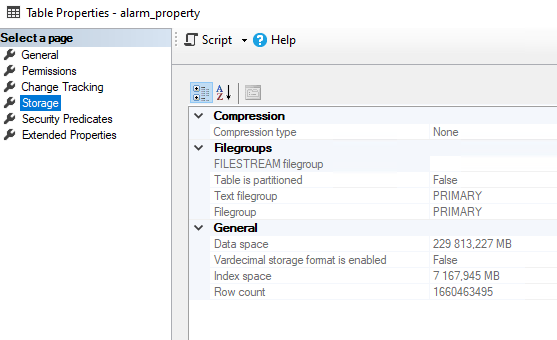


Some insights here:
During upgrades, DataMiner is checking the central database table definitions.
Specifically for central databases on MSSQL, the upgrade will try to make sure that tables that use VARCHAR/TEXT columns are updated to support unicode values (NVARCHAR). Same with tables that are not using the expected collation type (DB.xml | DataMiner Docs)
Apparently in your case the alarm_property table still had such columns or incorrect collation configured.
The conversion is done by creating a temporary table with correct columns/settings, copying the data and then removing/renaming tables. This indeed means that the data is temporarily available in the database twice.
The alarm_property table contains the values for the alarm properties linked to alarm events that are in the alarm offload table. Without the table converted, property values with unicode characters might not display as expected when queried from the database.
I would assume that the same error would have appeared on previous updates. There have not been changes to the alarm_property table format as far as I am aware.
I see that this question has been inactive for some time. Do you still need help with this? If not, could you select the answer (using the ✓ icon) to indicate that no further follow-up is needed?