
Skip to content
DataMiner Dojo

More results...

Generic selectors
Exact matches only
Search in title
Search in content
Post Type Selectors
Search in posts
Search in pages
Search in posts
Search in pages
Log in
Menu
  • Updates & Insights
  • Questions
  • Learning
    • E-learning Courses
    • Tutorials
    • Open Classroom Training
    • Certification
      • DataMiner Fundamentals
      • DataMiner Configurator
      • DataMiner Automation
      • Scripts & Connectors Developer: HTTP Basics
      • Scripts & Connectors Developer: SNMP Basics
      • Visual Overview – Level 1
      • Verify a certificate
    • YouTube Videos
    • Solutions & Use Cases
      • Solutions
      • Use Case Library
    • Agility
      • Learn more about Agile
        • Agile Webspace
        • Everything Agile
          • The Agile Manifesto
          • Best Practices
          • Retro Recipes
        • Methodologies
          • The Scrum Framework
          • Kanban
          • Extreme Programming
        • Roles
          • The Product Owner
          • The Agile Coach
          • The Quality & UX Coach (QX)
      • Book your Agile Fundamentals training
      • Book you Kanban workshop
    • >> Go to DataMiner Docs
  • DevOps
    • About the DevOps Program
    • Sign up for the DevOps Program
    • DataMiner DevOps Support
    • Feature Suggestions
  • Downloads
  • Swag Shop
  • PARTNERS
    • Business Partners
    • Technology Partners
  • Contact
    • Sales, Training & Certification
    • DataMiner Support
    • Global Feedback Survey
  • >> Go to dataminer.services

Visio shapes different element in a group

Solved62 views9 hours agovisio grouping
0
Emanuele Zuliani172 1 day ago 0 Comments

Hi,

i have a visio with multiple shapes. Each shape is linked to a different element to show the status of a given parameter
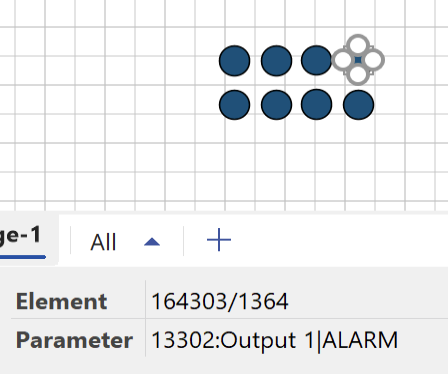
I'd like to group all of them to easily move in the visio but when I create the group all the shapes are not linked anymore to elements

Is there a way to fix this behaviour?

Emanuele Zuliani Selected answer as best 20 hours ago

2 Answers

  • Active
  • Voted
  • Newest
  • Oldest
0
Jarno Lernou [SLC] [DevOps Enabler]5.42K Posted 20 hours ago 2 Comments

Hi Emanuele,

I believe this is indeed possible, although it does feel a bit counterintuitive, so your question makes perfect sense. The reason behind the problem and the solution below is purely performance optimization.

You can create a group and link it to the object your Visio file is assigned to. Inside that group, add all your shapes and assign the correct element ID through the Element shape data field. In addition, add another shape data field called Options with the value AllowInheritance=False (see docs reference).

One small note: because the group is linked to a DataMiner object, it inherits additional features. For example, the group shape automatically becomes clickable to navigate to the object, and its background fill will change to match the object’s alarm color (gray when unmonitored). In this case, since the group is only used for functional/maintainability purposes, these extra features are not desired and should be disabled (see below). If needed, you can still enable the hyperlink on the child shapes.

If the Visio is linked to a View, the configuration looks as follows:

  • Group shape:
    • View : [this view]
    • Enabled : False
    • Options : NoAlarmColorFill
  • Child shape 1
    • Element : 172/123
    • Options : AllowInheritance=False
  • Child shape 2
    • Element : 172/456
    • Options : AllowInheritance=False

Note: When making changes to your existing Visio, you can select multiple shapes and edit the shape data for all of them together (e.g. add the new Options shape data).

Kind Regards,

Jarno

Jarno Lernou [SLC] [DevOps Enabler] Posted new comment 9 hours ago
Emanuele Zuliani commented 20 hours ago

it works. So basically we link the group to empty stuff just to make it active and then we force the child to be as standalone.
Thanks!

Jarno Lernou [SLC] [DevOps Enabler] commented 9 hours ago

Indeed, we enhance the shape by linking to a DataMiner object and from that moment, child shapes will also be considered.

0
Miguel Obregon [SLC] [DevOps Catalyst]21.19K Posted 1 day ago 1 Comment

Hi Emanuele,

You will need to create a shape data at group level pointing to the element. The child shapes should only contain the shape data pointing to the parameters.

Hope it helps.

Emanuele Zuliani Edited comment 1 day ago
Emanuele Zuliani commented 1 day ago

problem is each shape needs to point a different element. I tried creating child groups but the parent group without any shape data still wins and disable all the child groups

Please login to be able to comment or post an answer.

My DevOps rank

DevOps Members get more insights on their profile page.

My user earnings

0 Dojo credits

Spend your credits in our swag shop.

0 Reputation points

Boost your reputation, climb the leaderboard.

Promo banner DataMiner DevOps Professiona Program
DataMiner Integration Studio (DIS)
Empower Katas
Privacy Policy • Terms & Conditions • Contact

© 2025 Skyline Communications. All rights reserved.

DOJO Q&A widget

Can't find what you need?

? Explore the Q&A DataMiner Docs

[ Placeholder content for popup link ] WordPress Download Manager - Best Download Management Plugin