

Hi,
i have a visio with multiple shapes. Each shape is linked to a different element to show the status of a given parameter
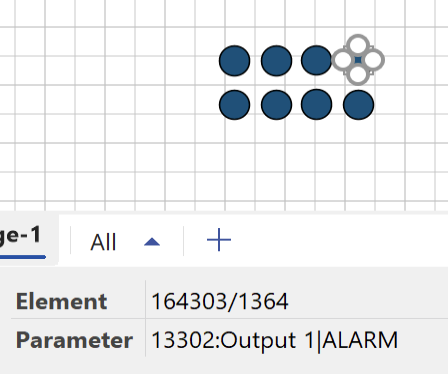
I'd like to group all of them to easily move in the visio but when I create the group all the shapes are not linked anymore to elements
Is there a way to fix this behaviour?

Hi Emanuele,
I believe this is indeed possible, although it does feel a bit counterintuitive, so your question makes perfect sense. The reason behind the problem and the solution below is purely performance optimization.
You can create a group and link it to the object your Visio file is assigned to. Inside that group, add all your shapes and assign the correct element ID through the Element shape data field. In addition, add another shape data field called Options with the value AllowInheritance=False (see docs reference).
One small note: because the group is linked to a DataMiner object, it inherits additional features. For example, the group shape automatically becomes clickable to navigate to the object, and its background fill will change to match the object’s alarm color (gray when unmonitored). In this case, since the group is only used for functional/maintainability purposes, these extra features are not desired and should be disabled (see below). If needed, you can still enable the hyperlink on the child shapes.
If the Visio is linked to a View, the configuration looks as follows:
- Group shape:
- View : [this view]
- Enabled : False
- Options : NoAlarmColorFill
- Child shape 1
- Element : 172/123
- Options : AllowInheritance=False
- Child shape 2
- Element : 172/456
- Options : AllowInheritance=False
Note: When making changes to your existing Visio, you can select multiple shapes and edit the shape data for all of them together (e.g. add the new Options shape data).
Kind Regards,
Jarno

Indeed, we enhance the shape by linking to a DataMiner object and from that moment, child shapes will also be considered.
it works. So basically we link the group to empty stuff just to make it active and then we force the child to be as standalone.
Thanks!