
Skip to content
DataMiner Dojo

More results...

Generic selectors
Exact matches only
Search in title
Search in content
Post Type Selectors
Search in posts
Search in pages
Search in posts
Search in pages
Log in
Menu
  • Updates & Insights
  • Questions
  • Learning
    • E-learning Courses
    • Tutorials
    • Open Classroom Training
    • Certification
      • DataMiner Fundamentals
      • DataMiner Configurator
      • DataMiner Automation
      • Scripts & Connectors Developer: HTTP Basics
      • Scripts & Connectors Developer: SNMP Basics
      • Visual Overview – Level 1
      • Verify a certificate
    • YouTube Videos
    • Solutions & Use Cases
      • Solutions
      • Use Case Library
    • Agility
      • Learn more about Agile
        • Agile Webspace
        • Everything Agile
          • The Agile Manifesto
          • Best Practices
          • Retro Recipes
        • Methodologies
          • The Scrum Framework
          • Kanban
          • Extreme Programming
        • Roles
          • The Product Owner
          • The Agile Coach
          • The Quality & UX Coach (QX)
      • Book your Agile Fundamentals training
      • Book you Kanban workshop
    • >> Go to DataMiner Docs
  • DevOps
    • About the DevOps Program
    • Sign up for the DevOps Program
    • DataMiner DevOps Support
    • Feature Suggestions
  • Downloads
  • Swag Shop
  • PARTNERS
    • Business Partners
    • Technology Partners
  • Contact
    • Sales, Training & Certification
    • DataMiner Support
    • Global Feedback Survey
  • >> Go to dataminer.services

Visio: How to use “ParameterSubscriptionFilter” output value as Automation Script parameter input

151 views3 days ago
5
Mariana Navarro [DevOps Advocate]207 3 days ago 0 Comments

Hello Dojo!
On my Visio page, I’m able to retrieve and display a column value from a specific row by using the Parameter shape data to hold the id of the column I want, and the ParameterSubscriptionFilter to filter the exact row. For example:

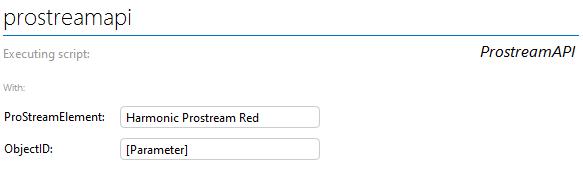
However, although the value is displaying as expected in the *, I'm failing to pass this value as a input parameter for Automation Script triggered by a shape button that looks like this:
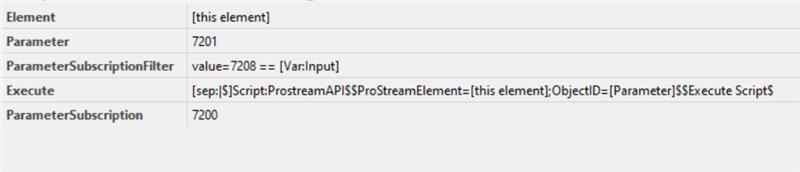
The [this element] placeholder is sending the correct info to the script, but the [Parameter] placeholder is not.
In another attempt I tried to remove the Parameter shape data and use [param:*,7201] in the place holder instead:
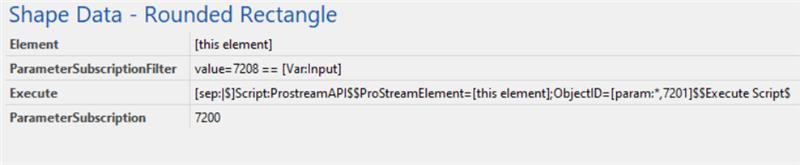
But with this approach, it seems the filter isn’t being applied. I’m getting values from a completely different column (ID 7211 instead of 7201), and they’re returned for every row in the table, separated by a ‘|’:
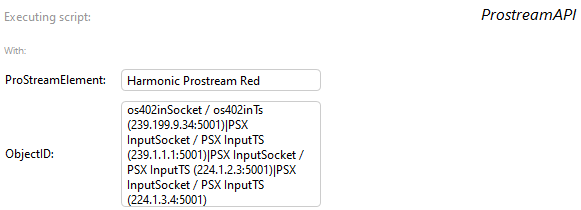
Is there a way to achieve what I'm trying to? What am I missing?

Thanks in advance!

Klaas Dewitte [SLC] [DevOps Advocate] Answered question 3 days ago

1 Answer

  • Active
  • Voted
  • Newest
  • Oldest
3
Klaas Dewitte [SLC] [DevOps Advocate]850 Posted 3 days ago 1 Comment

Hi Mariana,

For the second setup, the parametersubscriptionfilter does not work for the [param] placeholder, could you try using the "SubscriptionFilter" shape data with the same value and see if this provides the correct response like this:
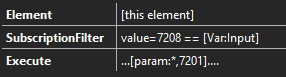
For the first setup, there is no placeholder "[parameter]", the correct way to get that parameter value is with the [param] placeholder as you did in the second setup

Mariana Navarro [DevOps Advocate] Edited comment 3 days ago
Mariana Navarro [DevOps Advocate] commented 3 days ago

Hello Klaas! Thanks for your reply. The filter now is working using SubscriptionFilter as you suggested, and I'm getting the value from the correct row. However, I'm still not retrieving the value I was expecting (column 7201, which is the row primary key), but I'm still retrieving column 7211 instead.

Please login to be able to comment or post an answer.

My DevOps rank

DevOps Members get more insights on their profile page.

My user earnings

0 Dojo credits

Spend your credits in our swag shop.

0 Reputation points

Boost your reputation, climb the leaderboard.

Promo banner DataMiner DevOps Professiona Program
DataMiner Integration Studio (DIS)
Empower Katas
Privacy Policy • Terms & Conditions • Contact

© 2026 Skyline Communications. All rights reserved.

DOJO Q&A widget

Can't find what you need?

? Explore the Q&A DataMiner Docs

[ Placeholder content for popup link ] WordPress Download Manager - Best Download Management Plugin