

Hi Dojo,
*** UPDATES INLINE ***
I like to execute a script based on any change in a table cell and also when the page opens.
On page level I added the Options and Execute shape data fields:
Options ExecuteSetsOnInit
Execute
Script:MyScript|Parameters:trigger=[param:1/400,2505,F3]|Options:NoConfirmation|SetTrigger=ValueChanged
=> param is DMA_ID/ELEMENT_ID,PARAMETER_ID,ROW_KEY
Is this correct? I read in the docs that in this case the row key is separated by colon
Update => Yes, the parameter subscription syntax is correct
The script is executed neither initially nor when the value changes.
Update => It is executed, but it does not change the session variable!
Note: I can execute the script with a visio shape click. And the script passes then the output to a session variable. But not when automatically executed. But when then script runs automatically by SetTrigger, it does not update the session variable with:
engine.AddScriptOutput(UIVariables.VisualOverview.CreateKey("ACTIVE_SYSTEM"), activeSystem);
Does this only work when executed by a user?
why do I want to this?
Instead of have a lot of the same complex multiple conditions combined, I just created a script which writes back a single output to display the shapes of the current active systems. I want to avoid to update many data fields if something changes like a parameter ID. I know I can use session variables for the IDs, but even then the conditions are not that easy to read and maintain then.

Hi David,
I tried to reproduce your setup based on the information you shared, and I managed to get a similar scenario working.
What made the difference in my case was the variable scope used when displaying the output. It seems to work when using a card-level variable.
=> So in your case, the fix would likely be to reference the output as follows:
"[cardvar:ACTIVE_SYSTEM]"
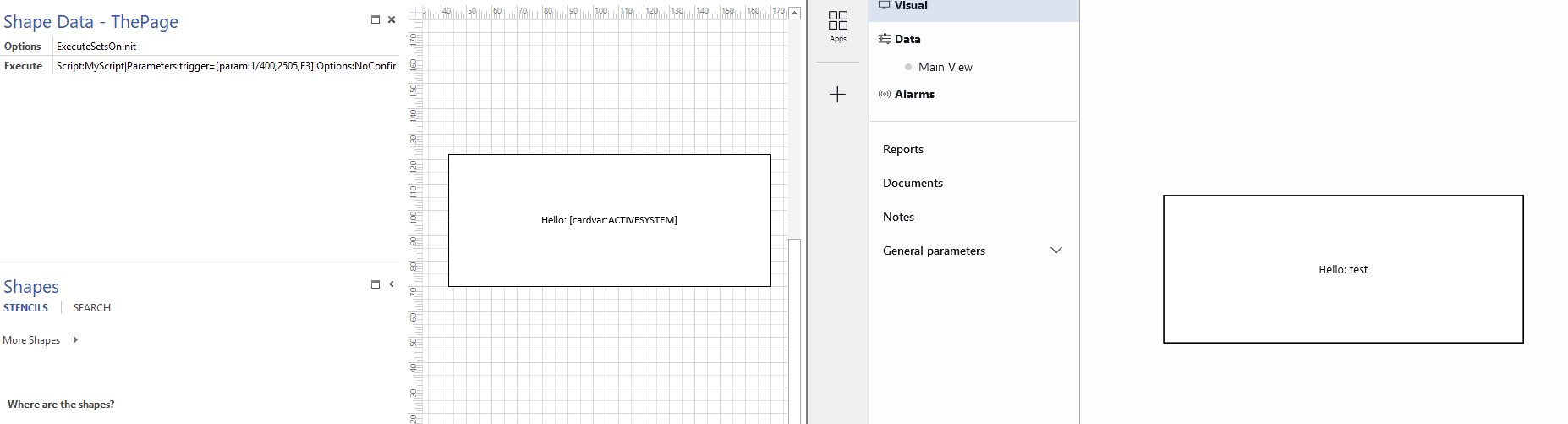
If this doesn’t resolve the issue, could you share a bit more detail about your Visio setup? (i.e. how are you showing your variable?)
wow that works, many thanks!!!
but why is it a card scoped variable???
I use in many shapes the "Variable" data field likes this:
ACTIVE_SYSTEM|Show;B
So it shows the shape when ACTIVE_SYSTEM == B
But even when I add to Page Level "Options" shape data "PageVariable" (beside the Execute) the variable is not in page scope (tried with pagevar: and Options set to "PageVariable")
This means the documentation is not correct here?
https://docs.dataminer.services/develop/devguide/Visio/linking_shapes/Linking_a_shape_to_an_Automation_script.html#passing-automation-script-output-to-session-variables

It seems this is indeed not working as expected based on the documentation. I’ll raise this internally and update the docs to make this clearer in the meantime.
Thanks!
thanks I will experiment with scope, but by default it uses the global scope and at least I need the page scope…
But I can set which scope should be used https://docs.dataminer.services/develop/devguide/Visio/linking_shapes/Linking_a_shape_to_an_Automation_script.html#passing-automation-script-output-to-session-variables