

Skip to content
DataMiner Dojo

More results...

Generic selectors
Exact matches only
Search in title
Search in content
Post Type Selectors
Search in posts
Search in pages
Search in posts
Search in pages
Log in
Menu
  • Updates & Insights
  • Questions
  • Learning
    • E-learning Courses
    • Tutorials
    • Open Classroom Training
    • Certification
      • DataMiner Fundamentals
      • DataMiner Configurator
      • DataMiner Automation
      • Scripts & Connectors Developer: HTTP Basics
      • Scripts & Connectors Developer: SNMP Basics
      • Visual Overview – Level 1
      • Verify a certificate
    • YouTube Videos
    • Solutions & Use Cases
      • Solutions
      • Use Case Library
    • Agility
      • Learn more about Agile
        • Agile Webspace
        • Everything Agile
          • The Agile Manifesto
          • Best Practices
          • Retro Recipes
        • Methodologies
          • The Scrum Framework
          • Kanban
          • Extreme Programming
        • Roles
          • The Product Owner
          • The Agile Coach
          • The Quality & UX Coach (QX)
      • Book your Agile Fundamentals training
      • Book your Kanban workshop
    • >> Go to DataMiner Docs
  • DevOps
    • About the DevOps Program
    • Sign up for the DevOps Program
    • DataMiner DevOps Support
    • Feature Suggestions
  • Downloads
  • Swag Shop
  • PARTNERS
    • Business Partners
    • Technology Partners
  • Contact
    • Sales, Training & Certification
    • DataMiner Support
    • Global Feedback Survey
  • >> Go to dataminer.services

Source of Parameter Range Information Displayed in Cube

Solved66 views46 minutes agoDM Cube Tooltip
3
Catarina Grilo [SLC] [DevOps Enabler]3.42K 6 hours ago 0 Comments

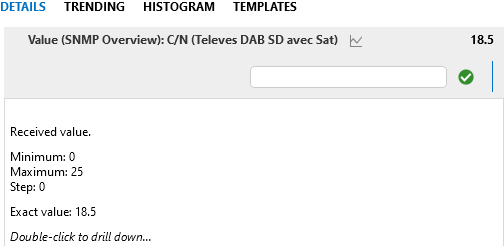
When hovering over a parameter in Cube, additional information is displayed, such as the minimum and maximum values, as well as the step value.

I thought this information was defined through the parameter ranges in the protocol (see: Range element | DataMiner Docs). However, I have encountered a parameter where no ranges are defined in the protocol, yet Cube still displays min/max values in the tooltip.
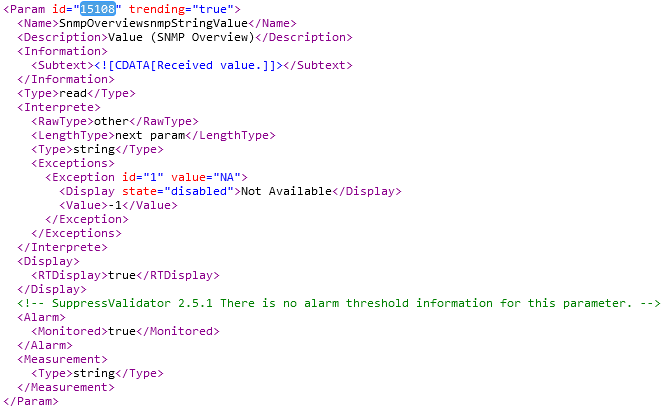
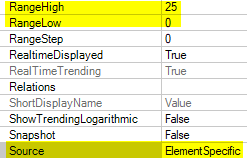
When comparing the output of GetElementProtocol and GetProtocol in CTT, I see different results:.

  • n GetElementProtocol, the ranges match what is displayed in Cube, and the source appears to be the element:
  • n GetProtocol, the ranges are completely different from those shown in Cube:
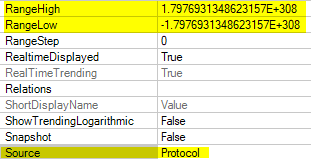
This seems to indicate that the range information is being overridden or defined at the element level rather than coming directly from the protocol.

Does anyone know where these ranges can be defined or updated at the element level?

Catarina Grilo [SLC] [DevOps Enabler] Selected answer as best 46 minutes ago

1 Answer

  • Active
  • Voted
  • Newest
  • Oldest
2
João Severino [SLC] [DevOps Enabler]14.75K Posted 2 hours ago 3 Comments

Hi Catarina,

If you have direct or RDP access to the server where that element is running, can you check the Description.xml file that is inside the element folder?
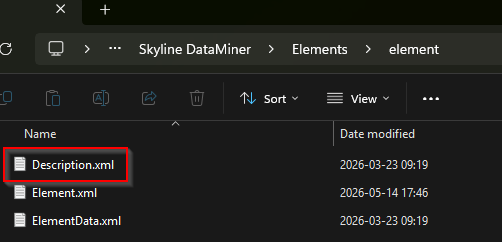
In this file, you will find if certain parameter ranges and/or descriptions have been modified from the base protocol ones for this specific element.

Catarina Grilo [SLC] [DevOps Enabler] Selected answer as best 46 minutes ago
Catarina Grilo [SLC] [DevOps Enabler] commented 51 minutes ago

Hi João,

Thank you for the tip. I checked, and indeed, the ranges are defined in the Description.xml file within the element folder.

Are these overrides only possible through manual modifications to the Description.xml file, or are there other ways to define or update the ranges at the element level?

Kind regards,

João Severino [SLC] [DevOps Enabler] commented 48 minutes ago

I know they are possible either manually or via the NT_UPDATE_DESCRIPTION_XML (127) notify call (see: https://docs.dataminer.services/develop/api/NotifyTypes/NT_UPDATE_DESCRIPTION_XML.html)
Do note this notify may be executed from the element itself or from another element.

Catarina Grilo [SLC] [DevOps Enabler] commented 47 minutes ago

Thank you for the info!

You are viewing 1 out of 1 answers, click here to view all answers.
Please login to be able to comment or post an answer.

My DevOps rank

DevOps Members get more insights on their profile page.

My user earnings

0 Dojo credits

Spend your credits in our swag shop.

0 Reputation points

Boost your reputation, climb the leaderboard.

Promo banner DataMiner DevOps Professiona Program
DataMiner Integration Studio (DIS)
Empower Katas
Privacy Policy • Terms & Conditions • Contact

© 2026 Skyline Communications. All rights reserved.

DOJO Q&A widget

Can't find what you need?

? Explore the Q&A DataMiner Docs

[ Placeholder content for popup link ] WordPress Download Manager - Best Download Management Plugin