
Skip to content
DataMiner Dojo

More results...

Generic selectors
Exact matches only
Search in title
Search in content
Post Type Selectors
Search in posts
Search in pages
Search in posts
Search in pages
Log in
Menu
  • Updates & Insights
  • Questions
  • Learning
    • E-learning Courses
    • Tutorials
    • Open Classroom Training
    • Certification
      • DataMiner Fundamentals
      • DataMiner Configurator
      • DataMiner Automation
      • Scripts & Connectors Developer: HTTP Basics
      • Scripts & Connectors Developer: SNMP Basics
      • Visual Overview – Level 1
      • Verify a certificate
    • YouTube Videos
    • Solutions & Use Cases
      • Solutions
      • Use Case Library
    • Agility
      • Learn more about Agile
        • Agile Webspace
        • Everything Agile
          • The Agile Manifesto
          • Best Practices
          • Retro Recipes
        • Methodologies
          • The Scrum Framework
          • Kanban
          • Extreme Programming
        • Roles
          • The Product Owner
          • The Agile Coach
          • The Quality & UX Coach (QX)
      • Book your Agile Fundamentals training
      • Book you Kanban workshop
    • >> Go to DataMiner Docs
  • DevOps
    • About the DevOps Program
    • Sign up for the DevOps Program
    • DataMiner DevOps Support
    • Feature Suggestions
  • Downloads
  • Swag Shop
  • PARTNERS
    • Business Partners
    • Technology Partners
  • Contact
    • Sales, Training & Certification
    • DataMiner Support
    • Global Feedback Survey
  • >> Go to dataminer.services

Query for selected sum/aggregated interfaces in “Line & area chart” for Bit in/out

110 views26th November 2025aggregation in dashboards dashboard chart Dashboard Graph sum trending
2
Minh Tung Nguyen46 26th November 2025 0 Comments

Greetings everyone,

we use multiple Juniper devices which we want to monitor the data-traffic in terms of bit in/out, visualized in a Line & area chart.

I've managed to create queries with selected interfaces we want and need to monitor and to sum the value for bit in and out in a parameter table. Challenge is now to visualize it into a graph, but it needs timestamps

The "aggregator" shows successfully the selected interfaces we choose from the parameter table "selector".
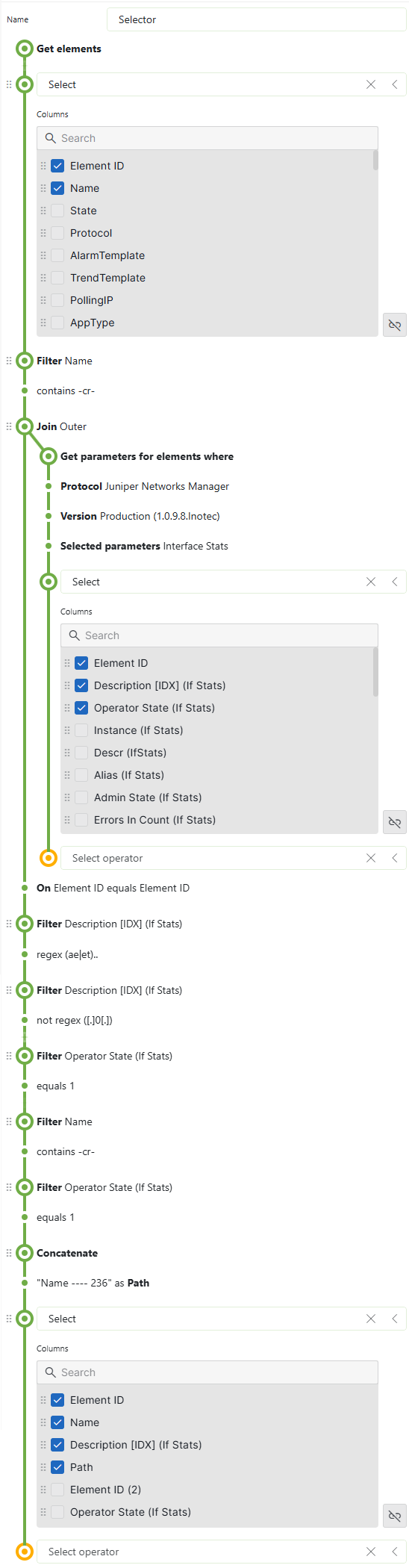
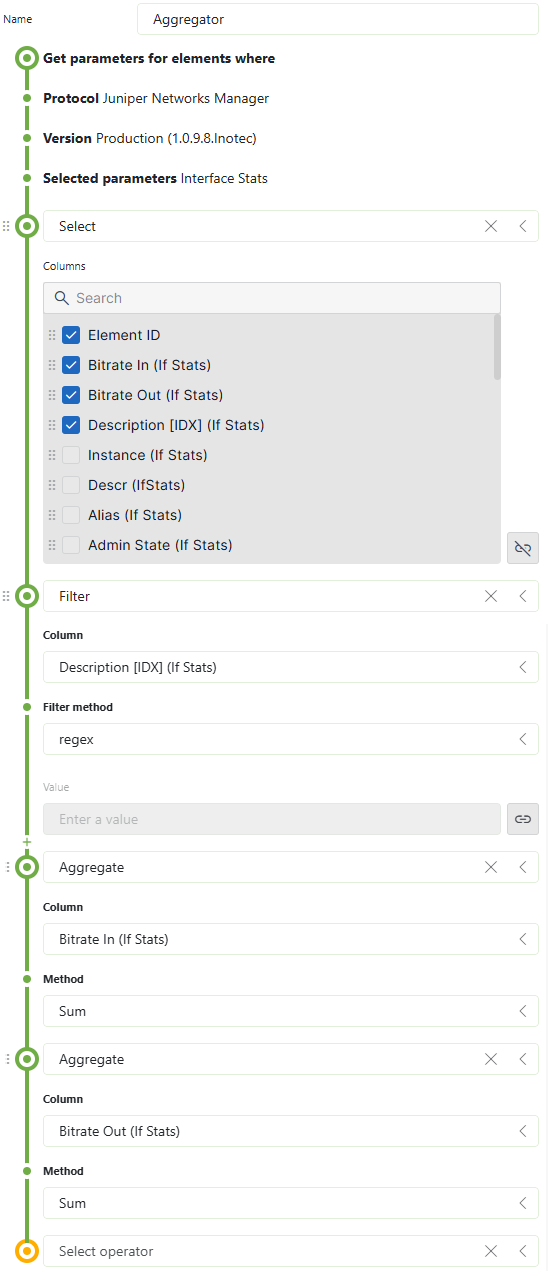
For this query i've tried to join multiple tables to match elements with "element id" and description [IDX] to bind into column "start time" which i then filter it with a timespan.

Unfortunately the parameter table wont show every entry we need of our juniper devices nor does it show anything at all due to many entries.

Any hints on solving this request?

Ive concerns that used the "join" wrongly but couldn't figure it out.

Thank you in advance!

Miguel Obregon [SLC] [DevOps Catalyst] Answered question 26th November 2025

1 Answer

  • Active
  • Voted
  • Newest
  • Oldest
1
Miguel Obregon [SLC] [DevOps Catalyst]21.21K Posted 26th November 2025 3 Comments

Hi Minh,

If I am not mistaken, your GQI is trying to sum all rates for a subset of interfaces available in the `Interfaces Stats` table across different timestamps. I believe this approach may not be optimal. Rather than executing this action for all timestamps at runtime, it will more efficient to compute the aggregation once and store the results in DB.

Below some possible alternatives:

  • Use aggregation rules to calculate the sum. Aggregations rules allows you to aggregate data from tables and persist the result in a DB.
  • Use the Data Aggregator. Data Aggregator allows you to execute the GQI query and offload the result in a CSV file. For example, once a day you can execute a query that will perform this aggregation and stores the result in a CSV file. This file can be mapped into a GQI query using an ad-hoc data source.
  • Implement an extra parameter in the connector that performs the aggregation.

Hope it helps.

Minh Tung Nguyen Posted new comment 10th December 2025
Minh Tung Nguyen commented 27th November 2025

Greetings Miguel,

It is kinda mandatory to have the data in a live Line & area chart.
Once a day or so is unfortunately not an option.

In such topic we were advised from our support to ask the community.
Because it looked like the only solution were hidden in a magical query.

Anyways thank you very much for your insights!

Miguel Obregon [SLC] [DevOps Catalyst] commented 27th November 2025

Hi Minh,
In this case, I will go for one of the approaches:
– Aggregation rules
– New driver feature that calculate the aggregated result

Minh Tung Nguyen commented 10th December 2025

Hey Miguel,

in Aggregation rules how do i set the condition to filter on selected description on created dashboard?

Like: calc sum bitrate In with condition match regex on choosen description interface from the parameter table.

1 paramater table for the rule to show the values of the interface
1 parameter table or smth which suites the most to filter/select the interface
1 line chart then to display it.

thanks in advance!

You are viewing 1 out of 1 answers, click here to view all answers.
Please login to be able to comment or post an answer.

My DevOps rank

DevOps Members get more insights on their profile page.

My user earnings

0 Dojo credits

Spend your credits in our swag shop.

0 Reputation points

Boost your reputation, climb the leaderboard.

Promo banner DataMiner DevOps Professiona Program
DataMiner Integration Studio (DIS)
Empower Katas
Privacy Policy • Terms & Conditions • Contact

© 2025 Skyline Communications. All rights reserved.

DOJO Q&A widget

Can't find what you need?

? Explore the Q&A DataMiner Docs

[ Placeholder content for popup link ] WordPress Download Manager - Best Download Management Plugin