

I am working with several Low Code Apps that contain tables where I would prefer not to apply any grouping. When the table is grouped by Time, users sometimes need to expand a group to view the underlying data. These tables are displayed on shared screens in our operations center and are intended for passive viewing from a distance, not for direct interaction with a mouse or keyboard. Please let me know if this is possible. Any help would be greatly appreciated.
DMS Versions are Main Release 10.4 CU5 and Feature Release 10.5.6

Alarm Tables
Hi Joe,
The alarm table component has a 'Group by' setting that allows you to group by Time, Severity or not at all (by clearing the input using the 'X'). Expanding all groups by default is not possible when a grouping option is selected.
Update:
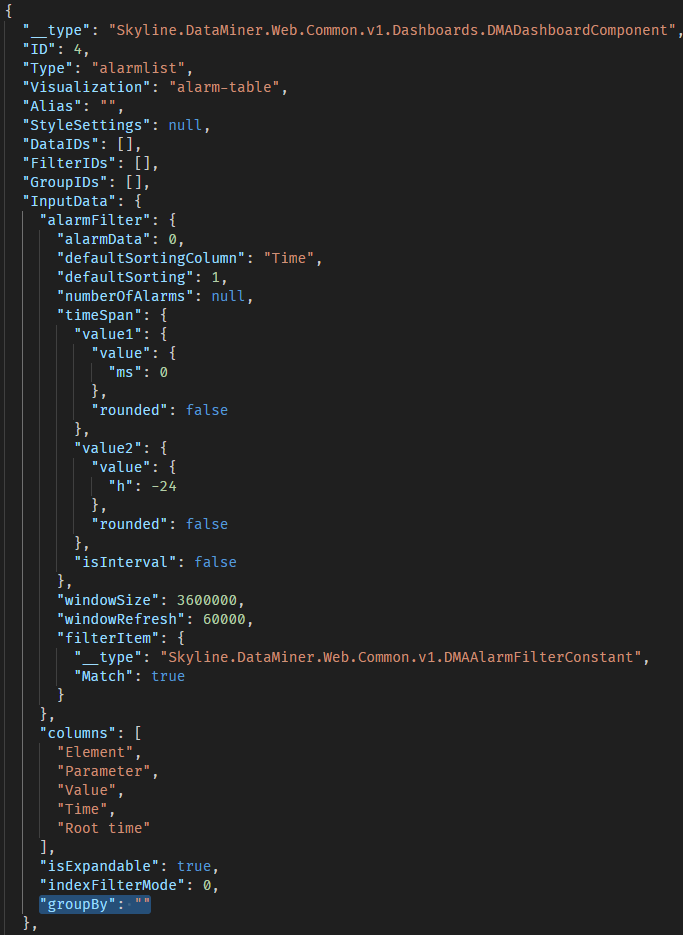
Clearing the 'Group by' setting will reset it's value back to group by Time the next time the dashboard/page is loaded. This is a software issue that we have to fix in a future DataMiner version. As a workaround, it is possible to manually edit the dashboard json-file & change the 'groupBy' setting to an empty string "". Note that this is for advanced users only as manually editing files is never recommended and error-prone.
Hi Wout,
So I've tried using the X to clear the selection and initially it looks like that works but if I refresh the screen or pull up the app on a different browser it defaults to Time again. When I go back into edit it also shows Time as the Group by selection.
This occurs in both systems that I manage and in Dashboards and Low Code Apps.
I have double checked this on a local system and you are indeed correct. It seems like the setting always defaults back to 'Time' when it was cleared. This is an issue, I have created a task on our backlog to fix this. I have added a temporary workaround to my original answer.
I appreciate it. Can you provide me with the location where the dashboard json-files are stored?
You can find the app files at 'C:/Skyline DataMiner/Applications/APP_ID/VERSION_NUMBER/pages/PAGE_ID.dmadb.json'. One of these files should have a component with Type of 'alarmlist', which is the component you are looking for.
Hi Joe, What kind of tables are you using exactly? Are these Parameter Tables, Alarm tables or regular (GQI) Tables?