

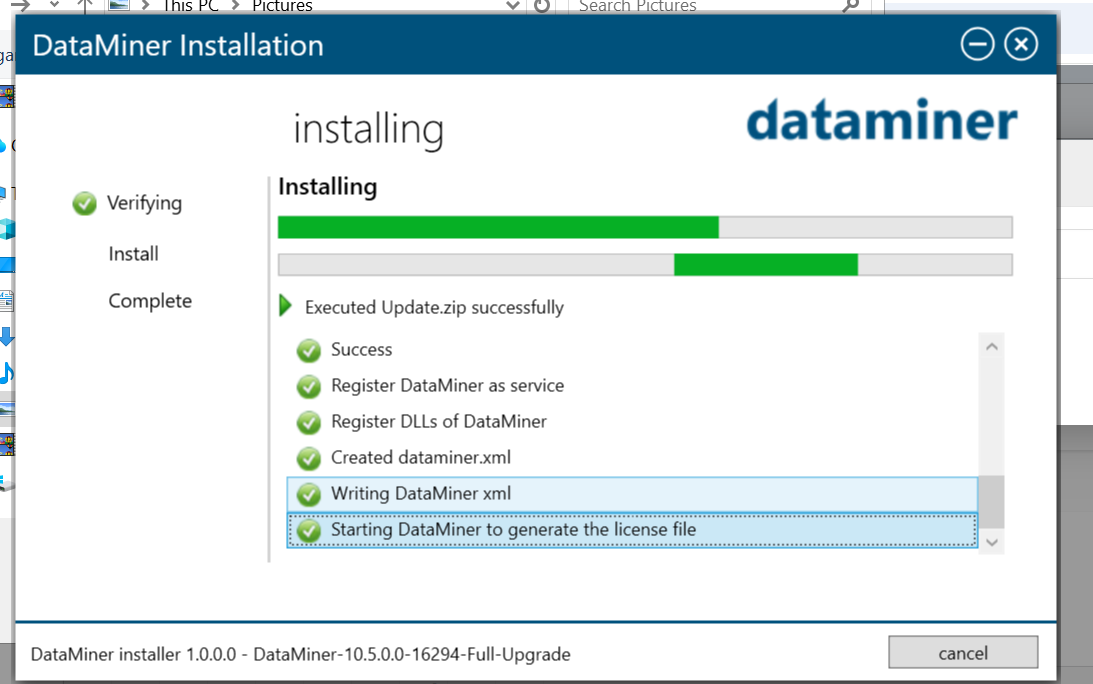
I am trying to install dataminer 10.5.0 and it is getting stuck at Starting Dataminer to generate the license file.
I do not know what's wrong what should i check.
<?xml version="1.0" encoding="utf-8"?>
<DataMiner id="-1" elementid="" xmlns="http://www.skyline.be/config/dataminer">
<IP>
<VirtualIPFrom/>
<VirtualIPTo/>
<VirtualIPMask/>
</IP>
<DMA>
<DMAName/>
<Location1/>
<Location2/>
<Location3/>
</DMA>
<Logging>
<Debug/>
<Error/>
<Info/>
</Logging>
<MobileGateway>
<IP/>
<UserName/>
</MobileGateway>
<Colors>
<Color type="normal" value=""/>
<Color type="warning" value=""/>
<Color type="minor" value=""/>
<Color type="major" value=""/>
<Color type="critical" value=""/>
<Color type="notMonitored" value=""/>
<Color type="initial" value=""/>
<Color type="timeout" value=""/>
<Color type="masked" value=""/>
</Colors>
<ID>
<Views current="" currentOwn=""/>
</ID>
<DataMinerGuid>{4A6C5519-E9AE-456B-8A4A-D311AE188FC4}</DataMinerGuid></DataMiner>
This is my generated dataminer.xml file

Hi,
You’re absolutely right — when using the DataMiner 10.5 installer with an active internet connection, there’s no need to manually request or install a license.
Could you please contact our DataMiner Support team regarding the issue you’re experiencing? To help us investigate more efficiently, it would be very helpful if you could include:
- A LogCollector package
- A copy of the file
C:\ProgramData\Skyline Communications\DataMinerInstallerLog.txt
(if this file is present)
You can find step-by-step guidance on how to contact support and collect the required data here:
- https://docs.dataminer.services/dataminer/Troubleshooting/Contacting_tech_support.html
- https://docs.dataminer.services/dataminer/Troubleshooting/Procedures/Collecting_data_to_report_an_issue_to_TechSupport.html
Regards,
Hi,
Could you please check whether a request.lic file has been generated in
C:\Skyline DataMiner?
If the file is present, you can then contact dataminer.licensing@skyline.be to proceed.
For the full procedure, please refer to the documentation:
https://docs.dataminer.services/dataminer/Administrator_guide/DataMiner_Licenses/Permanent_license.html
Regards,

And the last modification time of that file is one month old which is not recent and it has got a size of 19 MB so don't think that is the correct file.

Hello there,
I am happy to assist you with any troubles you've encountered with the DataMiner installer. Will reach out to you directly to resolve any issues.
We can begin by reviewing the licensing aspect and then proceed to the other steps of the installer.
Hi Samir, Thanks i have shared the required details with you through email.
We can communicate over email if anything else is required from my side.

Hello together,
have you found a solution for the problem? I'm asking because we ran in the exact same error.
Thank you!

Hi Simon,
I connected with the Technical team and this was resolved.
support@dataminer.services
Hi Ashok.
Thank you, good idea. Can you explain, how the problem gets resolved in your case?
Stop the presses! We've solved the problem!
There was undeleted files from an old agent in the User-Folder which had to be reinstalled during the process. After deleting all old files and restart the installation everything worked!!
Thanks everyone, have a hacky day!
Hi Debeus,
The file has been generated but as i was instructed that with 10.5.0 version their is no need to get the license it will be applied by itself.