
Skip to content
DataMiner Dojo

More results...

Generic selectors
Exact matches only
Search in title
Search in content
Post Type Selectors
Search in posts
Search in pages
Search in posts
Search in pages
Log in
Menu
  • Updates & Insights
  • Questions
  • Learning
    • E-learning Courses
    • Tutorials
    • Open Classroom Training
    • Certification
      • DataMiner Fundamentals
      • DataMiner Configurator
      • DataMiner Automation
      • Scripts & Connectors Developer: HTTP Basics
      • Scripts & Connectors Developer: SNMP Basics
      • Visual Overview – Level 1
      • Verify a certificate
    • YouTube Videos
    • Solutions & Use Cases
      • Solutions
      • Use Case Library
    • Agility
      • Learn more about Agile
        • Agile Webspace
        • Everything Agile
          • The Agile Manifesto
          • Best Practices
          • Retro Recipes
        • Methodologies
          • The Scrum Framework
          • Kanban
          • Extreme Programming
        • Roles
          • The Product Owner
          • The Agile Coach
          • The Quality & UX Coach (QX)
      • Book your Agile Fundamentals training
      • Book your Kanban workshop
    • >> Go to DataMiner Docs
  • DevOps
    • About the DevOps Program
    • Sign up for the DevOps Program
    • DataMiner DevOps Support
    • Feature Suggestions
  • Downloads
  • Swag Shop
  • PARTNERS
    • Business Partners
    • Technology Partners
  • Contact
    • Sales, Training & Certification
    • DataMiner Support
    • Global Feedback Survey
  • >> Go to dataminer.services

Inconsistent sign out behaviour

96 views6 hours ago
2
Carl Stanley [DevOps Advocate]241 25th June 2026 0 Comments

HI Dojo,

I noticed a strange issue today when accessing the /root of a dma to see the web apps.

With all of the below I'm using Chrome as the browser running version 149.0.7827.197

If I navigate to a dma in the address bar ie: https://<hostname>.<domain>, the /root page loads and I'm authenticated etc and I see the screen with all the apps. However if I click my initial in the top right, there is no option to sign out.

If I open a new tab and copy the exact same URL, the Sign out option is now there in the menu on the new tab. However if I click it, I just automatically get re-authenticated and signed back in. However if I do close chrome completely, it will ask me to sign in again the next time.

Is this expected behaviour? It seems odd to me. If I go via admin.dataminer.services and click the URL for that system, I'm presented with the SAML sign on window, I sign in and see the apps, but this time the Sign out button is there, and when I click it, it fully signs out and presents me with the Login via identity provider window again.

Finally, if I open a LCA from cube, the sign out button is present in the browser, however when I click it, it just automatically re-authenticates me and loads the LCA again.

It might seem trivial or maybe some of this is expected in normal use cases, however we have shared machines in an MCR environment that are always logged into the OS, so it's important each user can log in and out of dataminer with their user correctly.

Thanks, Carl

Gilles Bara [SLC] [DevOps Advocate] Answered question 6 hours ago

1 Answer

  • Active
  • Voted
  • Newest
  • Oldest
0
Gilles Bara [SLC] [DevOps Advocate]7.17K Posted 6 hours ago 0 Comments

Hi Carl,

Since version 10.6.1, SAML users should see a "Sign in with another user" option. Clicking this invalidates your WebAPI session and redirects you to the authentication page with a token to change users. Your Identity Provider session remains open.
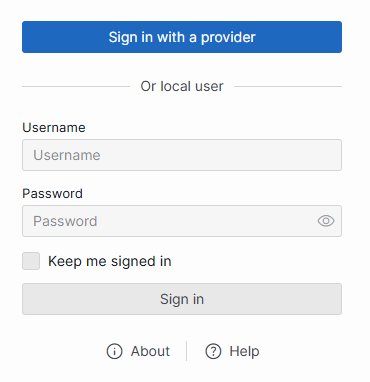
The standard "Sign out" button only invalidates the WebAPI session, not the IdP session (which would immediately re-authenticate you anyway). That is why we intentionally hide the "Sign out" button for SAML users.

I can confirm the bug you described though. When opening a new tab or an LCA from Cube, the app loses track of the delegated authentication and incorrectly displays the "Sign out" button. Clicking it triggers the confusing loop where you are immediately re-logged in by the open IdP session.

(Note: Sessions are bound to the browser, so closing the entire browser will correctly require a new login).

I will create a front-end task to fix this button visibility issue and keep you posted here when it is resolved.

Gilles Bara [SLC] [DevOps Advocate] Answered question 6 hours ago
You are viewing 1 out of 1 answers, click here to view all answers.
Please login to be able to comment or post an answer.

My DevOps rank

DevOps Members get more insights on their profile page.

My user earnings

0 Dojo credits

Spend your credits in our swag shop.

0 Reputation points

Boost your reputation, climb the leaderboard.

Promo banner DataMiner DevOps Professiona Program
DataMiner Integration Studio (DIS)
Empower Katas
Privacy Policy • Terms & Conditions • Contact

© 2026 Skyline Communications. All rights reserved.

DOJO Q&A widget

Can't find what you need?

? Explore the Q&A DataMiner Docs

[ Placeholder content for popup link ] WordPress Download Manager - Best Download Management Plugin