

Hello,
we are doing test for the integration of the Miranda iControl GSM driver into Dataminer. We got everything working but we noticed that time to raise alarm is not that fast as we would like.
Currently we are using Miranda iControl General version 3.0.3.8 and iControl version 8.10.
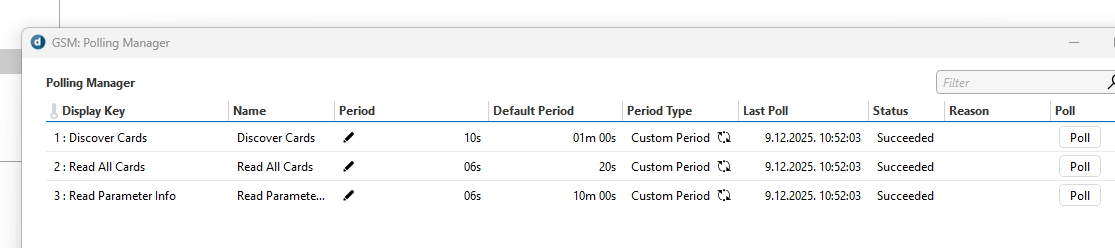
We have tried to change default period values in Pooling Manager menu for Discover Cards, Read All Cards and Read Parameters but time for alarm remains more or the less the same. Sometimes little bit faster, sometimes slower, there is no pattern visible.
Also for the test we have tried using driver for Ateme DR5000 decoder and it seems to be working much faster (almost instantly). If possible we would like to achieve the same with iControl.
It seems like this isn't a general timing for Dataminer rather that it depends on the each driver config.
Can you please advise how to achieve better results?
Thanks!

I'm assuming you are using the Miranda IControl General connector?
If that is the case, can you verify that "Process HCO GSM Traps" setting (on the GSM Alarms page) is enabled and that the device is configured to send traps to DataMiner?
Traps will allow to instantly show alarm updates in DataMiner while polling will only periodically update them.

Can you verify that traps are being sent to DataMiner when an alarm occurs?
It seems there is some issue with traps but we noticed the following error when trying to see element log:
Logfile "GSM" from agent "10.0.3.167"…
Failed getting logfile (The host name in the certificate is invalid or does not match
)
This is probably some HTTPS certification issue. Do you have an idea how to disable certificate verification?
Thanks!
In meantime we have resolved HTTPS log issue by following this article:
https://docs.dataminer.services/dataminer/Administrator_guide/DataMiner_Agents/Configuring_a_DMA/Setting_up_HTTPS_on_a_DMA.html?q=settinguphttpsonadma
We tried setting up iControl as SNMP Trap but this didn't do any difference. Now we reverted back to initial setup of iControl as SNMP Agent according to Grass Valley iControl documentation:
https://azure1wwwapps.grassvalley.com/manuals/icontrol_v7.00a/index.html#page/iControl7SNMP.08.53.html
We have also noticed in element log the following errors:
2025/12/10 17:39:09.876|SLElement.exe|14804|CParameter::SetElementState|DBG|0|** parameter alarmstate 37008/appserver_frame1_densite_slot_10_146 from 1 to 5
2025/12/10 17:39:09.877|SLElement.exe|14804|CParameter::SetElementState|DBG|0|** parameter alarmstate 37033/appserver_frame1_densite_slot_10_146 from 1 to 5
2025/12/10 17:39:19.812|SLManagedScripting.exe|ManagedInterop|ERR|0|16|QA1113|1113|Run|Exception thrown:
System.IndexOutOfRangeException: Index was outside the bounds of the array.
at Skyline.Protocol.HcoOperation.AlarmProcessor.ProcessAlarmResponse(List`1 alarmResponses)
at QAction.ProcessSessionResponse(SLProtocol protocol)
at QAction.Run(SLProtocol protocol)
2025/12/10 17:39:21.132|SLElement.exe|14548|CParameter::SetElementState|DBG|0|** parameter alarmstate 37013/appserver_FRAME1_Densite_SLOT_8_146 from 5 to 9
2025/12/10 17:39:21.132|SLElement.exe|14548|CElement::NotifyAlarmState|DBG|0|** Element Alarmstate changed to 5.
2025/12/10 17:39:29.793|SLManagedScripting.exe|ManagedInterop|ERR|0|16|QA1113|1113|Run|Exception thrown:
System.IndexOutOfRangeException: Index was outside the bounds of the array.
at Skyline.Protocol.HcoOperation.AlarmProcessor.ProcessAlarmResponse(List`1 alarmResponses)
at QAction.ProcessSessionResponse(SLProtocol protocol)
at QAction.Run(SLProtocol protocol)
2025/12/10 17:39:40.837|SLElement.exe|14548|CParameter::SetElementState|DBG|0|** parameter alarmstate 37013/appserver_FRAME1_Densite_SLOT_10_146 from 5 to 9
2025/12/10 17:39:40.837|SLElement.exe|14548|CElement::NotifyAlarmState|DBG|0|** Virtual Element 1008817/51 Alarmstate changed to 5.
2025/12/10 17:39:49.847|SLManagedScripting.exe|ManagedInterop|ERR|0|16|QA1113|1113|Run|Exception thrown:
System.IndexOutOfRangeException: Index was outside the bounds of the array.
It seems like this Miranda iControl General app doesn't recognize this alarm state. Does this make any sense?
Hi Marko, I suggest raising this issue to techsupport (support@dataminer.services) so we can fix this parsing issue in the connector.
Yes, we are using iControl General Connector and yes both "Process HCO GSM Traps" and "Process HCO GSM Active Alarm Listen" are enabled.