Skip to content
DataMiner Dojo

More results...

Generic selectors
Exact matches only
Search in title
Search in content
Post Type Selectors
Search in posts
Search in pages
Search in posts
Search in pages
Log in
Menu
  • Updates & Insights
  • Questions
  • Learning
    • E-learning Courses
    • Tutorials
    • Open Classroom Training
    • Certification
      • DataMiner Fundamentals
      • DataMiner Configurator
      • DataMiner Automation
      • Scripts & Connectors Developer: HTTP Basics
      • Scripts & Connectors Developer: SNMP Basics
      • Visual Overview – Level 1
      • Verify a certificate
    • YouTube Videos
    • Solutions & Use Cases
      • Solutions
      • Use Case Library
    • Agility
      • Learn more about Agile
        • Agile Webspace
        • Everything Agile
          • The Agile Manifesto
          • Best Practices
          • Retro Recipes
        • Methodologies
          • The Scrum Framework
          • Kanban
          • Extreme Programming
        • Roles
          • The Product Owner
          • The Agile Coach
          • The Quality & UX Coach (QX)
      • Book your Agile Fundamentals training
      • Book you Kanban workshop
    • >> Go to DataMiner Docs
  • DevOps
    • About the DevOps Program
    • Sign up for the DevOps Program
    • DataMiner DevOps Support
    • Feature Suggestions
  • Downloads
  • Swag Shop
  • PARTNERS
    • Business Partners
    • Technology Partners
  • Contact
    • Sales, Training & Certification
    • DataMiner Support
    • Global Feedback Survey
  • >> Go to dataminer.services

IAS – UIBlockType.Numeric Error

Solved303 views8th January 2026interactive automation script
3
Gina Douglas [DevOps Member]200 3rd December 2025 4 Comments

Hello Team,

We are developing an Interactive Automation Script using the Skyline.DataMiner.Utils.InteractiveAutomationScriptToolkit (v10.5.5.4).

We are trying to configure a Numeric widget to accept and display three decimal places with a 0.001 step size.

SrateSelection = new Numeric() { Decimals = 3, StepSize = 0.001, Minimum = 0, Value = srateValue};

SatfSelection = new Numeric() { Decimals = 3, StepSize = 0.001, Minimum = 0, Value = satfValue};

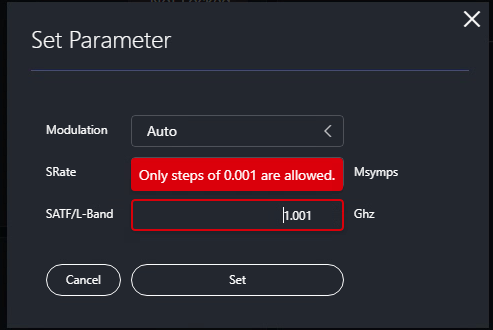
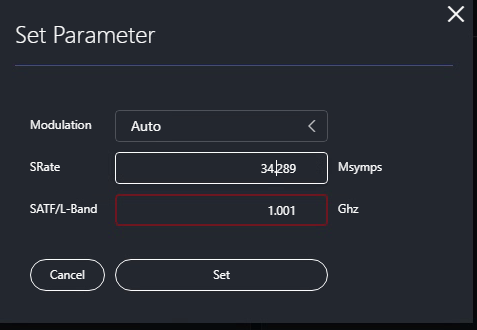
The user should be able to use the up/down arrows and edit any value with three decimals. The problem Detected is that the widget throws an error (Only Steps of 0.001 are allowed) when the initial value (Value) is loaded or when the arrows are used on specific numbers:

Values like 1.00x and 2.00x for the rest of the values it works well.

We have attempted several workarounds to mitigate the floating-point precision error, including using Math.Round(value, 3) and intermediate decimal conversions. Is there a known bug or limitation for StepSize = 0.001 in this version of the toolkit that causes a precision conflict for these specific values? is there a way I can fix it ?
Thanks in advance !!

Gina Douglas [DevOps Member] Selected answer as best 8th January 2026
Aaron Van Vyve [SLC] [DevOps Advocate] commented 4th December 2025

Hi Gina,

The numeric component has issues in certain situations when using the StepSize in combination with Decimals. It can cause validation errors for specific values (such as 1.00x or 2.00x) due to an internal precision conflict.

This issue will be resolved with the upcoming web upgrade 10.6.1 (releasing soon). To benefit from this fix, your system will need to be running DataMiner version 10.5.12 or higher.

Gina Douglas [DevOps Member] commented 4th December 2025

Hi Aaron,
Thank you for the update and for letting me know about this future fix.
Do you have an approximate date or estimated timeframe for the release of the web upgrade 10.6.1?

Jan-Klaas Kesteloot [SLC] [DevOps Advocate] commented 5th December 2025

Hi Gina, the 10.6.1 release is planned for Friday Dec 12th 🙂

Gina Douglas [DevOps Member] commented 5th December 2025

Awesome! thank you.

1 Answer

  • Active
  • Voted
  • Newest
  • Oldest
0
Marieke Goethals [SLC] [DevOps Catalyst]6.98K Posted 19th December 2025 1 Comment

Hi Gina,
Have you been able to fix this issue with the 10.6.1 upgrade? If yes, could you select this answer to indicate that this question can be closed an no further follow-up is needed?

Gina Douglas [DevOps Member] Posted new comment 8th January 2026
Gina Douglas [DevOps Member] commented 8th January 2026

Hi Mariake,
I wanted to let you know that the error was fixed after upgrading to DMA V10.5.12 and WebApps 10.6.1. Apologies for the delay in my response; I was only recently able to complete the upgrade of my staging environment to these versions.

Everything seems to be working correctly now.

Please login to be able to comment or post an answer.

My DevOps rank

DevOps Members get more insights on their profile page.

My user earnings

0 Dojo credits

Spend your credits in our swag shop.

0 Reputation points

Boost your reputation, climb the leaderboard.

Promo banner DataMiner DevOps Professiona Program
DataMiner Integration Studio (DIS)
Empower Katas
Privacy Policy • Terms & Conditions • Contact

© 2026 Skyline Communications. All rights reserved.

DOJO Q&A widget

Can't find what you need?

? Explore the Q&A DataMiner Docs

[ Placeholder content for popup link ] WordPress Download Manager - Best Download Management Plugin