

Skip to content
DataMiner Dojo

More results...

Generic selectors
Exact matches only
Search in title
Search in content
Post Type Selectors
Search in posts
Search in pages
Search in posts
Search in pages
Log in
Menu
  • Updates & Insights
  • Questions
  • Learning
    • E-learning Courses
    • Tutorials
    • Open Classroom Training
    • Certification
      • DataMiner Fundamentals
      • DataMiner Configurator
      • DataMiner Automation
      • Scripts & Connectors Developer: HTTP Basics
      • Scripts & Connectors Developer: SNMP Basics
      • Visual Overview – Level 1
      • Verify a certificate
    • YouTube Videos
    • Solutions & Use Cases
      • Solutions
      • Use Case Library
    • Agility
      • Learn more about Agile
        • Agile Webspace
        • Everything Agile
          • The Agile Manifesto
          • Best Practices
          • Retro Recipes
        • Methodologies
          • The Scrum Framework
          • Kanban
          • Extreme Programming
        • Roles
          • The Product Owner
          • The Agile Coach
          • The Quality & UX Coach (QX)
      • Book your Agile Fundamentals training
      • Book you Kanban workshop
    • >> Go to DataMiner Docs
  • DevOps
    • About the DevOps Program
    • Sign up for the DevOps Program
    • DataMiner DevOps Support
    • Feature Suggestions
  • Downloads
  • Swag Shop
  • PARTNERS
    • Business Partners
    • Technology Partners
  • Contact
    • Sales, Training & Certification
    • DataMiner Support
    • Global Feedback Survey
  • >> Go to dataminer.services

How to programmatically sync files via Automation Script (equivalent to Tools > Synchronization UI)?

Solved150 views1 day agoautomation engine Automation script SLNet synchronization
3
Harun Ibrahimovic [SLC] [DevOps Advocate]132 3 days ago 0 Comments

Hi Dojo!

I'm working on an Automation Script that modifies the Hyperlinks.xml file located in C:\Skyline DataMiner\. After making changes to this file programmatically, I need to sync it.

Context:

In the DataMiner Cube UI, there's a manual option to do this via:

  • Tools > Synchronization
  • Type: File
  • File: C:/Skyline DataMiner/Hyperlinks.xml
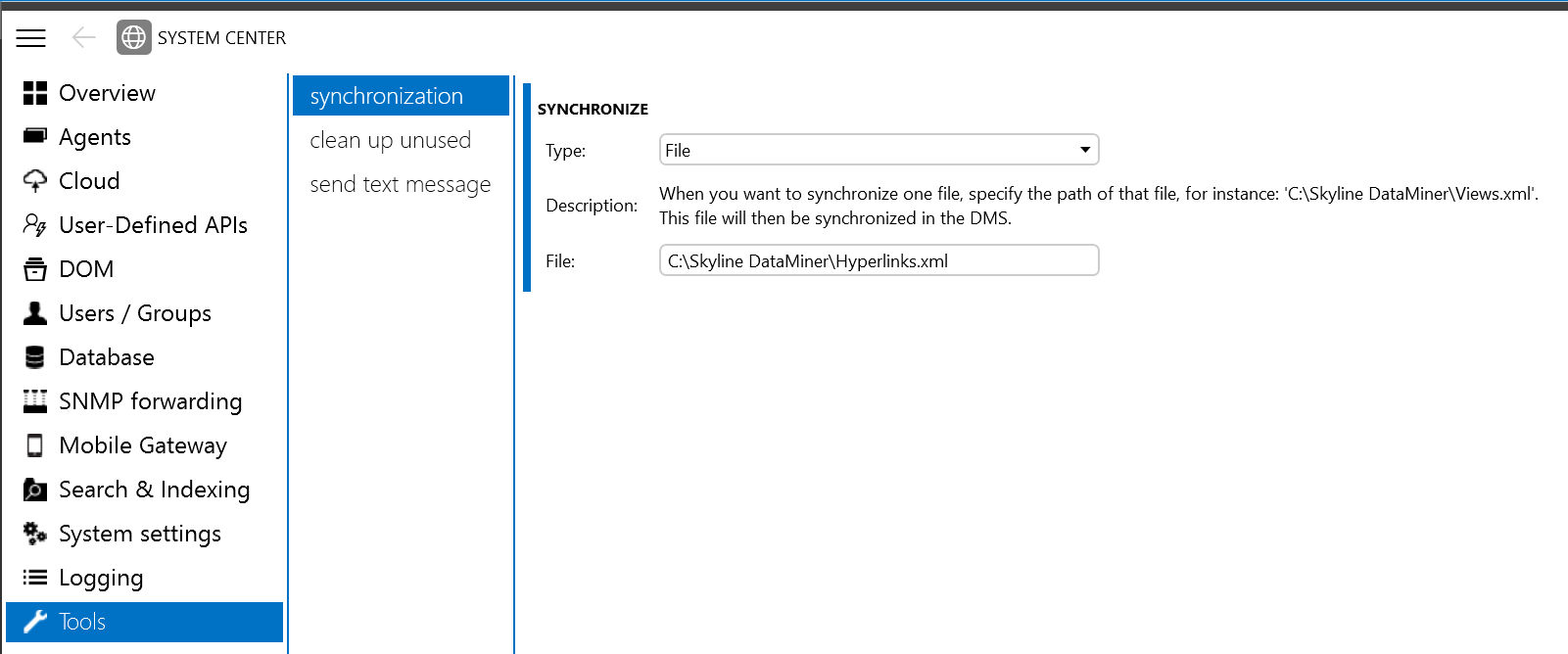
I need to trigger this same synchronization programmatically from an Automation Script.

What I've Tried:

I attempted to use <strong>SyncRequestMessage</strong>, but I'm encountering an "Invalid base path" error:

string filePath = @"C:\Skyline DataMiner\Hyperlinks.xml";
SyncRequestMessage syncRequest = new SyncRequestMessage();
syncRequest.BasePath = @"Skyline DataMiner";
syncRequest.DataMinerID = engine.GetUserConnection().ServerDetails.AgentID;
// ... populate ExistingFiles with Hyperlinks.xml info
engine.SendSLNetMessage(syncRequest);

I've tried multiple BasePath formats (with/without drive letter, with/without trailing slash, relative paths, etc.) but all result in "Invalid base path" error.

My Questions:

  1. What SLNet message does the UI's "Tools > Synchronization" use for file synchronization? Is it SyncRequestMessage or something else?
  2. What is the correct way to construct this message? Specifically:
    • What should BasePath be set to?
    • What format does the file path need to be in?
    • Are there other required properties?
  3. Is there sample code or documentation showing how to programmatically sync files from an Automation Script?
  4. Are there alternative approaches to achieve file synchronization across the cluster from a script?

Harun Ibrahimovic [SLC] [DevOps Advocate] Selected answer as best 1 day ago

2 Answers

  • Active
  • Voted
  • Newest
  • Oldest
1
José Silva [SLC] [DevOps Catalyst]1.82K Posted 3 days ago 2 Comments

Hi Harun,

Did you tried this: Sync DMS via Automation Script - DataMiner Dojo

Kind regards,

Harun Ibrahimovic [SLC] [DevOps Advocate] Selected answer as best 1 day ago
Harun Ibrahimovic [SLC] [DevOps Advocate] commented 2 days ago

Thanks for the help! I found a more targeted approach for syncing a specific file instead of the full DMS:

csharpvar setDataMinerInfoMessage = new SetDataMinerInfoMessage
{
What = 41, // NT_SEND_DMS_FILE_CHANGE
bInfo1 = Int32.MaxValue,
bInfo2 = Int32.MaxValue,
DataMinerID = engine.GetUserConnection().ServerDetails.AgentID,
IInfo1 = Int32.MaxValue,
IInfo2 = 32, // file change notification
StrInfo1 = @"C:Skyline DataMinerHyperlinks.xml", // full file path
};
engine.SendSLNetMessage(setDataMinerInfoMessage);

Key difference: What = 41 syncs only the specified file, while What = 64 syncs the entire DMS.

José Silva [SLC] [DevOps Catalyst] commented 1 day ago

Hi Harun,
Indeed. Miguel Obregon explained it in that post 🙂

See the reply on the best answer 😉
Fell free to use any of those
2
Brent [SLC]2.19K Posted 3 days ago 0 Comments

Hi Harun,

Even when forcing a sync as requested, there is a good chance the file will not be synced. This is because the internal sync does not use the file-metadata to detect changes, but rather keeps an internal "last changed" time. Doing manual edits to the file bypasses this logic and the system may treat the files in sync, even if they are not.

A better approach would be to use the automation module to change the hyperlinks using the AddOrUpdateHyperlinkMessage.

This will ensure the change is treated as if you have done it through cube and the system will sync it accross the cluster instantly or during midnight sync.

Brent [SLC] Answered question 3 days ago
Please login to be able to comment or post an answer.

My DevOps rank

DevOps Members get more insights on their profile page.

My user earnings

0 Dojo credits

Spend your credits in our swag shop.

0 Reputation points

Boost your reputation, climb the leaderboard.

Promo banner DataMiner DevOps Professiona Program
DataMiner Integration Studio (DIS)
Empower Katas
Privacy Policy • Terms & Conditions • Contact

© 2026 Skyline Communications. All rights reserved.

DOJO Q&A widget

Can't find what you need?

? Explore the Q&A DataMiner Docs

[ Placeholder content for popup link ] WordPress Download Manager - Best Download Management Plugin