

Hi Dojo,
I'm trying to export Dashboard in PDF using automation (on click in LCA, it should generate and store PDF in C:\Skyline DataMiner\Webpages\Public\WebFileManager).
To achieve this, I followed the documentation for 'Upload report to shared folder' Automation action: Upload report to shared folder | DataMiner Docs.
The system I'm using is DaaS and I tried with both RDP credentials and my user credentials. Dashboard is public and all users have access.
I'm getting error Failed to send report: 0x80131500h.
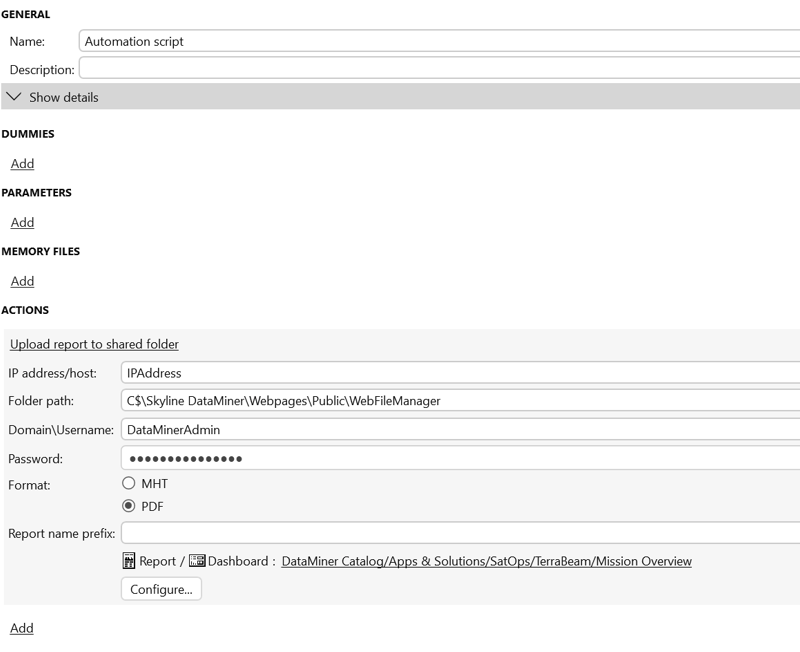 Has anyone encountered this error before in a DaaS environment, or is there something specific I should check regarding permissions, paths, or execution context when exporting dashboards to PDF?
Thanks!

Hi Tamara,
Could you try to remove the user credentials/password and run your automation script again? This should be enough to make the upload go through.

Glad to hear it is working, Tamara! I've updated the documentation with more information and configuration examples in the meantime.
Hello Tiago,
tried it without user credentials, it works fine now.
Thanks!